Release Notes - Beta v0.9
Summary
This release introduces the most significant interview capabilities to date, featuring the Real-Time Voice Interview System for conducting live voice interviews with AI, Behavioral Analysis for interview integrity detection, Manual Edit Controls for AI-generated summaries with full audit trail, Demo Interview Mode for testing and showcasing, and Audit Log System for compliance tracking.
What's New
- Real-Time Voice Interview System with AI interaction
- Behavioral Analysis for Interview Integrity Detection
- Edit AI-Generated Summaries (Review & Interview Evaluation)
- Demo Interview Mode for testing and showcasing
- Audit Log System for change tracking
- Interview public join page with setup screen
- Tab switch detection and warnings during interviews
Improvements
- Real-time transcription display during interviews
- Interview recording with auto-save functionality
- Enhanced candidate evaluation with transcript analysis
Real-Time Voice Interview System
Conduct Live Voice Interviews with AI
The new voice interview system brings a complete real-time interview platform, enabling recruiters to conduct live AI-powered interviews with candidates through voice interaction. This revolutionary feature transforms the interview experience with natural voice conversations, real-time transcription, and comprehensive recording capabilities.
Core Features:
- Voice chat: Low-latency, high-quality audio streaming for natural conversations
- AI Interviewer: Intelligent AI that conducts conversational interviews with contextual follow-up questions
- Live Transcription: Real-time speech-to-text displaying every word as spoken
- Auto Recording: Automatic interview recording with cloud storage for future review
- Session Management: Robust connection handling and automatic reconnection logic
- Pre-Join Screen: Device testing and setup before entering the interview
- AI Visualization: Real-time visual feedback showing AI speaking state and audio levels
- Transcription Panel: Live transcript display with speaker identification and timestamps
- Interview Controls: Complete control over audio, recording, and session management
How It Works:
1. Schedule interview with voice mode enabled in interview settings
2. Candidate receives unique interview join URL
3. Candidate clicks link and lands on pre-join screen
4. Test and select microphone and camera, preview audio levels
5. Click "Join Interview" to enter the interview room
6. AI interviewer greets candidate and begins structured interview
7. Candidate responds using voice, AI listens and asks follow-up questions
8. Conversation transcribed in real-time with speaker labels
9. Interview automatically recorded to cloud storage
10. Either party ends interview when complete
11. Recruiter reviews recording, transcript, and AI-generated evaluation
Benefits:
- Natural voice conversations feel more authentic than text chat
- AI conducts interviews 24/7 with no scheduling conflicts
- Consistent interview structure and evaluation criteria
- Complete interview record with transcript and audio recording
- Scalable: conduct unlimited interviews simultaneously
- Modern candidate experience with cutting-edge technology
- Detailed review capabilities with searchable transcripts
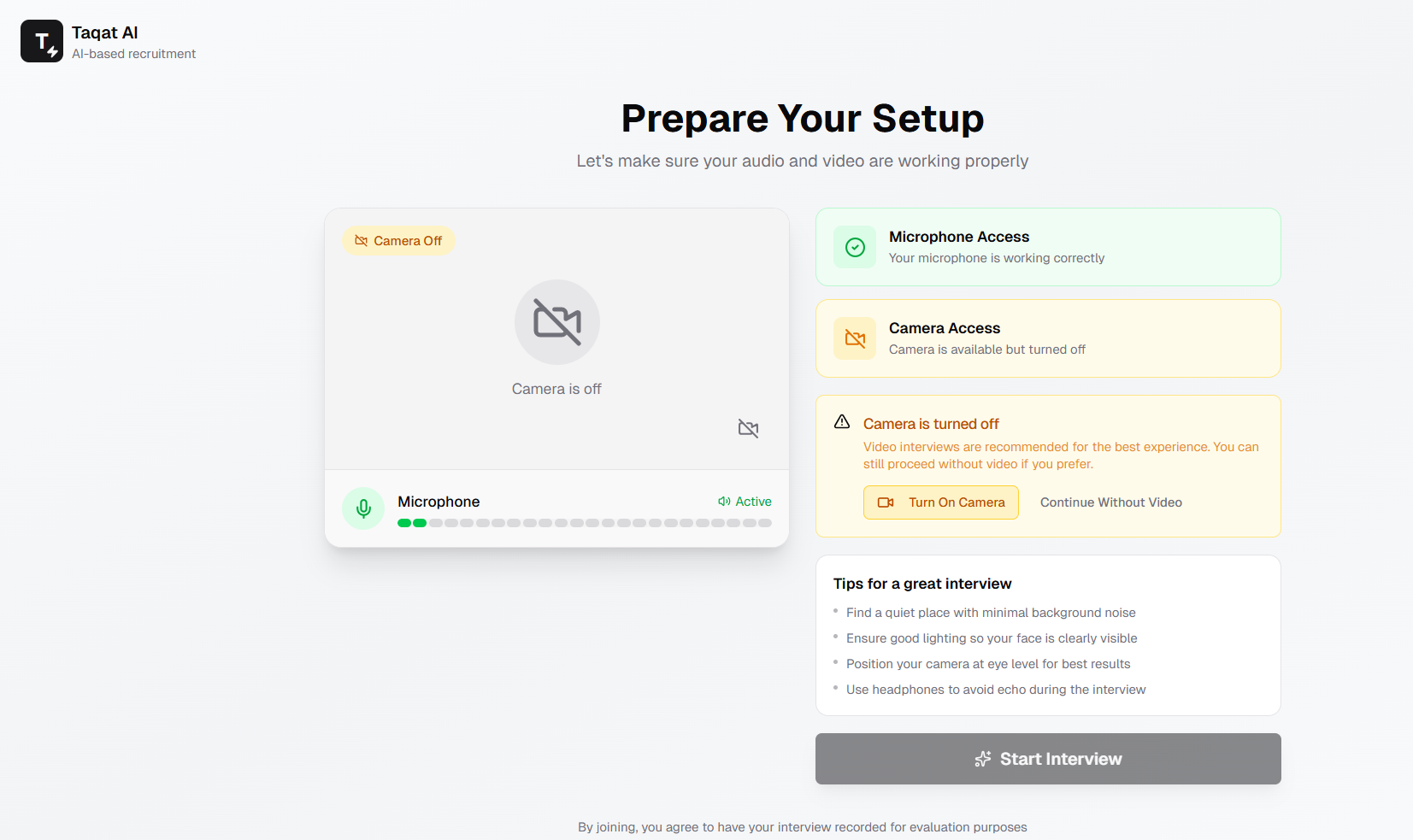
Pre-join screen showing device setup, audio preview, and interview details
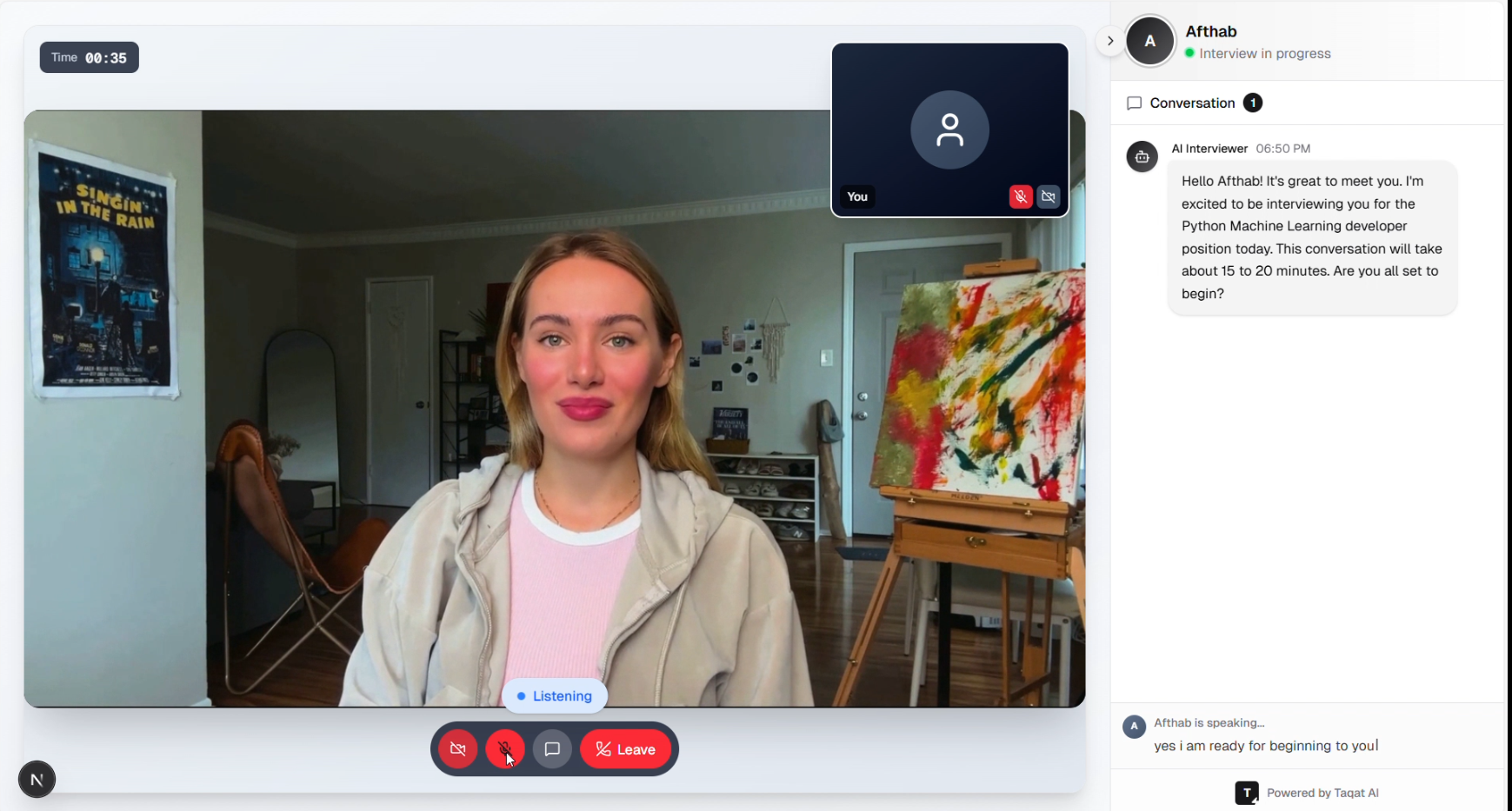
Live interview interface with AI visualization, transcription panel, and interview controls
Tab Switch Detection & Focus Monitoring
Monitor Candidate Focus During Interviews
The tab switch detection feature monitors when candidates navigate away from the interview page during a live session, helping ensure interview integrity and candidate engagement.
Features:
- Automatic Detection: System detects when candidate switches browser tabs or minimizes window
- Warning Display: Immediate on-screen warning prompts candidate to return focus
- Event Logging: All tab switch events logged with timestamps for review
- Count Tracking: Total tab switches recorded in interview metadata
- Recruiter Visibility: Tab switch count visible in interview evaluation
- Configurable Warnings: Customize warning message and behavior
How It Works:
1. Interview session begins with focus monitoring active
2. System automatically detects when candidate switches tabs or windows
3. When focus lost: warning overlay appears on interview screen
4. Event logged with timestamp and duration
5. Tab switch counter increments
6. Warning dismisses when candidate returns focus
7. All events stored in interview record
8. Recruiter reviews tab switch log during evaluation
Benefits:
- Ensure candidates remain focused during interviews
- Detect potential integrity concerns
- Provide objective data for evaluation
- Fair warning system for candidates
- Complete audit trail of interview behavior
- Data-driven decision making
Auto Recording
Automatic Interview Recording and Storage
Every voice interview is automatically recorded and securely stored in the cloud, providing complete interview documentation for review, training, and compliance.
Features:
- Automatic Recording: Recording starts when interview begins, no manual action needed
- Cloud Storage: Secure storage with encryption at rest and in transit
- High-Quality Audio: Professional audio quality for clear playback
- Recording Metadata: Duration, participants, timestamp, interview ID stored
- Post-Interview Access: One-click access to recordings from interview page
- Transcript Sync: Recording synced with transcript for easy navigation
- Retention Policy: Configurable retention periods for compliance
How It Works:
1. Interview session starts in voice room
2. Recording automatically begins
3. Audio stream captured and compressed
4. Recording uploaded to cloud storage in real-time
5. Recording link stored in interview record
6. Interview ends, final recording processed
7. Recruiter accesses recording from interview details page
Benefits:
- Never miss interview details with complete recordings
- Review candidate responses for accurate evaluation
- Training material for improving interview techniques
- Compliance documentation for audit requirements
- Dispute resolution with objective record
- Quality assurance for interview consistency
- Zero effort required from recruiters or candidates
Behavioral Analysis for Interview Integrity
AI-Powered Interview Integrity Detection
Advanced behavioral analysis system to analyze interview video recordings and detect potential integrity issues such as cheating, external help, unauthorized assistance, or reading from scripts.
Core Features:
- Multi-Face Detection: Identifies if multiple people are present during interview
- Eye Gaze Tracking: Analyzes where candidate is looking (camera, off-screen, reading)
- Reading Behavior Detection: Detects patterns indicating script reading
- Off-Screen Interaction: Identifies when candidate is talking to someone off-camera
- Eye Contact Analysis: Measures quality and consistency of eye contact
- Body Language Assessment: Evaluates posture, movement, and professionalism
- Environment Review: Assesses interview environment appropriateness
- Integrity Scoring: Calculates 0-100 integrity score based on all factors
Analysis Process:
1. Video Frame Extraction
- After interview completes, system starts behavioral analysis
- Extracts 1 frame every 10 seconds from interview recording
- Processes frames for AI vision analysis
- Typical 30-minute interview = approximately 180 frames analyzed
2. Per-Frame Vision Analysis
- Number of faces: Detects multiple people (cheating indicator)
- Eye gaze direction: Camera, left, right, down, up, or off-screen
- Reading patterns: Eyes moving left-right rapidly (script reading)
- Off-screen interaction: Talking to someone not visible
- Eye contact quality: How often looking at camera
- Body language: Posture, fidgeting, professionalism
- Environment: Background, lighting, appropriateness
3. Metric Aggregation
- Multiple faces detected: -40 points (maximum deduction)
- Off-screen interaction: -30 points (maximum)
- Reading behavior: -25 points (maximum)
- Excessive looking away (>50% of frames): -15 points (maximum)
4. Integrity Score Calculation
- Starts at 100 points
- Deducts points based on violation severity and frequency
- Final score: 0-100
5. Summary Generation
- 90-100: "High integrity interview" - minimal concerns
- 70-89: "Moderate integrity concerns" - some suspicious behavior
- 50-69: "Significant integrity concerns" - multiple red flags
- <50: "Major integrity issues detected" - serious violations
Display in Interview Summary:
- Shown in AI Interview Summary component under "Interview Integrity Analysis"
- Integrity Score Badge: Color-coded (green >85, yellow 70-85, orange 50-69, red <50)
- External Help Alert: Red badge if multiple people detected
- Reading Behavior: Badge showing "Likely", "Possible", or "None"
- Overall Summary: Text assessment of integrity
- Concerns Section: List of detected cheating indicators (if any)
- Positive Insights: List of integrity-affirming observations
How It Works:
1. Interview completes
2. System queues
3. Background job
4. Metrics aggregated and integrity score calculated
5. Results merged
6. Interview recordingStatus updated to 'completed'
7. Recruiter sees analysis in Interview Summary
Benefits:
- Objective Integrity Assessment: Remove guesswork about interview honesty
- Automated Detection: No manual video review required
- Data-Driven Decisions: Quantified integrity score (0-100)
- Compliance Protection: Document interview conditions for audits
- Fair Evaluation: Consistent analysis for all candidates
- Early Red Flags: Identify concerning behavior before hiring
- Time Savings: Automated vs manual video review
- Comprehensive Analysis: Analyzes entire interview, not just clips
Use Cases:
- Remote Interview Verification: Ensure remote interviews are conducted honestly
- High-Security Positions: Critical for sensitive roles requiring trust
- Compliance Documentation: Prove interview integrity for regulated industries
- Quality Assurance: Verify AI interview process working correctly
- Dispute Resolution: Objective evidence if candidate claims unfair evaluation
- Process Improvement: Identify patterns in interview environment issues
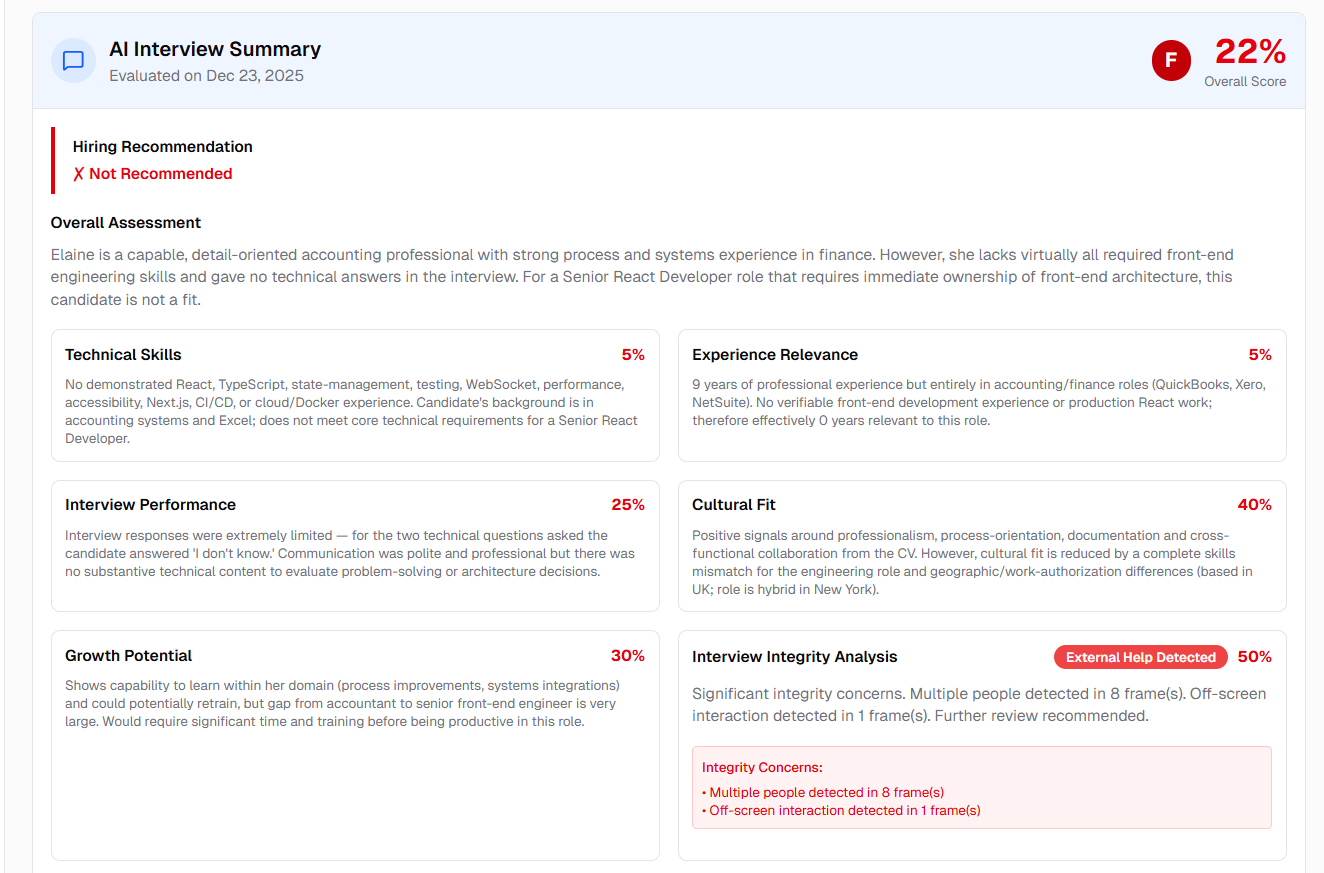
Interview integrity analysis showing integrity score, reading behavior, and detailed assessment
Demo Interview Mode
Test and Demo Interviews Without Permanent Storage
Conduct demonstration or test interviews that don't save permanently, perfect for showcasing the platform, training recruiters, or testing new interview formats without affecting real data.
Features:
- No Permanent Storage: Interview sessions don't save to the system
- Full Functionality: All features work exactly like real interviews
- Temporary Sessions: Session data automatically cleared after completion
- AI Interviewer Showcase: Perfect for demonstrating AI capabilities to prospects
- Test Scenarios: Safe environment for testing new interview questions
- Demo Job Templates: Pre-configured demo job positions for consistent demos
- Shareable Demo Links: Generate public demo links for sales/marketing
- Limited Duration: Set time limits for demo interviews (e.g., 5-10 minutes)
- Feature Highlights: Showcase specific platform features in demos
- No User Login: Public access for lead generation demos
Use Cases:
- Sales Demos: Show prospects how the platform works with live demo
- Training: Train new recruiters without affecting real candidate data
- Testing: Test new interview questions, formats, or AI prompts safely
- Content Creation: Record demo interviews for marketing videos
- User Onboarding: Let new users practice before conducting real interviews
- Presentations: Live demos during conference presentations or webinars
- Quality Assurance: Test new features before releasing to production
How It Works:
1. Navigate to AI Interviewer Showcase page
2. Page displays demo job scenarios (e.g., Software Engineer, Sales Manager)
3. Select demo job scenario
4. Click "Start Interview"
5. Enter demo mode interview room
6. Conduct full interview with AI
7. Session automatically clears after 30 minutes
8. No data saved permanently
Benefits:
- Risk-Free Demos: Show platform without affecting real data or quotas
- Clean Data: No test data cluttering real environment
- Unlimited Testing: Test as many scenarios as needed without consequences
- Lead Generation: Convert prospects through interactive demos
- Training Environment: Safe space for new users to learn
- Fast Iteration: Test new features quickly without cleanup
- Professional Demos: Consistent, polished demo experience every time
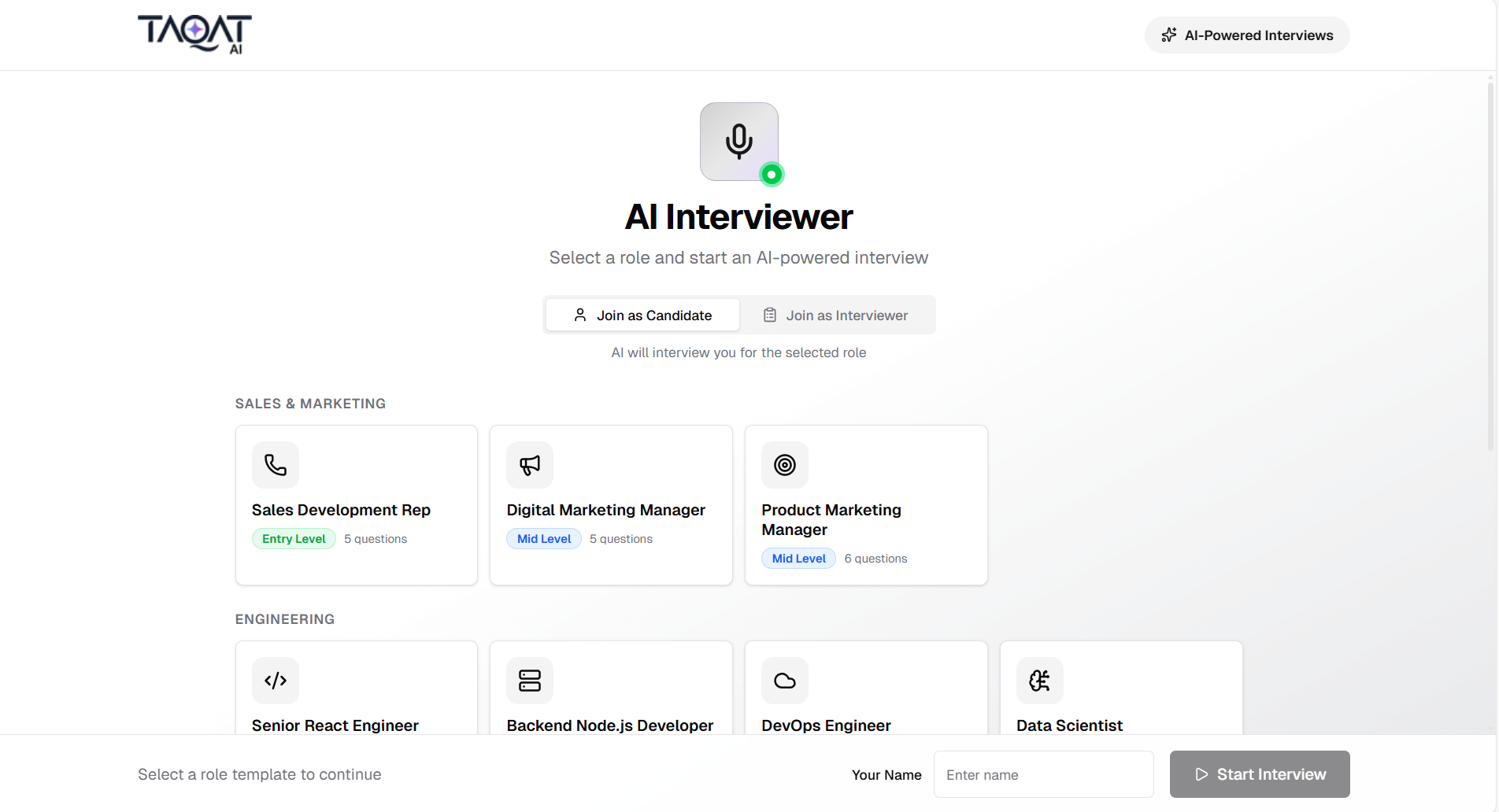
Public AI interviewer showcase page with demo job scenarios
Audit Log System
Change Tracking for Compliance and Security
Added comprehensive audit logging to track critical changes in the platform. All edits to AI-generated evaluations and important actions are now automatically logged with complete before/after snapshots for compliance and accountability.
What's Tracked:
- AI Review Edits: When recruiters manually adjust AI candidate screening scores and recommendations
- Interview Evaluation Edits: When recruiters modify AI interview assessments and hiring recommendations
- Offer Letter Actions: When offer letters are sent to candidates
Key Features:
- Complete change history with before/after states
- User attribution for every change
- Tamper-proof, append-only logs
- Ready for compliance audits
- Users are notified when actions will be logged
Edit AI-Generated Summaries
Manual Override of AI Evaluations with Full Audit Trail
Recruiters can manually edit AI-generated candidate reviews and interview evaluations to adjust scores, refine assessments, or add human judgment. All edits are automatically logged in the audit system for compliance.
Edit AI Review Summary
Override AI Candidate Screening Results
The AI Review Summary displays AI-powered candidate screening scores and recommendations. Recruiters can manually adjust any field if they disagree with AI's assessment or have additional context.
Editable Fields (4 fields):
1. Overall Score
- Adjustable scale control
- Adjusts the candidate's overall fit score
- Displayed prominently with color-coding (green >70, yellow 50-70, red <50)
2. Recommendation
- Multi-line text box
- AI's written recommendation about hiring the candidate
- Can rewrite entirely or adjust tone/emphasis
3. Key Strengths
- One strength per line in text box
- AI identifies candidate's strong points
- Can add, remove, or modify strength items
4. Areas of Concern
- One concern per line in text box
- AI identifies potential red flags or gaps
- Can add, remove, or modify concern items
How It Works:
1. View AI Review: Navigate to candidate application page
2. Click Edit Button: Top-right corner of AI Review Summary card
3. Edit Window Opens: Popup window with all editable fields pre-filled
4. Make Changes: Adjust score using scale, edit text in boxes
5. Save Changes: Click "Save" button
6. Changes Logged: System automatically logs before/after state
7. Success Message: Confirmation message appears
8. Screen Updates: Card refreshes with new values
Authorization:
- Only job owner can edit review summaries
- Other users see read-only view
Audit Trail:
- Every edit creates audit log entry
- Captures complete before/after snapshot
- Tracks which user made changes
- Timestamp of modification
- Dialog shows: "Changes will be logged for audit purposes"
Use Cases:
- Adjust for Context: AI missed important details from resume
- Human Judgment: Recruiter has insights AI doesn't have
- Tone Adjustment: Soften or strengthen AI's recommendation
- Add Strengths: Highlight skills AI didn't emphasize
- Remove Concerns: Dismiss AI concerns that aren't relevant
- Score Calibration: Adjust score to align with company standards
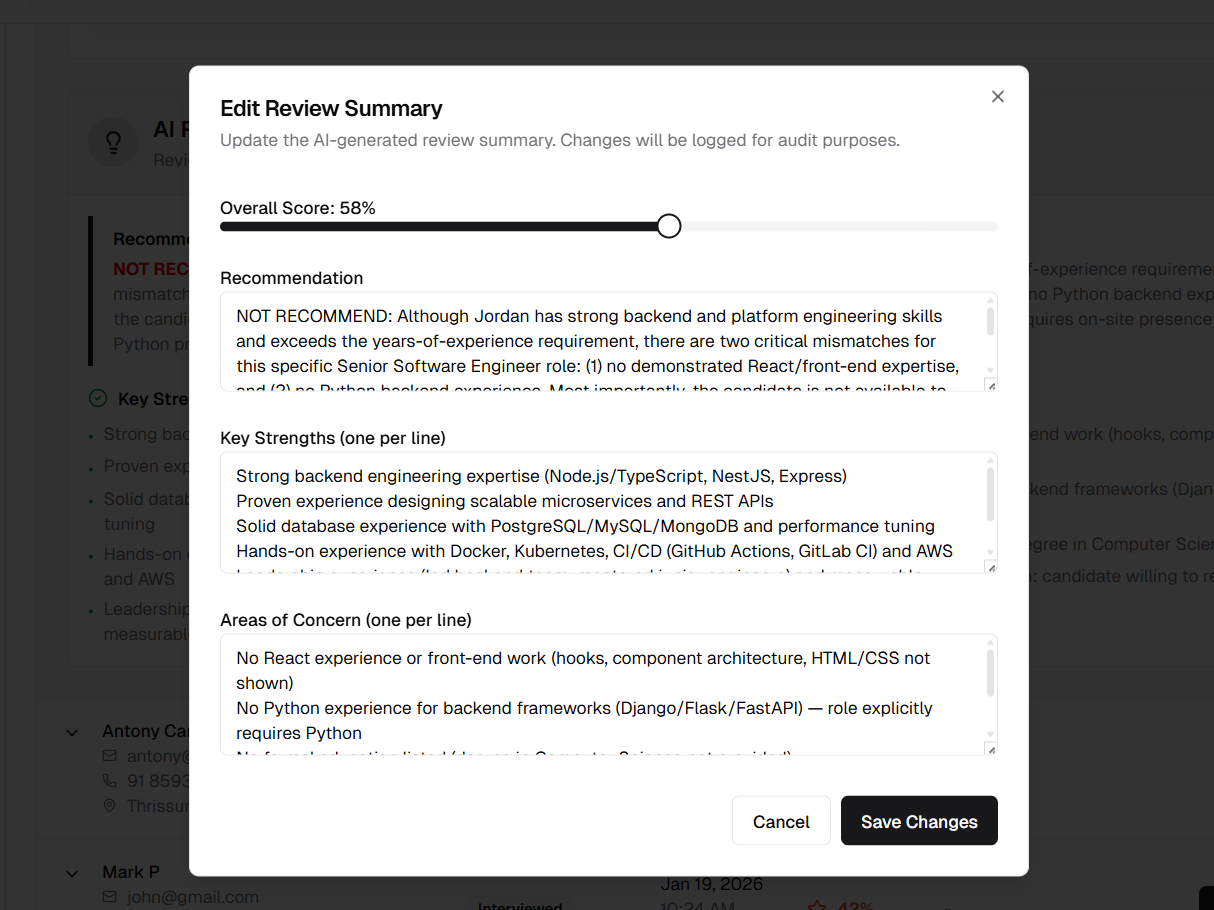
Edit dialog for AI Review Summary showing score slider and text fields
Edit AI Interview Evaluation
Override AI Interview Assessment Results
The AI Interview Summary displays comprehensive AI-powered interview evaluation with detailed scoring across multiple criteria. Recruiters can manually adjust any assessment if they want to add human judgment or correct AI's analysis.
Editable Fields (15+ fields):
Overall Assessment:
- Overall Score - Adjustable scale for overall interview performance
- Hiring Grade - Selection menu: A+, A, B+, B, C, D, F
- Hiring Recommendation - Selection menu: Hire, Maybe Hire, Not Hire
- Overall Assessment - Multi-line summary of interview performance
Skill Assessment Criteria:
- Technical Skills - Score (0-100) + detailed assessment text
- Experience Relevance - Score (0-100) + detailed assessment text
- Interview Performance - Score (0-100) + detailed assessment text
- Cultural Fit - Score (0-100) + detailed assessment text
- Growth Potential - Score (0-100) + detailed assessment text
Additional Details:
- Key Strengths - One per line, candidate's strong points
- Areas of Concern - One per line, potential red flags
- Interview Highlights - One per line, notable moments from interview
- Recommendation Reasoning - Explanation for hiring recommendation
How It Works:
1. View AI Interview Evaluation: Navigate to candidate application → Interview Summary tab
2. Click Edit Button: Top-right corner of AI Interview Summary card
3. Edit Window Opens: Wide popup window with all fields organized in sections
4. Make Changes:
- Adjust scores using adjustable scales (0-100)
- Select grade and recommendation from selection menus
- Edit assessment text in text boxes
- Modify lists (one item per line)
5. Save Changes: Click "Save" button
6. Changes Logged: System automatically logs complete before/after state
7. Success Message: Confirmation message appears
8. Screen Updates: Interview summary refreshes with new values
Window Layout:
- Section Organization: Fields grouped logically (Overall → Skills → Details)
- Organized Layout: Overall score and grade side-by-side on larger screens
- Scrollable: Long form scrolls within window
- Adapts to Screen Size: Works on all screen sizes
Authorization:
- Only job owner can edit interview evaluations
- Other users see read-only view
Audit Trail:
- Every edit creates comprehensive audit log entry
- Captures all modified fields (score, details, grade, recommendation, behavioral analysis)
- Tracks which user made changes
- Timestamp of modification
- Dialog shows: Changes will be logged for audit purposes
Use Cases:
- Adjust Technical Scores: Recruiter disagrees with AI's technical assessment
- Update Hiring Decision: Change recommendation based on additional information
- Refine Grade: Adjust letter grade to match company calibration
- Add Context: Include notes AI couldn't infer from video/audio
- Correct Errors: Fix AI misinterpretations of candidate responses
- Add Highlights: Emphasize moments AI didn't flag
- Remove False Concerns: Dismiss AI concerns that aren't valid
- Balance Assessment: Adjust tone to be more positive or critical
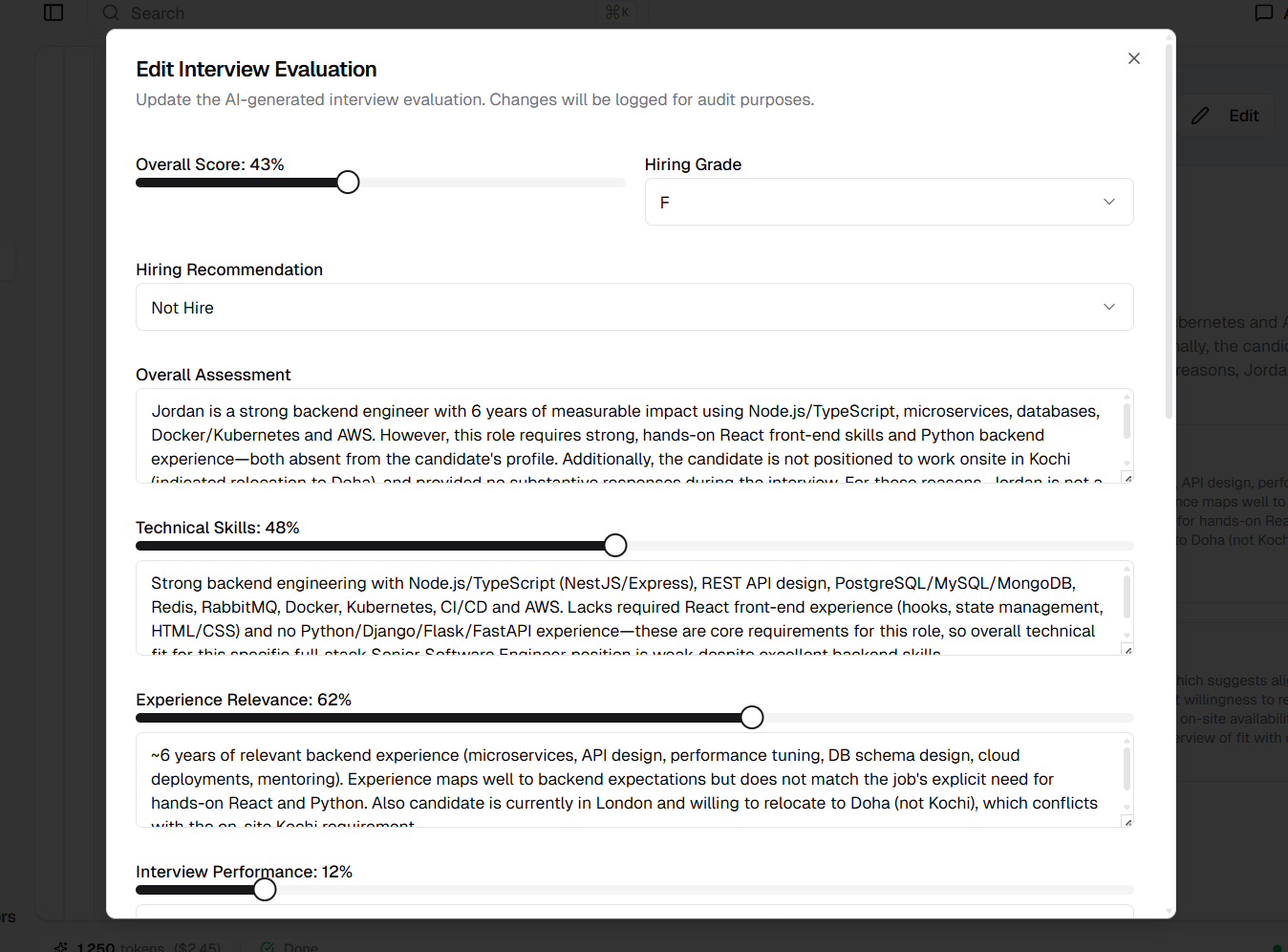
Edit dialog for AI Interview Evaluation showing multiple score sliders, dropdowns, and text fields
Released on January 20, 2026
View all releases