Release Notes - Beta v0.8
Summary
This release introduces a comprehensive Analytics Dashboard for data-driven recruitment insights and enhanced transcript analysis with automatic candidate evaluation. The Analytics Dashboard provides real-time metrics across three focused views: Overview, Pipeline, and Interviews. Additionally, the transcript upload feature has been redesigned to automatically analyze and populate all evaluation fields with AI-calculated scores. New job creation fields have been added for better job tracking and organization.
What's New
- Analytics Dashboard with Overview, Pipeline, and Interviews tabs
- Enhanced transcript upload with automatic AI analysis
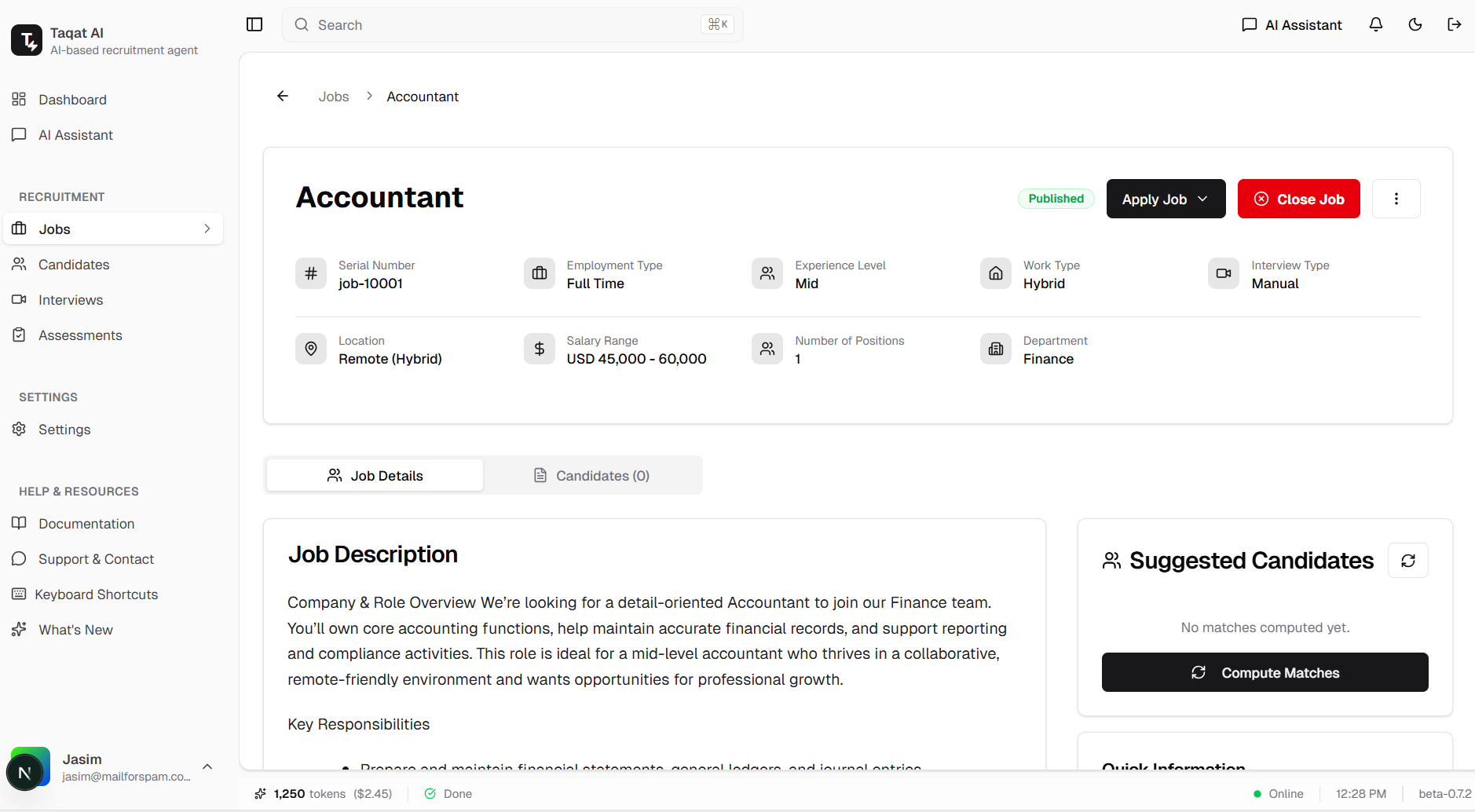
- New job creation fields: Serial Number, Number of Positions, Department
- Display new job fields and interview type in job application list
Improvements
- Hide AI assessment review for jobs without assessment in job details page
- Skip email trigger execution when no active jobs exist
Bug Fixes
- Fixed Gmail trigger not deactivating from Composio after disconnecting
- Fixed Interview list page "All" tab not opening
Analytics Dashboard - Overview
Real-Time Recruitment Metrics at a Glance
The Overview tab provides a comprehensive snapshot of your recruitment activity with key performance indicators and visual analytics.
Metrics Cards:
- Total Candidates: Count of all candidates in the system
- Active Jobs: Number of currently posted job openings
- Pending Applications: Applications awaiting review
- Upcoming Interviews: Scheduled interviews count
Features:
- Job Status Pie Chart: Visual breakdown of jobs by status (Posted, Drafted, Closed)
- Top Jobs by Applications: Horizontal bar chart showing which jobs receive the most applications
- Application Trend: Line/area chart showing application volume over time
- Latest Applications Table: Recent applications with candidate details, job, status, score, and applied date
Table Columns:
- Candidate (name, email, profile)
- Job
- Status
- Score
- Applied (relative time, e.g., "3 days ago")
Benefits:
- Instant visibility into recruitment health
- Identify top-performing job postings
- Track application trends over time
- Quick access to recent candidate activity
- Data-driven recruitment decisions
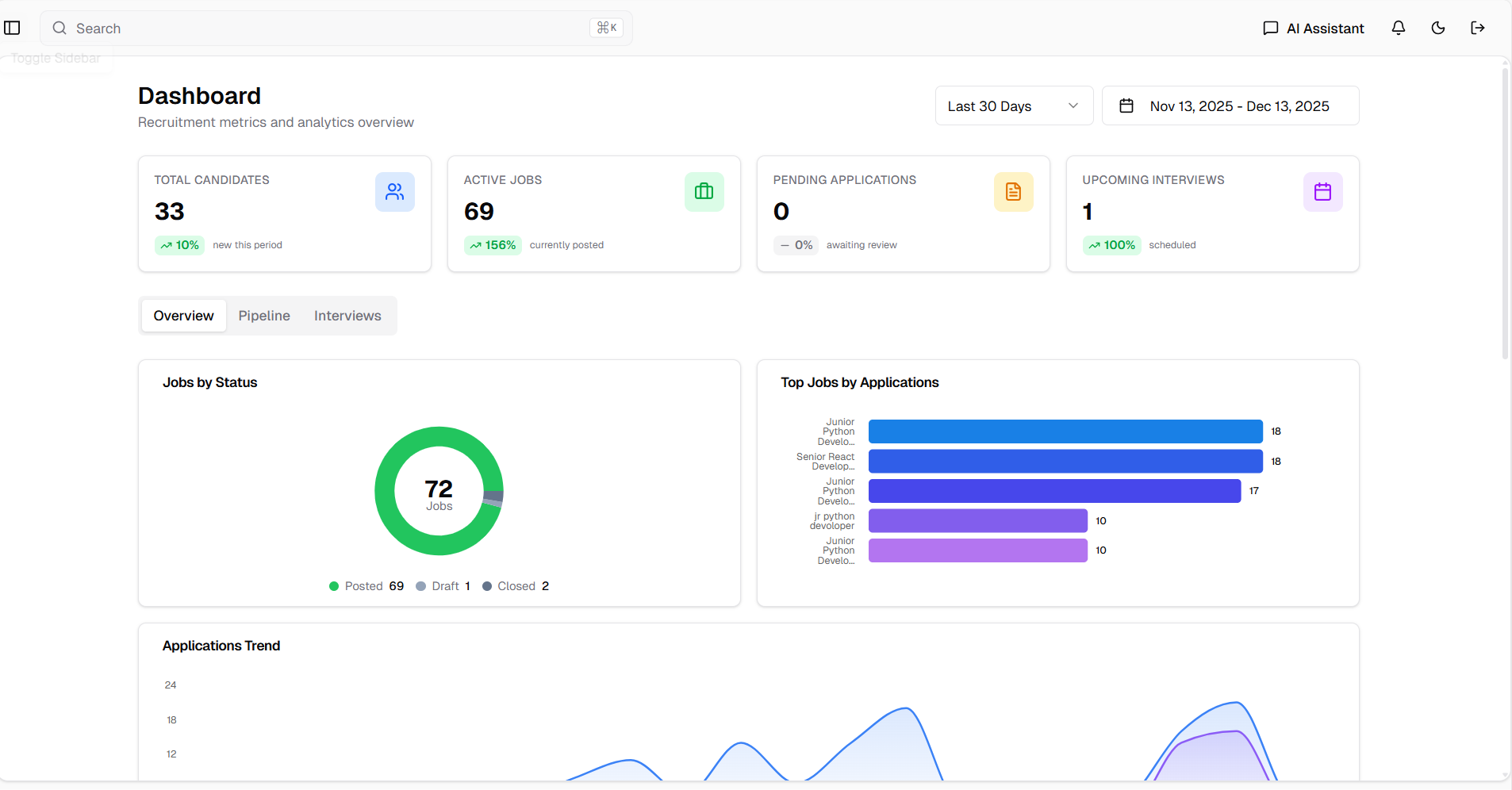
Analytics Dashboard Overview tab showing metrics cards and job status pie chart
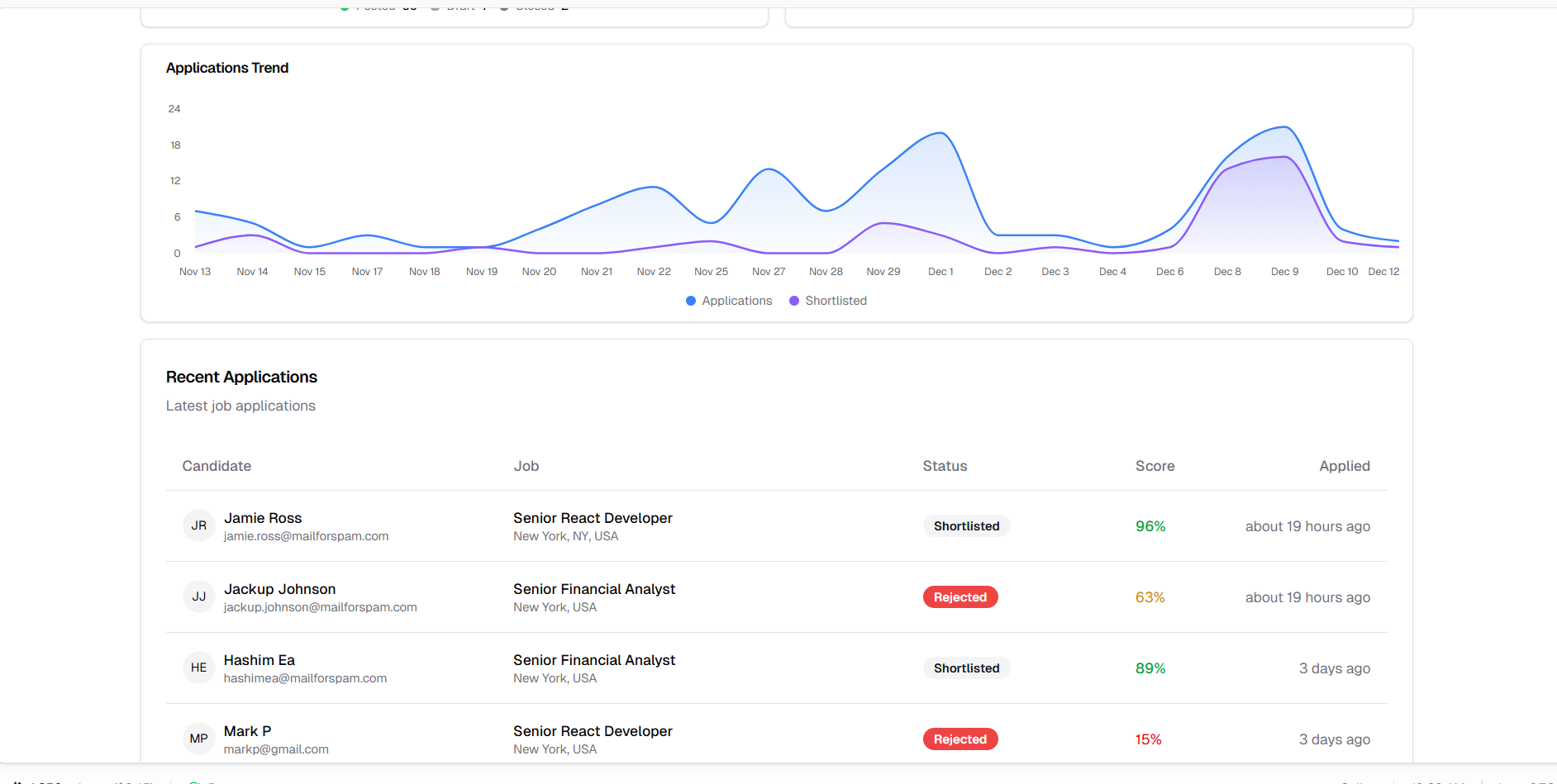
Top jobs by application count and application trend visualization
Analytics Dashboard - Pipeline
Recruitment Funnel and Job Performance Analytics
The Pipeline tab provides deep insights into your hiring funnel efficiency and individual job performance metrics.
Application Funnel:
Visual funnel chart showing candidate progression through stages:
- Applied: Total applications received
- Reviewed: Applications reviewed by recruiters
- Interviewing: Candidates in interview process
- Evaluated: Candidates who completed evaluation
- Offered: Candidates who received offers
Job Performance Table:
Detailed breakdown of hiring metrics per job posting.
Table Columns:
- Job (title, location)
- Applications (total count)
- Shortlisted (candidates shortlisted)
- Interviewed (candidates interviewed)
- Offered (offers extended)
- Conversion (percentage of applications to offers)
Features:
- Funnel Visualization: Clear view of where candidates drop off in the process
- Conversion Tracking: Understand efficiency at each hiring stage
- Job-Level Metrics: Compare performance across different job postings
- Bottleneck Identification: Identify stages needing attention
Benefits:
- Optimize recruitment funnel efficiency
- Identify high-performing job postings
- Spot bottlenecks in the hiring process
- Make data-driven process improvements
- Track conversion rates by job
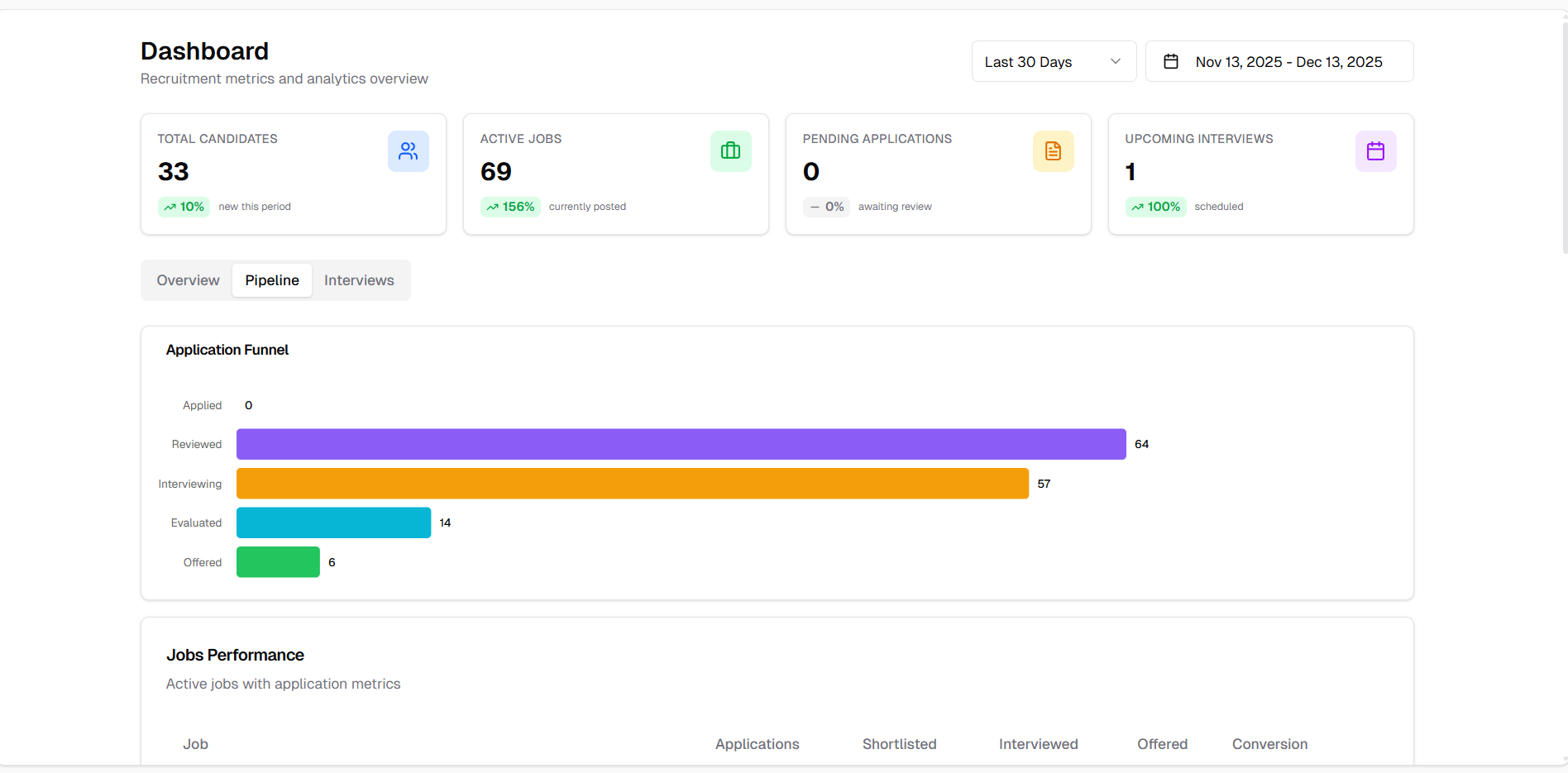
Application funnel showing candidate progression through hiring stages
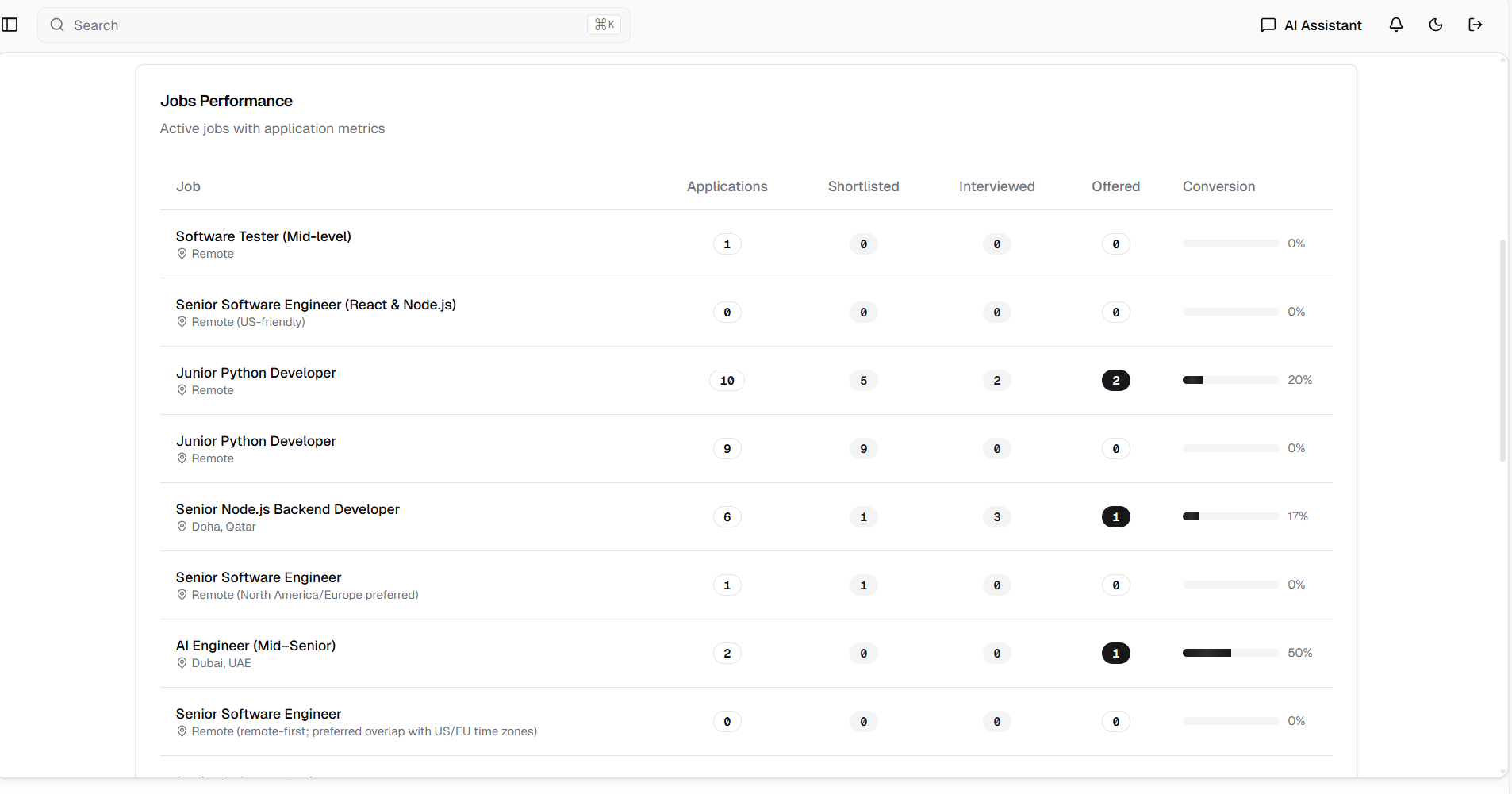
Job performance table with detailed metrics per job posting
Analytics Dashboard - Interviews
Interview Analytics and Scheduling Overview
The Interviews tab provides comprehensive analytics on interview outcomes, assessment performance, and upcoming scheduled interviews.
Interview Outcomes Chart:
Bar chart visualization showing distribution of interview results:
- Pending: Interviews awaiting evaluation
- Hire: Candidates recommended for hiring
- Maybe: Candidates requiring further consideration
- Reject: Candidates not moving forward
Assessment Pass Rates Chart:
Bar chart showing the success rate of candidate assessments, helping identify evaluation patterns and standards.
Upcoming Interviews Table:
Schedule overview of all upcoming interviews.
Table Columns:
- Candidate (name and details)
- Job (position title)
- Date & Time (scheduled interview time)
- Type (meeting platform - Google Meet, Teams, Zoom)
- Action (View button to access interview details)
Features:
- Outcome Distribution: Clear view of interview result trends
- Assessment Analytics: Track pass/fail rates across evaluations
- Schedule Management: Quick overview of upcoming interviews
- Direct Navigation: View button for instant access to interview details
Benefits:
- Track interviewing effectiveness
- Monitor assessment standards
- Manage interview schedule efficiently
- Identify trends in hiring decisions
- Quick access to interview preparation
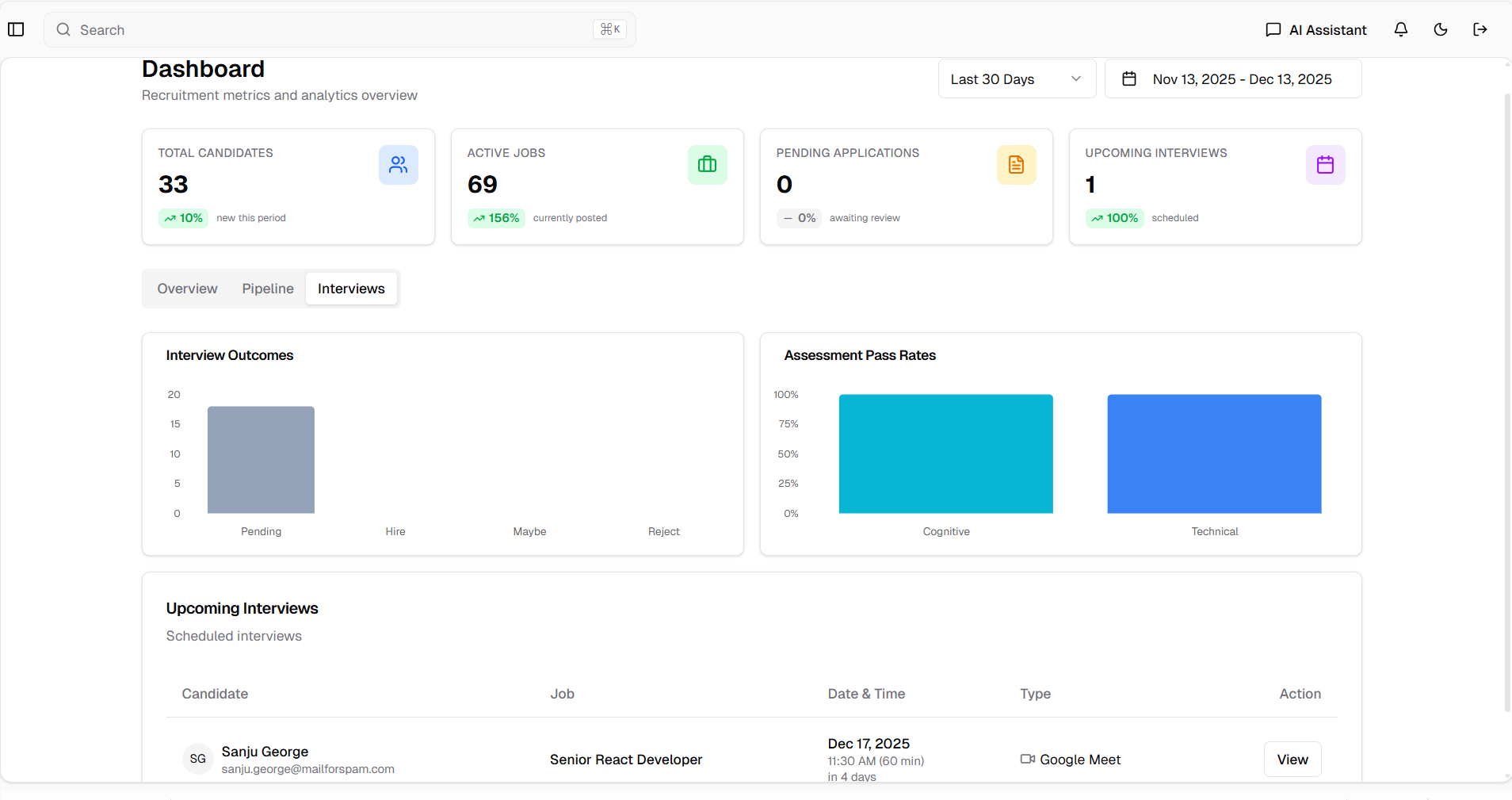
Interview outcomes chart, assessment pass rates, and upcoming interviews table
Enhanced Transcript Upload with AI Analysis
Automatic Evaluation from Interview Transcripts
The transcript upload feature has been enhanced and moved to a prominent position at the top of the evaluation interface. Uploading a transcript now automatically triggers comprehensive AI analysis that populates all evaluation fields and calculates scores instantly.
Features:
- Prominent Placement: Upload transcript option moved to the top for easy access
- Automatic Analysis: AI analyzes transcript content immediately upon upload
- Auto-Populated Fields: All evaluation categories filled automatically
- Score Calculation: Uses existing evaluation criteria for consistent scoring
- Manual Override: Recruiters can edit any field or score after auto-population
Auto-Analyzed Evaluation Fields:
- Technical Skills: Assessment of candidate's technical competencies
- Experience Relevance: How well experience matches job requirements
- Interview Performance: Quality of responses and communication
- Cultural Fit: Alignment with company values and team dynamics
- Growth Potential: Candidate's ability to learn and advance
- Concerns: Potential red flags or areas of concern
- Strengths: Key positive attributes identified
- Additional Notes: AI-generated summary and observations
How It Works:
1. Navigate to candidate evaluation or interview details
2. Click "Upload Transcript" at the top of the form
3. Select the interview transcript file
4. AI automatically analyzes the content
5. All evaluation fields populate with AI-generated insights
6. Score is calculated using existing evaluation criteria
7. Review the auto-populated data
8. Optionally edit any field or adjust scores manually
9. Save the evaluation
Benefits:
- Significant time savings on manual evaluation
- Consistent scoring across all candidates
- Comprehensive analysis from transcript content
- Reduced evaluation bias through AI analysis
- Flexibility to adjust AI-generated assessments
- Faster time-to-decision on candidates
- Complete evaluation documentation
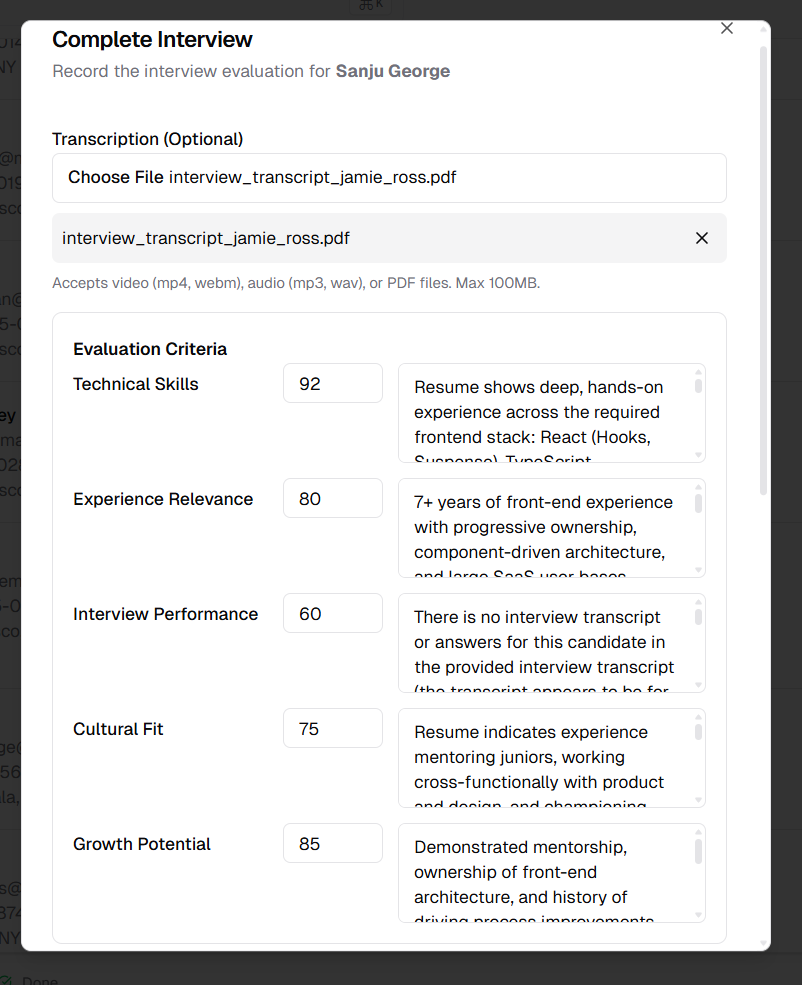
Transcript upload interface with auto-populated evaluation fields
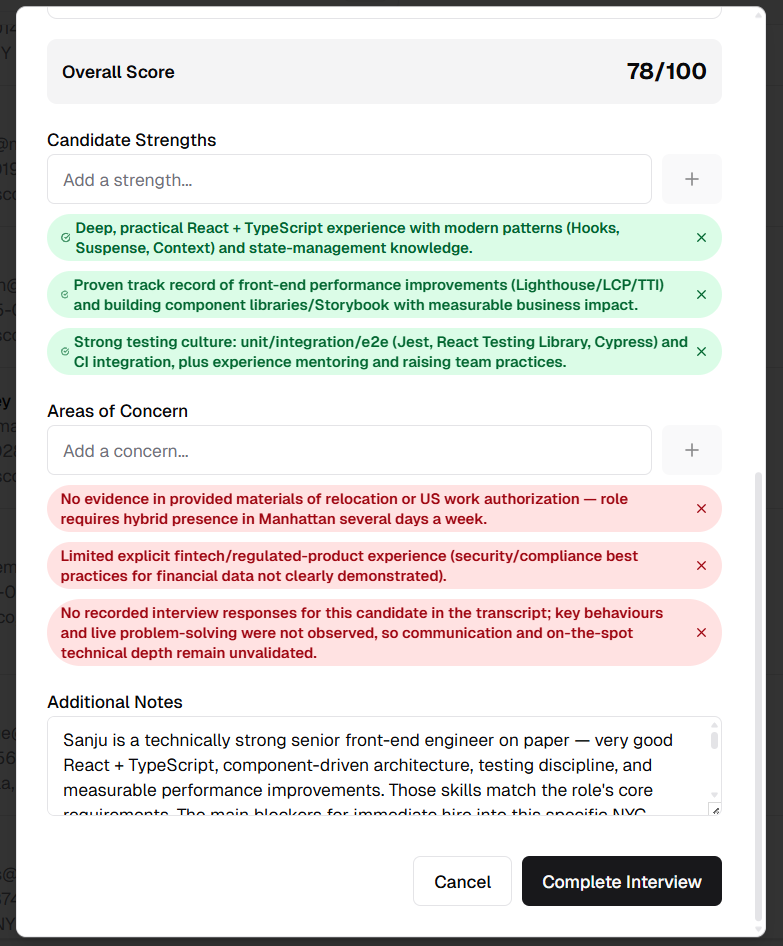
Complete AI-analyzed evaluation with scores and detailed assessments
New Job Creation Fields
Enhanced Job Record Management
Three new fields have been added to the job creation form to improve job tracking, organization, and hiring capacity management.
New Fields:
- Serial Number: A unique identifier for the job record. This field allows organizations to maintain their own internal job numbering system for easy reference and tracking across HR systems.
- Number of Positions: A numeric field specifying how many positions are available for the job. This helps recruiters track hiring capacity and manage multiple openings for the same role.
- Department: A select (dropdown) field allowing users to pick the department relevant to the job. Includes an "Other" option that accepts custom entry for departments not in the predefined list.
Features:
- Unique Identifiers: Serial numbers for internal job tracking
- Capacity Planning: Track multiple openings per job posting
- Department Organization: Categorize jobs by department
- Custom Departments: Add custom department names when needed
- Consistent Data Entry: Dropdown selection reduces errors
Benefits:
- Better job organization and tracking
- Clear visibility into hiring capacity
- Improved departmental reporting
- Integration-ready with external HR systems
- Flexible department management
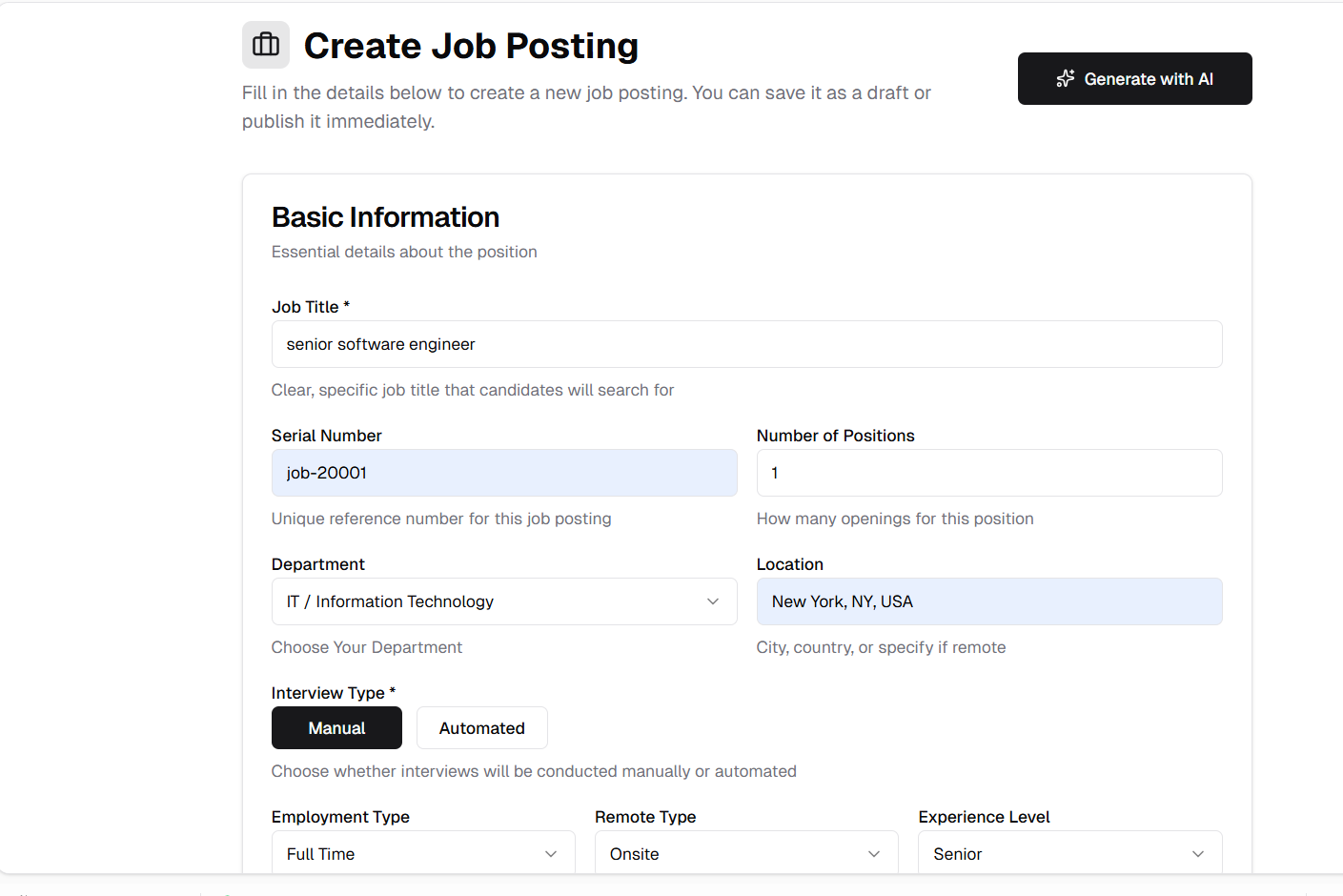
Job creation form showing Serial Number, Number of Positions, and Department fields
Enhanced Job Application List Display
Additional Job Details in Application View
The job application list now displays the new job fields along with interview type information, providing recruiters with more context at a glance.
New Display Fields:
- Serial Number: Job's unique identifier
- Number of Positions: Available positions count
- Department: Job's department category
- Interview Type: Manual or Automated interview setting
Features:
- Comprehensive Job Info: All relevant job details visible in list view
- Interview Mode Visibility: Quickly identify manual vs automated interview jobs
- Better Context: Make informed decisions without opening job details
- Streamlined Workflow: Reduce navigation needed to access key information
Benefits:
- Faster candidate processing
- Better job identification in lists
- Clear interview process visibility
- Improved recruiter efficiency
- Enhanced decision-making context
Job application list showing new fields including Serial Number, Number of Positions, Department, and Interview Type
Improvements
Hide AI Assessment Review for Jobs Without Assessment
Cleaner Job Details Interface
The AI assessment review section is now conditionally displayed based on whether the job has an assessment configured. Jobs without assessment no longer show the empty or irrelevant assessment review panel, resulting in a cleaner and more focused job details page.
What Changed:
- Assessment review section only appears for jobs with assessment enabled
- Jobs without assessment display a streamlined interface
- Reduces visual clutter and confusion for recruiters
- Improves page load performance by not rendering unused components
Benefits:
- Cleaner user interface
- Less confusion for recruiters
- Focused content relevant to each job's configuration
- Better user experience
Skip Email Trigger Execution When No Active Jobs
Optimized Email Processing
The email application processing trigger now checks for active posted jobs before executing. If no jobs are currently posted and active, the trigger skips execution entirely, saving resources and preventing unnecessary processing.
What Changed:
- System checks for posted jobs count before triggering email parsing
- Trigger execution is skipped when posted jobs count is zero
- Reduces unnecessary API calls and processing overhead
- Prevents false positives when no jobs are accepting applications
Benefits:
- Improved system performance
- Reduced unnecessary resource usage
- Prevents processing emails when no jobs are active
- More efficient background task management
Bug Fixes
Fixed Gmail Trigger Not Deactivating After Disconnect
Proper Trigger Cleanup on Gmail Disconnection
Previously, when users disconnected their Gmail integration, the email trigger remained active in Composio, causing potential issues with orphaned triggers. This has been fixed to properly remove the trigger from Composio when Gmail is disconnected.
What Was Fixed:
- Gmail trigger is now properly deactivated when disconnecting Gmail
- Composio trigger is removed along with the Gmail disconnection
- No orphaned triggers remain after disconnection
- Clean state maintained for future reconnections
Impact:
- Prevents orphaned triggers in Composio
- Ensures clean disconnection process
- Avoids potential conflicts on reconnection
- Proper resource cleanup
Fixed Interview List "All" Tab Not Opening
Interview List Navigation Restored
The "All" tab in the interview list page was not functioning correctly, preventing users from viewing all interviews. This issue has been resolved, and the All tab now opens and displays all interviews as expected.
What Was Fixed:
- "All" tab now properly loads and displays interviews
- Tab navigation works correctly across all interview tabs
- Interview list renders without errors
- Consistent behavior across all filter tabs
Impact:
- Full interview visibility restored
- Improved navigation experience
- Reliable tab switching functionality
- Complete access to interview data
Released on December 13, 2025
View all releases