Release Notes - Beta v0.6
Summary
This release introduces a comprehensive manual interview module for complete control over your interview process. You can schedule interviews with customizable settings, send calendar invitations to candidates and interviewers, and complete interviews with detailed evaluation scoring.
What's New
- Interview list to view and manage all scheduled interviews
- Manual interview scheduling with job and candidate selection
- Interview form with date, time, timezone, duration, and platform options
- Calendar invitations (ICS format) sent to candidates and interviewers
- New interview type field in job creation (Manual/Automated)
- Assign Interview button for shortlisted candidates with manual interview jobs
- Complete Interview workflow with comprehensive evaluation scoring
- Automatic score calculation and hire recommendation
- Support for interview transcription uploads (PDF, image, video, audio)
- Suggested candidates from existing Candidate list based on CV score threshold
What's New
Interview List
Centralized Interview Management
View and manage all scheduled interviews in one organized list.
Features:
- Interview Overview: See all scheduled interviews at a glance
- Status Tracking: Monitor interview status (Scheduled, Completed, Cancelled)
- Quick Details: View candidate name, job, date, time, and platform
- Action Options: Access interview details, complete interview, or cancel
- Filtering: Sort and filter interviews by status, date, or job
How It Works:
1. Navigate to the Interviews section
2. View all scheduled interviews in list format
3. See key details for each interview
4. Click on an interview for more details
5. Use action buttons to manage interviews
Benefits:
- Centralized interview tracking
- Easy schedule overview
- Quick access to interview actions
- Better time management
- Clear visibility of interview pipeline
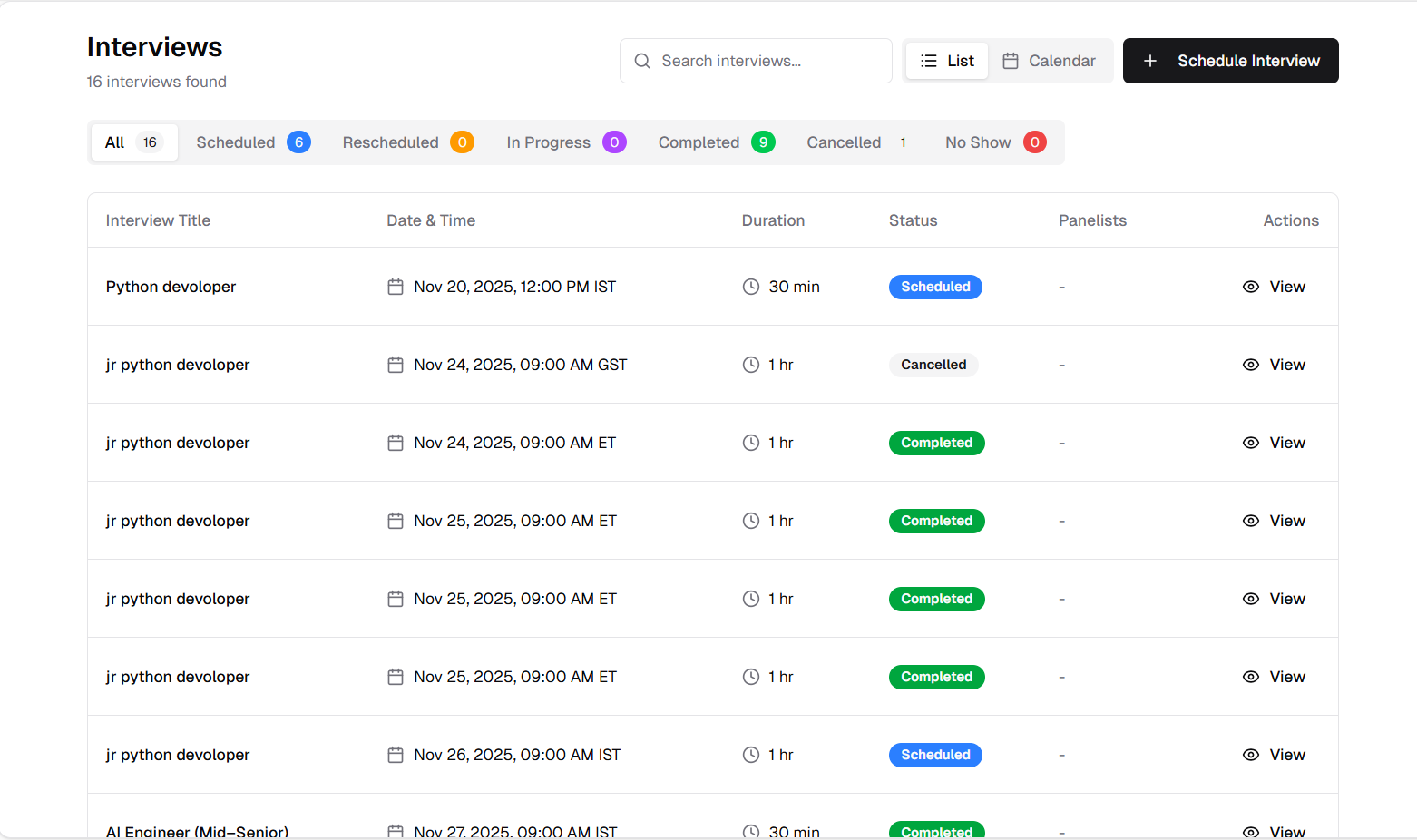
Interview list showing all scheduled interviews with status and actions
Schedule Manual Interviews
Complete Interview Scheduling System
Schedule interviews manually by selecting a job and choosing from shortlisted candidates.
Features:
- Job Selection: Choose from your active jobs
- Candidate Filtering: Only shortlisted candidates appear for the selected job
- Quick Access: Direct scheduling from the interview module
- Organized Workflow: Streamlined selection process
How It Works:
1. Navigate to the Interview module
2. Click "Schedule Interview"
3. Select a job from the dropdown
4. Choose from shortlisted candidates for that job
5. Proceed to the interview form
Benefits:
- Focused candidate selection
- Only qualified candidates shown
- Clear job-to-interview association
- Efficient scheduling workflow

Select job and shortlisted candidate for interview scheduling
Interview Scheduling Form
Comprehensive Interview Configuration
Configure all interview details in one form with flexible options for date, time, platform, and participants.
Features:
- Date Selection: Pick the interview date
- Time Configuration: Set specific interview time
- Timezone Support: Select appropriate timezone
- Duration Options: Choose from 30, 45, 60, or 90 minutes
- Interviewer Email: Specify who will conduct the interview
- Meeting Platform: Select Google Meet, Microsoft Teams, Zoom, or In Person
- Meeting Link: Add meeting link
- Additional Notes: Optional field for extra instructions or context
How It Works:
1. Fill in the interview date and time
2. Select timezone for the meeting
3. Choose interview duration
4. Enter interviewer email address
5. Select meeting platform
6. Add optional notes for context
7. Click "Schedule Interview"
Benefits:
- Complete scheduling control
- Multiple platform support
- Flexible duration options
- Global timezone support
- Clear communication with additional notes
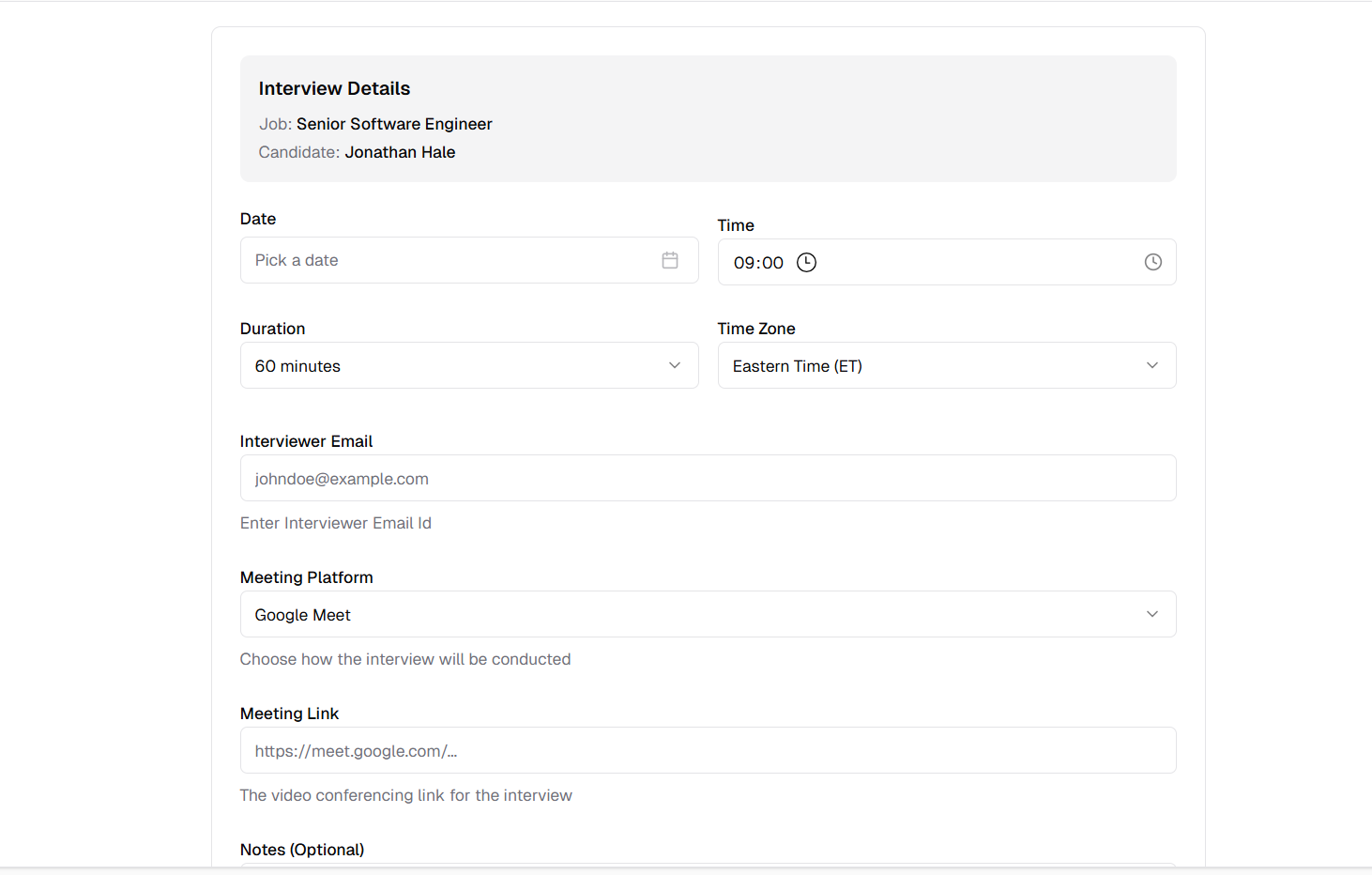
Complete interview scheduling form with all configuration options
Calendar Invitations
Automated Email Notifications with ICS Calendar Format
Both candidates and interviewers receive professional email invitations with calendar attachments.
Features:
- Candidate Email: Professional invitation sent to candidate
- Interviewer Email: Notification sent to interviewer with details
- ICS Calendar Format: Attachable calendar event
- Meeting Link: Included for virtual interviews
- All Details Included: Date, time, duration, platform, and notes
How It Works:
1. Interview is scheduled through the form
2. System generates ICS calendar file
3. Email sent to candidate with: Interview details, Meeting link, Calendar attachment
4. Email sent to interviewer with: Candidate information, Interview details, Calendar attachment
5. Recipients can add to their calendar with one click
Benefits:
- Professional communication
- Universal calendar compatibility
- No manual calendar entry needed
- All participants stay informed
- Reduced scheduling conflicts
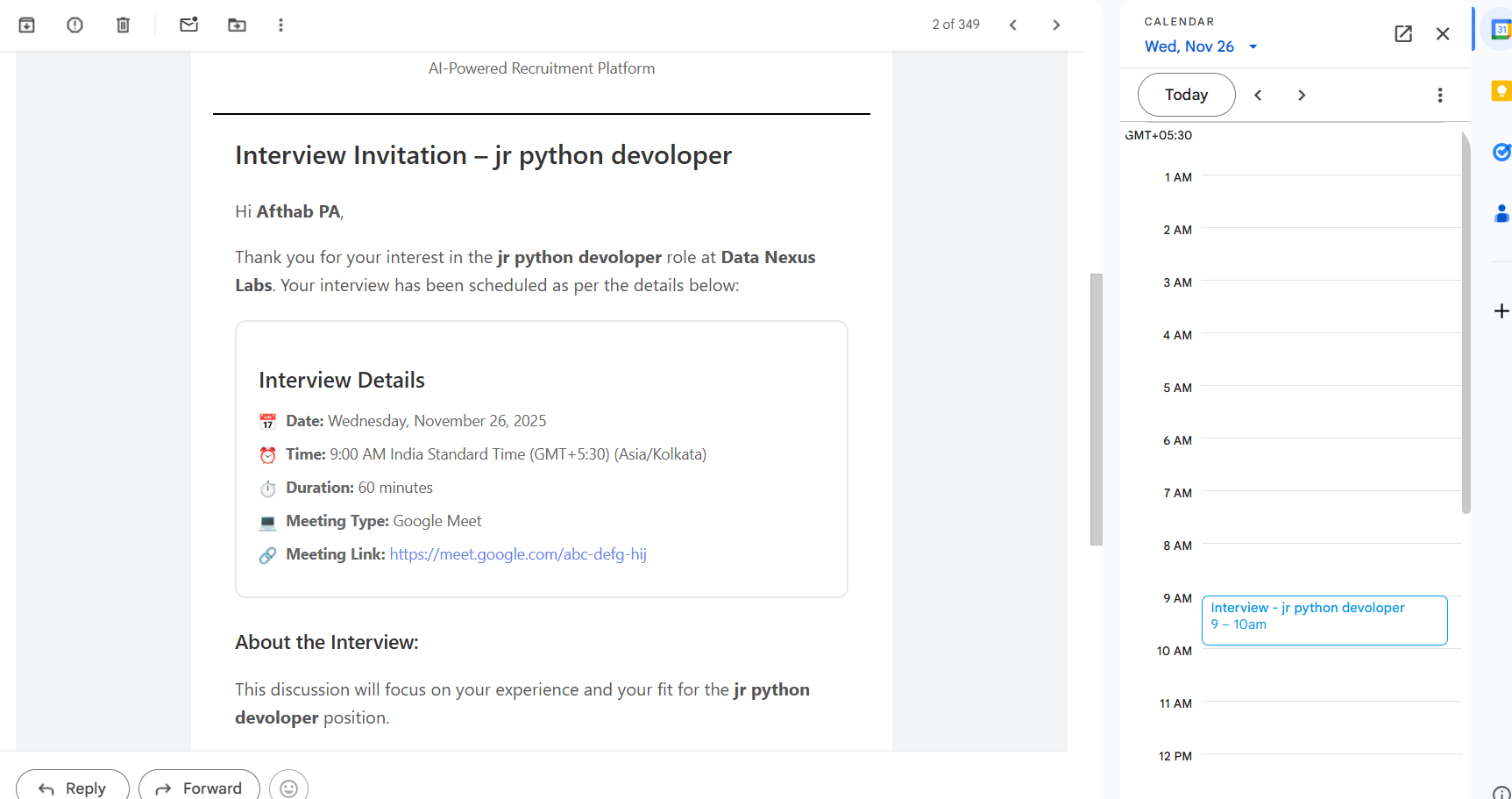
Professional email invitation sent to candidate
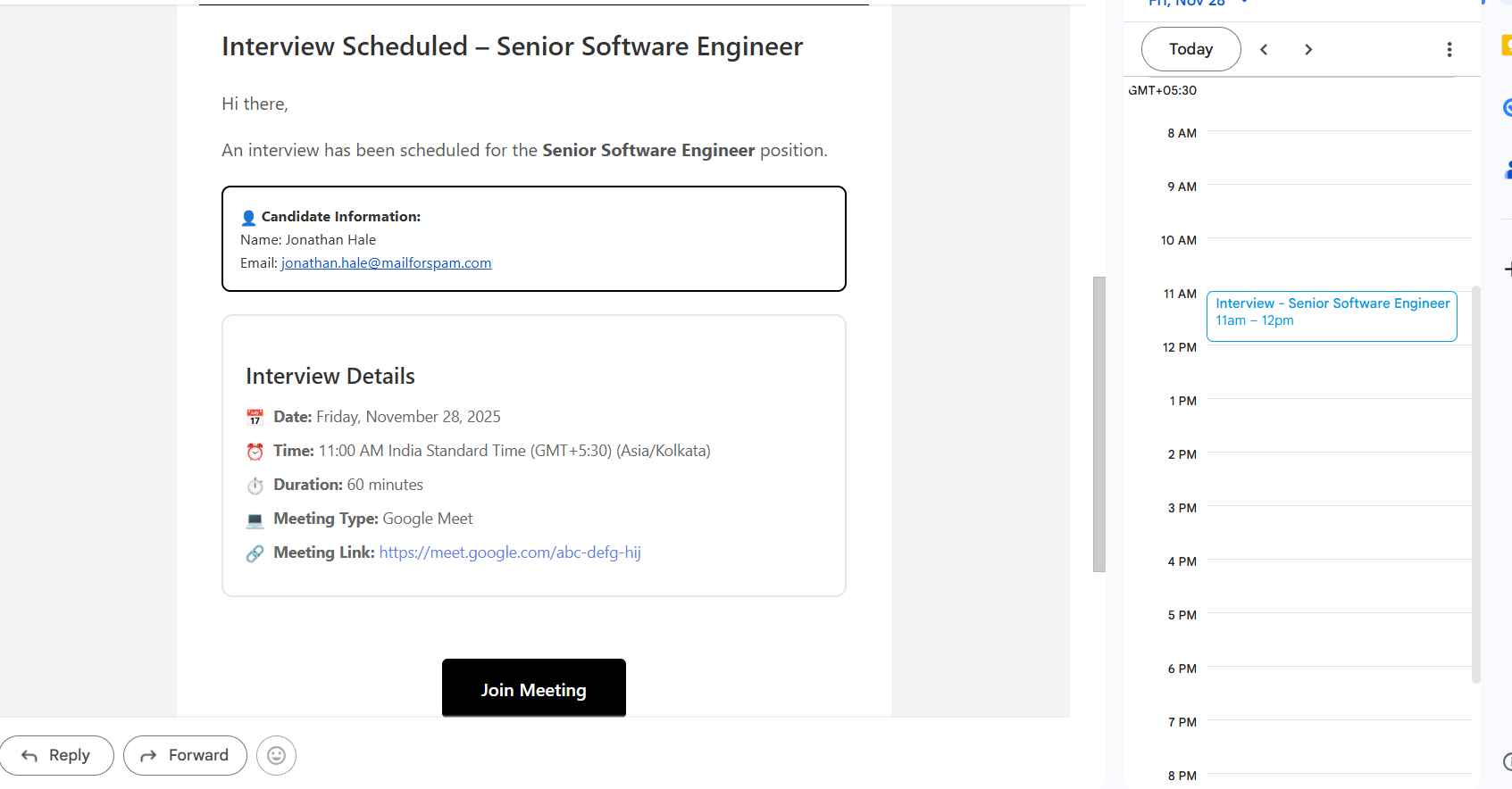
Notification email sent to interviewer with all details
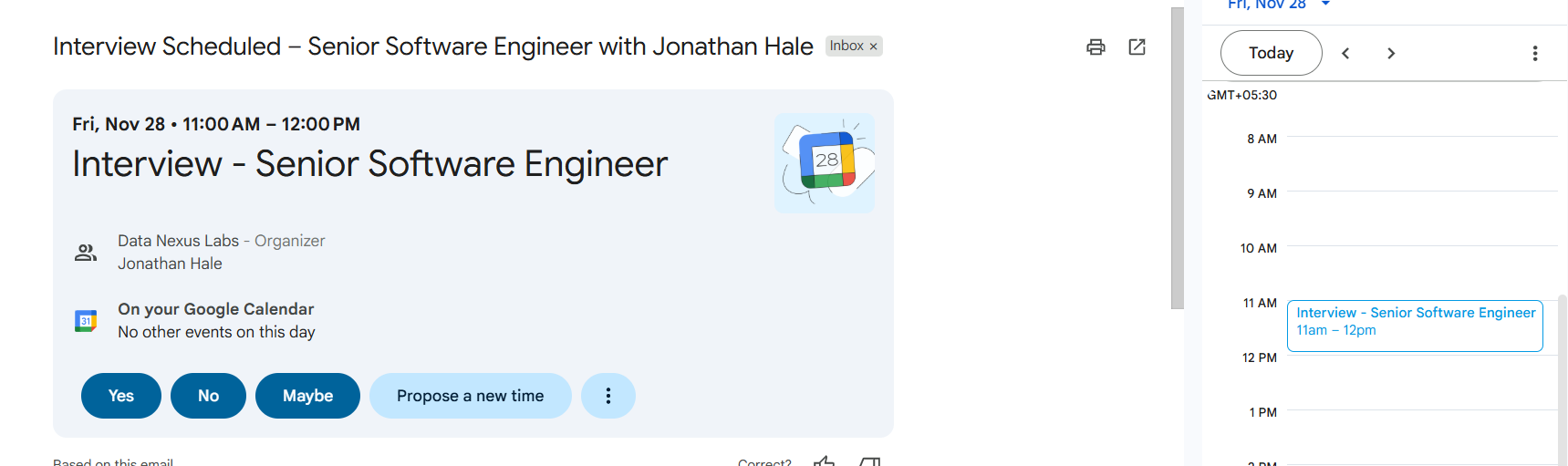
Calendar event in ICS format for easy scheduling
Interview Type in Job Creation
Manual or Automated Interview Configuration
New field in job creation form to specify interview type, with manual as the default.
Features:
- Interview Type Field: Choose between Manual or Automated
- Default Setting: Manual interview type by default
- Job-Level Configuration: Set once per job
- Workflow Control: Determines how interviews are scheduled
How It Works:
1. Create a new job
2. In the job form, locate "Interview Type" field
3. Select either:
- Manual: Recruiters schedule and conduct interviews manually
- Automated: System handles scheduling automatically
4. Default is set to Manual
5. Save job with selected interview type
Benefits:
- Flexibility per job
- Clear workflow expectations
- Control over interview process
- Easy configuration
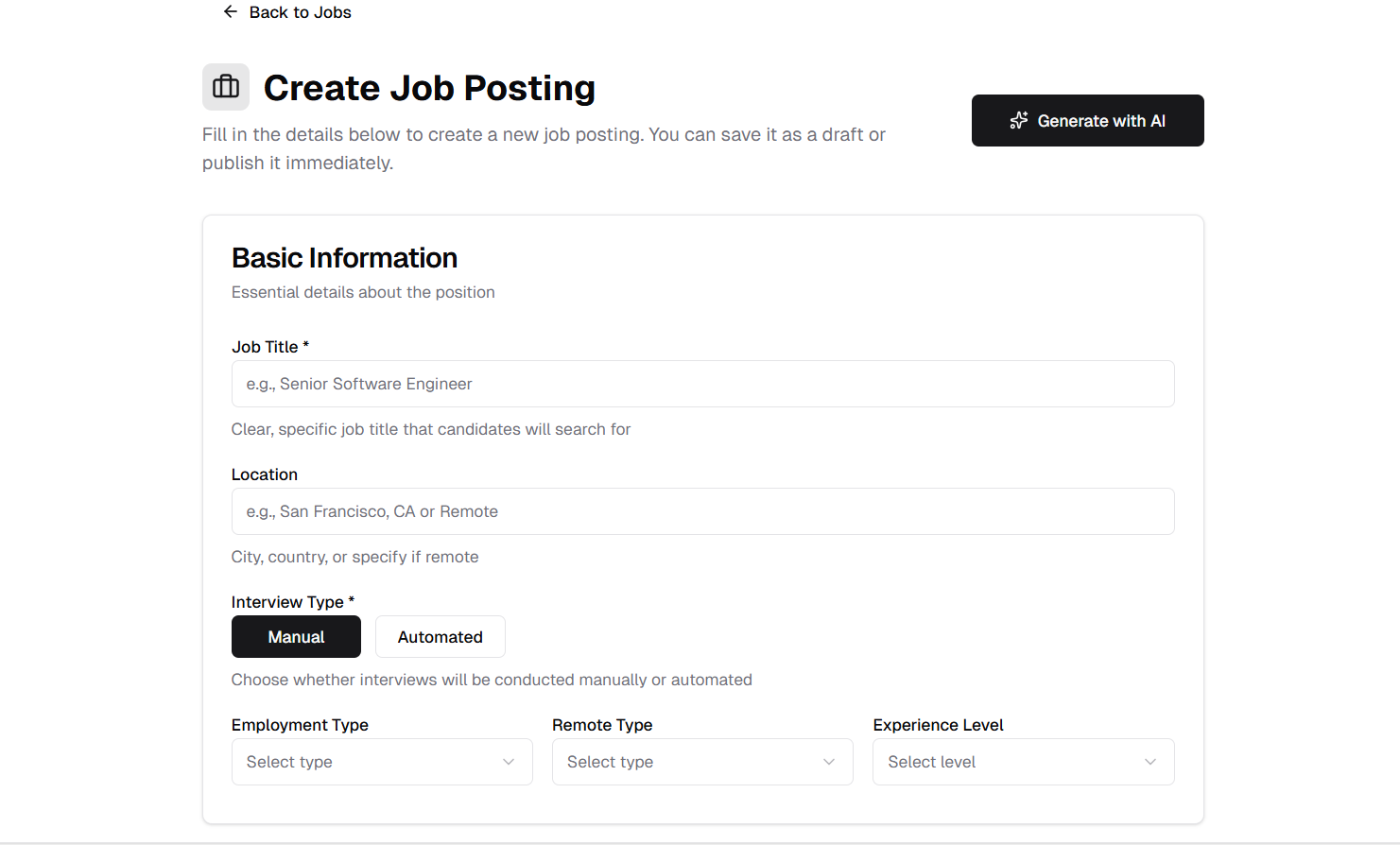
Interview type selection in job creation form
Interview Type in AI Chat
AI Assistant Asks About Interview Type
When creating jobs through the AI chat interface, the system prompts for interview type preference.
Features:
- Conversational Setup: AI asks about interview type during job creation
- Default Suggestion: Manual interview type suggested as default
- Natural Flow: Part of the job creation dialogue
- Clear Options: Manual or Automated options presented
How It Works:
1. Start job creation through AI chat
2. AI guides you through job details
3. AI asks about interview type preference
4. Respond with Manual or Automated
5. AI includes selection in job creation
Benefits:
- Consistent configuration
- Natural conversation flow
- No missed settings
- Easy to specify preferences
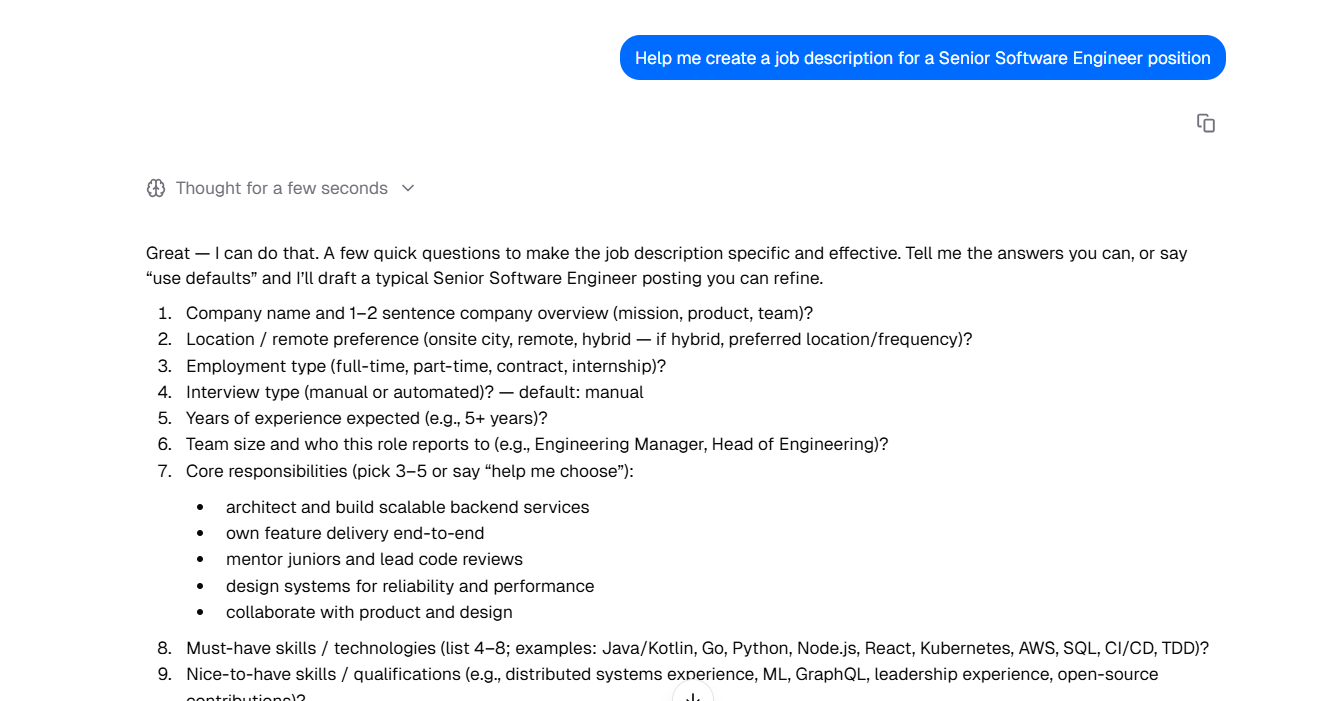
AI assistant asking about interview type during job creation
Assign Interview Button
Quick Interview Assignment for Manual Interview Jobs
For jobs with manual interview type, shortlisted candidates display an "Assign Interview" button.
Features:
- Contextual Display: Button appears only for manual interview jobs
- Shortlisted Only: Available for shortlisted candidates
- Direct Navigation: Goes straight to interview creation form
- Quick Access: One-click interview assignment
How It Works:
1. Navigate to job applicants list
2. For jobs with manual interview type
3. Shortlisted candidates show "Assign Interview" button
4. Click the button
5. Opens interview scheduling form for that candidate
Benefits:
- Streamlined workflow
- No manual navigation needed
- Context-aware interface
- Faster interview scheduling

Assign Interview button for shortlisted candidates in manual interview jobs
Complete Interview Button
Mark Interviews as Completed
After scheduling an interview, a "Complete Interview" button appears to record interview results.
Features:
- Post-Schedule Display: Appears after interview is assigned
- Clear Call-to-Action: Obvious button for completing interview
- Direct Access: Opens comprehensive evaluation form
- Status Tracking: Track interview completion status
How It Works:
1. Interview is scheduled for candidate
2. "Complete Interview" button appears
3. Click button after interview is conducted
4. Opens evaluation form
5. Submit evaluation to complete process
Benefits:
- Clear next step indication
- Easy interview completion
- No status confusion
- Streamlined evaluation workflow

Complete Interview button displayed after interview is assigned
Interview Evaluation Form
Comprehensive Interview Scoring System
Complete evaluation form with multiple scoring categories and automatic calculation.
Features:
- Scoring Categories:
- -Technical Skills (0-100)
- -Experience Relevance (0-100)
- -Interview Performance (0-100)
- -Cultural Fit (0-100)
- -Growth Metrics (0-100)
- Category Details: Add notes for each score
- Overall Score: Automatically calculated from all categories
- Candidate Strengths: Document positive observations
- Concerns: Note any concerns or red flags
- Additional Notes: Optional field for extra comments
- Transcription Upload: Support for PDF, image, video, or audio files
How It Works:
1. Click "Complete Interview"
2. For each category: Enter score (0-100), Add details/notes
3. Overall score calculates automatically
4. Document candidate strengths
5. Note any concerns
6. Add optional additional notes
7. Upload transcription if available
8. Submit evaluation
Benefits:
- Structured evaluation process
- Objective scoring criteria
- Automatic score calculation
- Complete documentation
- Media support for records
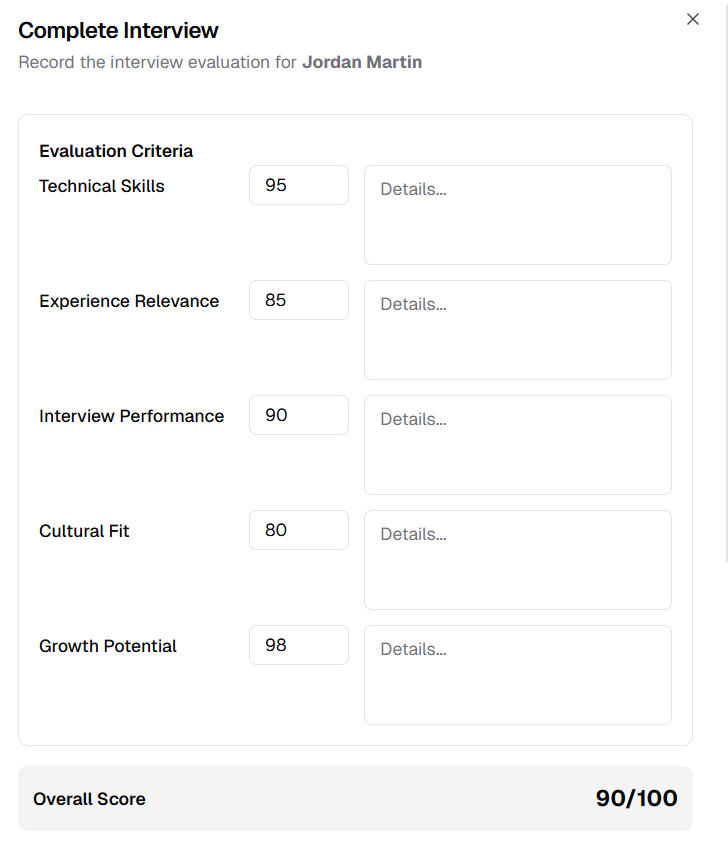
Interview evaluation form with scoring categories and details
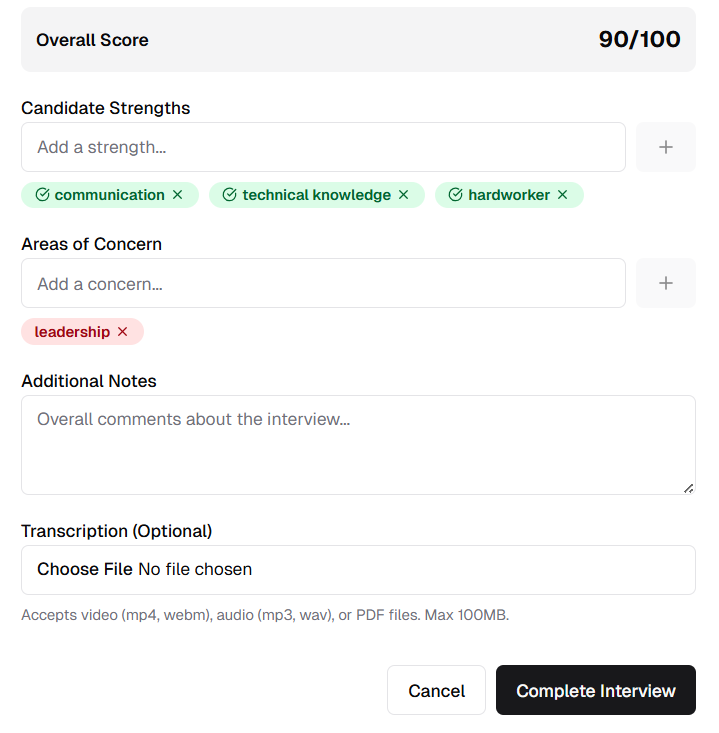
Strengths, concerns, notes, and transcription upload options
Automatic Hire Recommendation
Score-Based Offer Generation
System automatically evaluates scores and generates offer options for qualified candidates.
Features:
- Automatic Evaluation: System checks overall score
- Threshold Detection: Identifies candidates meeting hire criteria
- Send Offer Button: Appears for candidates who meet threshold
- Status Update: Candidate status can be updated to "Hire"
- Streamlined Process: Direct path from evaluation to offer
How It Works:
1. Complete interview evaluation
2. Submit evaluation form
3. System calculates overall score
4. If score meets hire threshold:
- "Send Offer" button appears
- Candidate status updated
5. Click to proceed with offer letter
Benefits:
- Objective hiring decisions
- Automated qualification check
- Reduced manual evaluation
- Clear hire recommendations
- Faster offer process
Suggested Candidates from Existing Candidate List
AI-Powered Candidate Matching
Automatically suggest candidates from existing candidate list based on CV score matching the job threshold.
Features:
- Automatic Suggestions: System finds candidates with CV scores above job threshold
- Auto-Check on Job Creation: Automatically checks and updates suggested candidates when a new job is created
- Score-Based Matching: Only qualified candidates are suggested
- Refresh Button: Refresh the suggested candidates list on user demand
- Bulk Selection: Select multiple candidates using checkboxes
- Add to Hiring: Add selected candidates directly to the job's hiring pipeline
How It Works:
1. Navigate to a specific job's details page
2. View "Suggested Candidates" panel on the right side
3. System shows candidates with CV score > job threshold
4. See last updated timestamp for freshness
5. Click refresh button to update suggestions
6. Click "Select" to open selection mode
7. Check boxes for candidates you want to add
8. Click "Add to Hiring" to add selected candidates
9. Candidates appear in job applicants list
Benefits:
- Leverage existing candidate database
- Faster candidate sourcing
- Quality-matched suggestions
- Reduce duplicate sourcing efforts
- Efficient bulk candidate addition
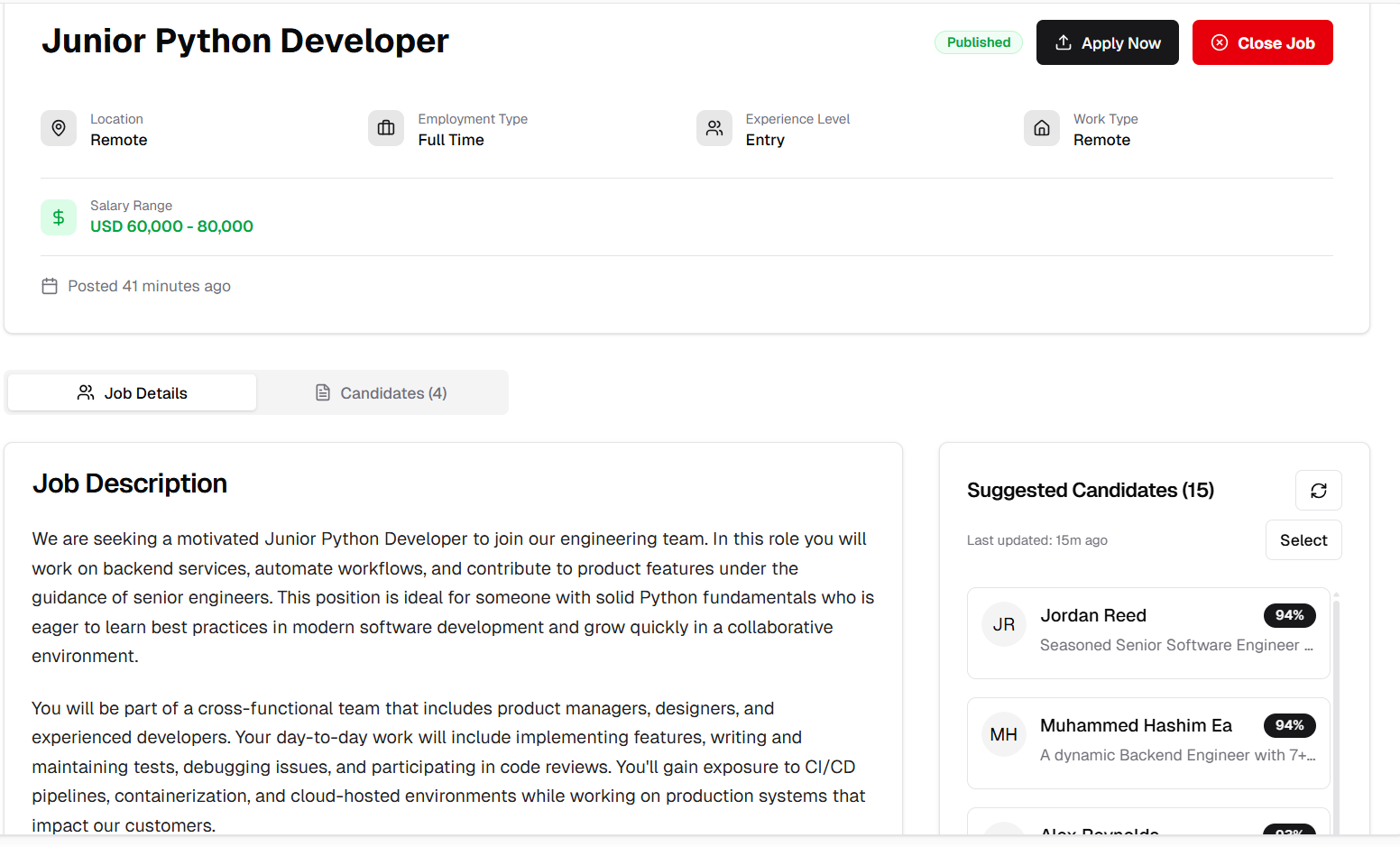
Suggested candidates based on CV score threshold matching
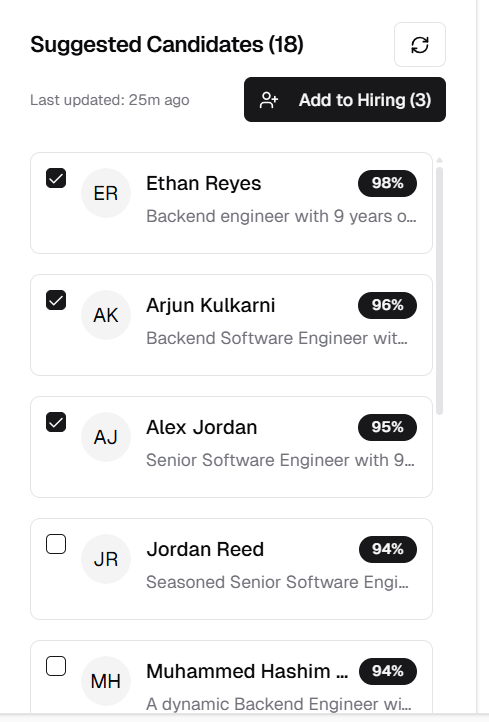
Select candidates with checkboxes to add to hiring
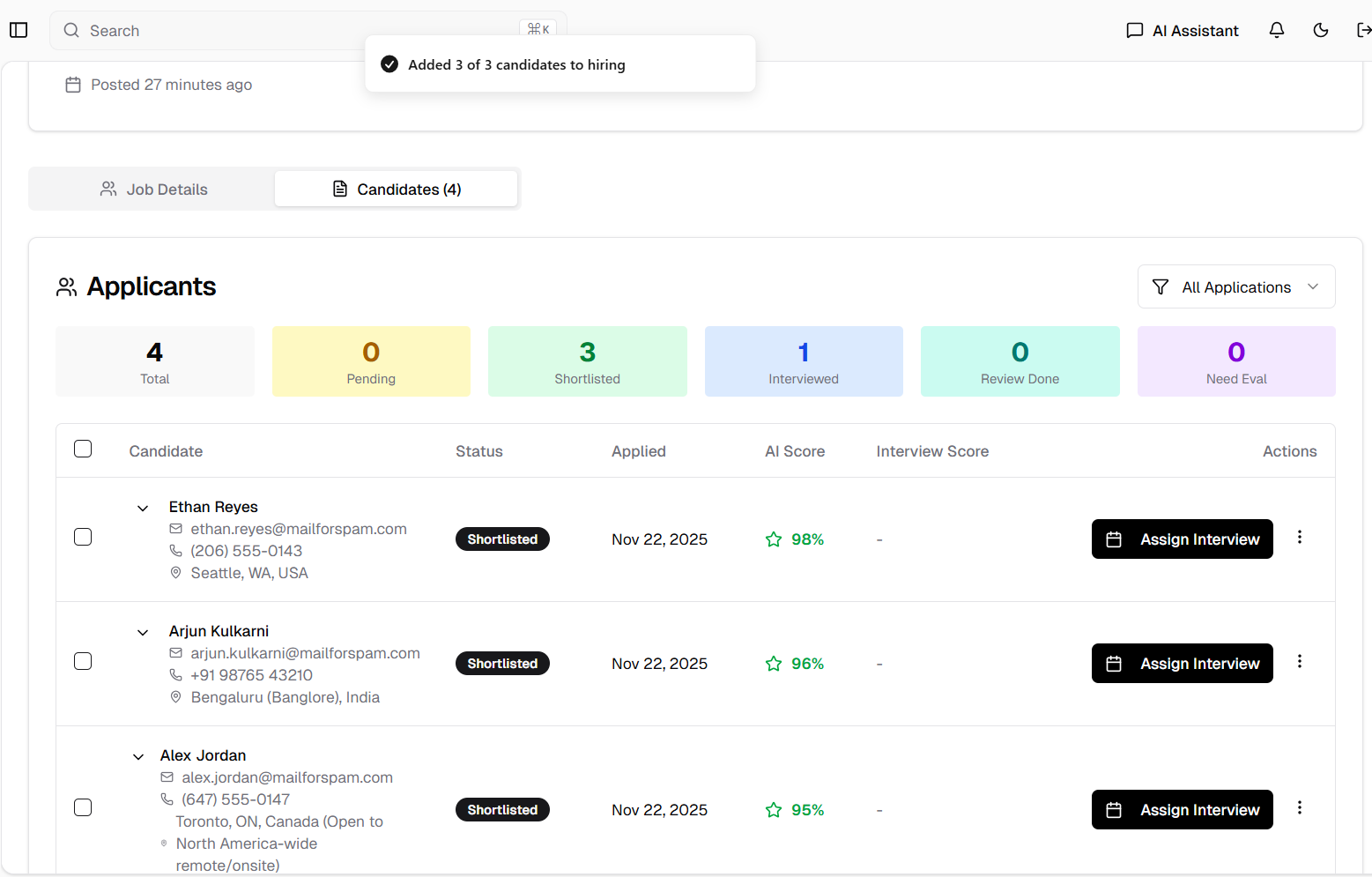
Candidates successfully added to the hiring pipeline
UI Improvements
Coming Soon Pages
Dashboard and Documentation Placeholders
Added professional coming soon pages for features under development.
Features:
- Dashboard Coming Soon: Placeholder page for upcoming dashboard features
- Documentation Coming Soon: Placeholder for documentation section
- What's New Redirect: Updated to redirect to release notes page
- Consistent Design: Professional placeholder messaging
Benefits:
- Clear communication of upcoming features
- Professional user experience
- Easy access to release notes from What's New
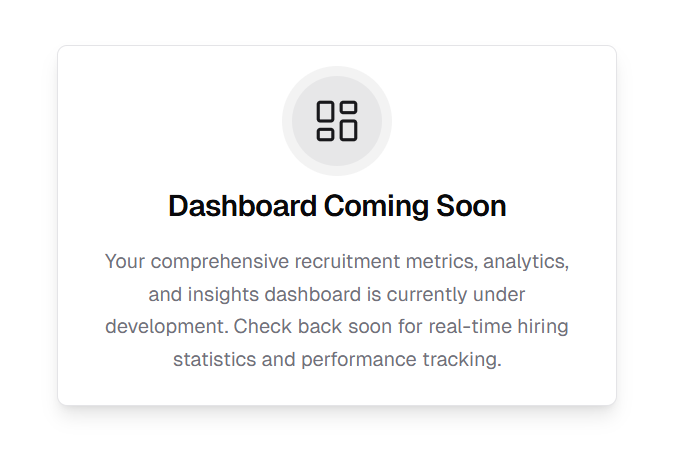
Coming soon page for Dashboard
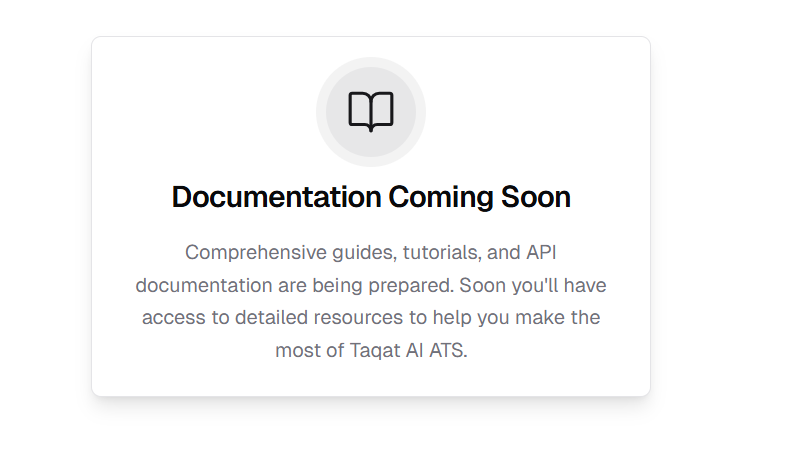
Coming soon page for Documentation
Expired API Key Indicator
Visual Warning for Expired Keys
Expired API keys now display in red color for immediate visibility.
Features:
- Red Color Indicator: Expired keys highlighted in red
- Instant Recognition: Easy to identify expired keys at a glance
- Visual Warning: Clear indication that action is needed
Benefits:
- Quick identification of expired keys
- Reduced confusion about key status
- Prompts timely key renewal
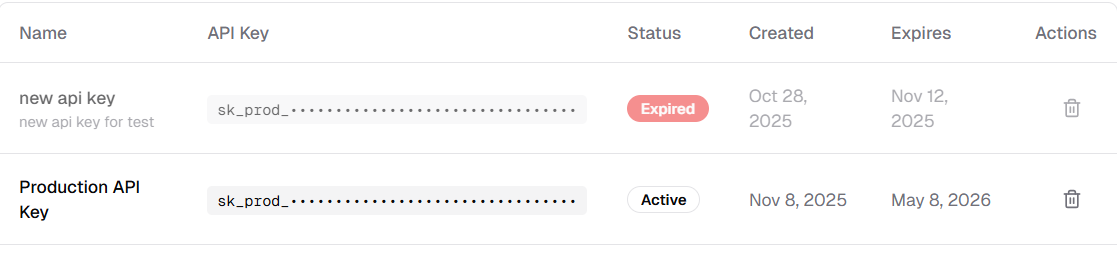
Expired API key displayed in red for visibility
Sidebar Chat Visibility
Smart Sidebar Behavior
Sidebar chat component is now hidden when AI Assistant page is active.
Features:
- Context-Aware Display: Chat hidden on AI Assistant page
- Reduced Redundancy: Prevents duplicate chat interfaces
- Cleaner UI: More focused workspace
Benefits:
- Cleaner interface on AI Assistant page
- No duplicate chat components
- Better user experience
- More screen space for main content
Released on November 22, 2025
View all releases