Release Notes - Beta v0.5.2
Summary
This release focuses on automated offer letter generation for both permanent and contract positions, AI-powered assessment question generation from context, improved assessment workflow, and critical UI fixes. The offer letter feature enables recruiters to send professional employment offers directly after interviews, while the AI question generator accelerates assessment creation with context-aware questions.
What's New
- Offer letter generation for hired candidates with dual job type support
- AI-powered assessment question generation from context
- Assessment display in job description with direct navigation links
- Assessment deletion prevention when attached to jobs
- CV download options (original and platform-generated)
- Optimized model selector with curated AI model selection
- UI fix for chat suggestion submit button
- Fixed clear filter button functionality
Assessment Management Enhancements
Assessment Display in Job Details
Comprehensive Assessment Visibility
View assessment attached to a job directly from the job details screen. Each assessment includes a clickable link for quick navigation to full assessment details.
Key Features:
Assessment Listing:
- Inline Display: All assessments shown in job description page
- Direct Navigation: Click assessment name to view full details
- Quick Overview: See all tests required for the position
- Seamless Integration: Assessments integrated into job workflow
Benefits:
- Clear visibility of screening requirements
- Easy assessment management per job
- Quick access to assessment details
- Better job posting preparation
- Streamlined hiring workflow
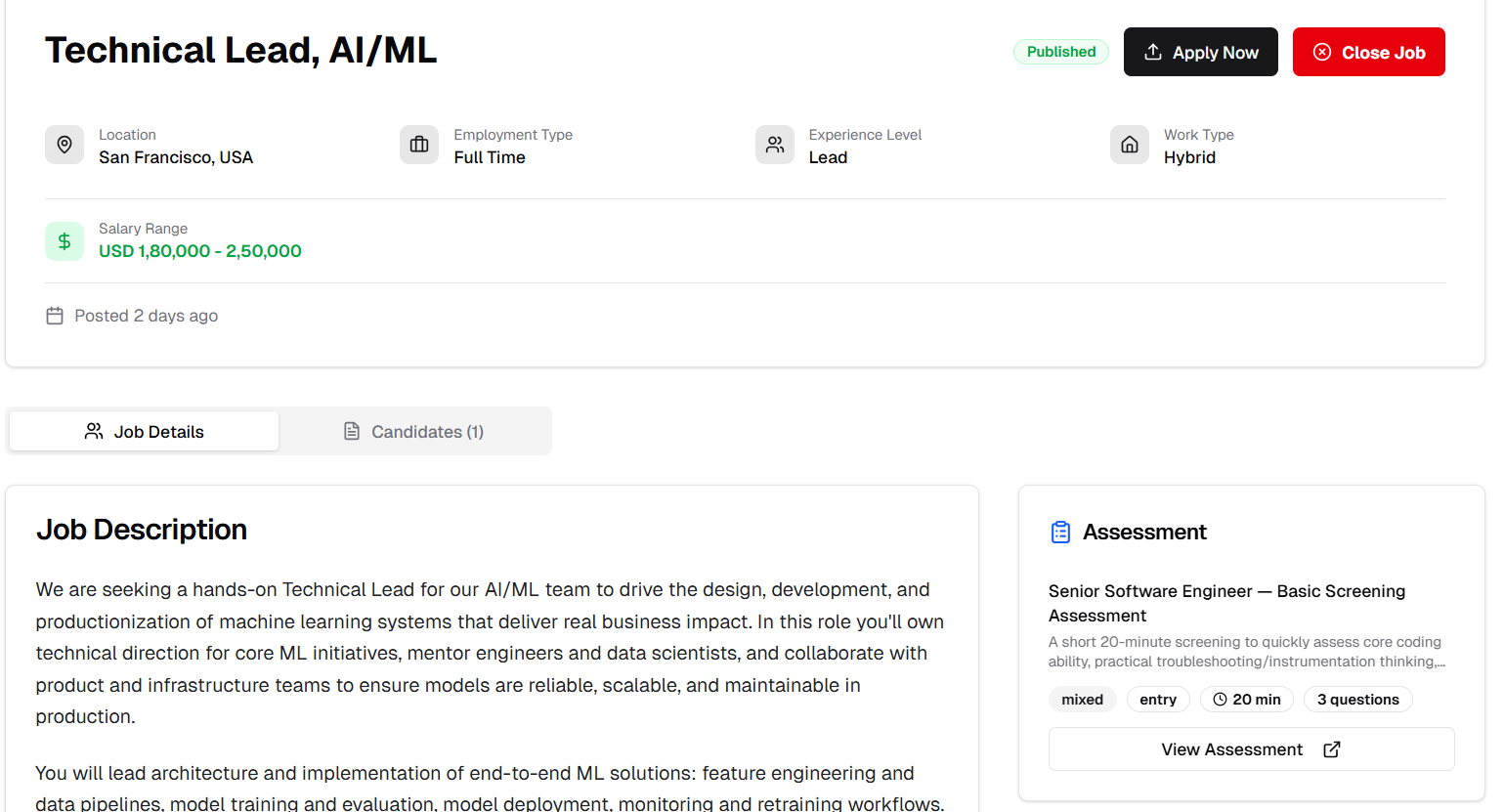
Assessments displayed in job details with navigation links
Assessment Delete Prevention
Protection for Active Assessments
Prevent accidental deletion of assessments that are attached to active job postings. System provides clear feedback when deletion is restricted.
Key Features:
Smart Deletion Rules:
- Attached Assessment Protection: Cannot delete assessments linked to jobs
- Clear Error Messages: Informative feedback explaining why deletion is blocked
- Job Reference: Shows which jobs are using the assessment
- Safe Operations: Prevents broken job-assessment relationships
How It Works:
1. Attempt to delete an assessment
2. System checks for job attachments
3. If attached to jobs: Deletion is blocked
4. If not attached: Deletion proceeds normally
Benefits:
- Data integrity protection
- Prevents broken job postings
- Clear user guidance
- Safer assessment management
- Maintains recruitment workflow continuity
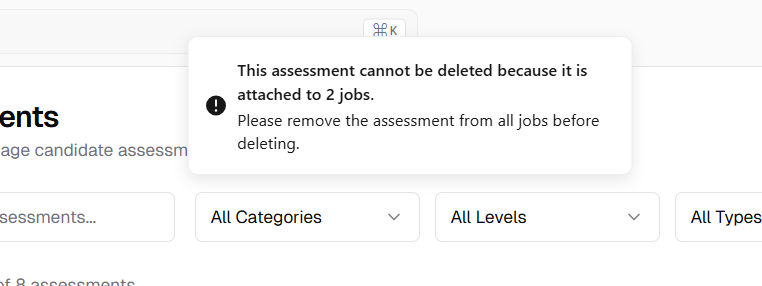
Error message preventing deletion of attached assessment
AI-Powered Question Generation
Intelligent Assessment Question Creation
Generate relevant assessment questions using AI based on custom context. Simply provide context text about the role, skills, or topic, and the AI generates professional, targeted questions for your assessments.
Key Features:
Context-Based Generation:
- Custom Context Input: Textarea for inputting job description, skill requirements, or topic details
- One-Click Generation: "Generate Question" button creates questions instantly
- Single Question Focus: Generates one question at a time for precise control
- Review & Edit: Generated questions appear in form for review before saving
- Iterative Creation: Generate multiple questions sequentially with different contexts
Question Quality:
- Role-Specific: Questions tailored to your context
- Professional Format: Industry-standard question structure
- Multiple Choice Support: Automatic answer option generation
- Difficulty Calibration: Appropriate challenge level based on context
- Comprehensive Coverage: Spans technical, behavioral, and situational aspects
How It Works:
1. Add Context: Enter contextual details (job description, skills, topics) above the form to generate questions.
2. Generate Question: Click “Generate Question” to let AI analyze context and auto-fill a relevant question.
3. Review & Refine: Review and edit the generated question, options, and scoring criteria as needed.
4. Save & Repeat: Save each question and add new context to generate more, building the assessment gradually.
Use Cases:
- Technical Assessments: Generate coding, system design, or technical questions
- Skill-Based Testing: Create questions for specific competencies
- Behavioral Screening: Generate scenario-based behavioral questions
- Industry-Specific: Questions tailored to healthcare, finance, tech, etc.
- Role Matching: Questions aligned with specific job requirements
Benefits:
- Rapid question creation
- Context-aware relevance
- Professional quality questions
- Time savings on test preparation
- Consistent evaluation standards
- Easy assessment building
- Scalable question library
- Customizable to specific needs
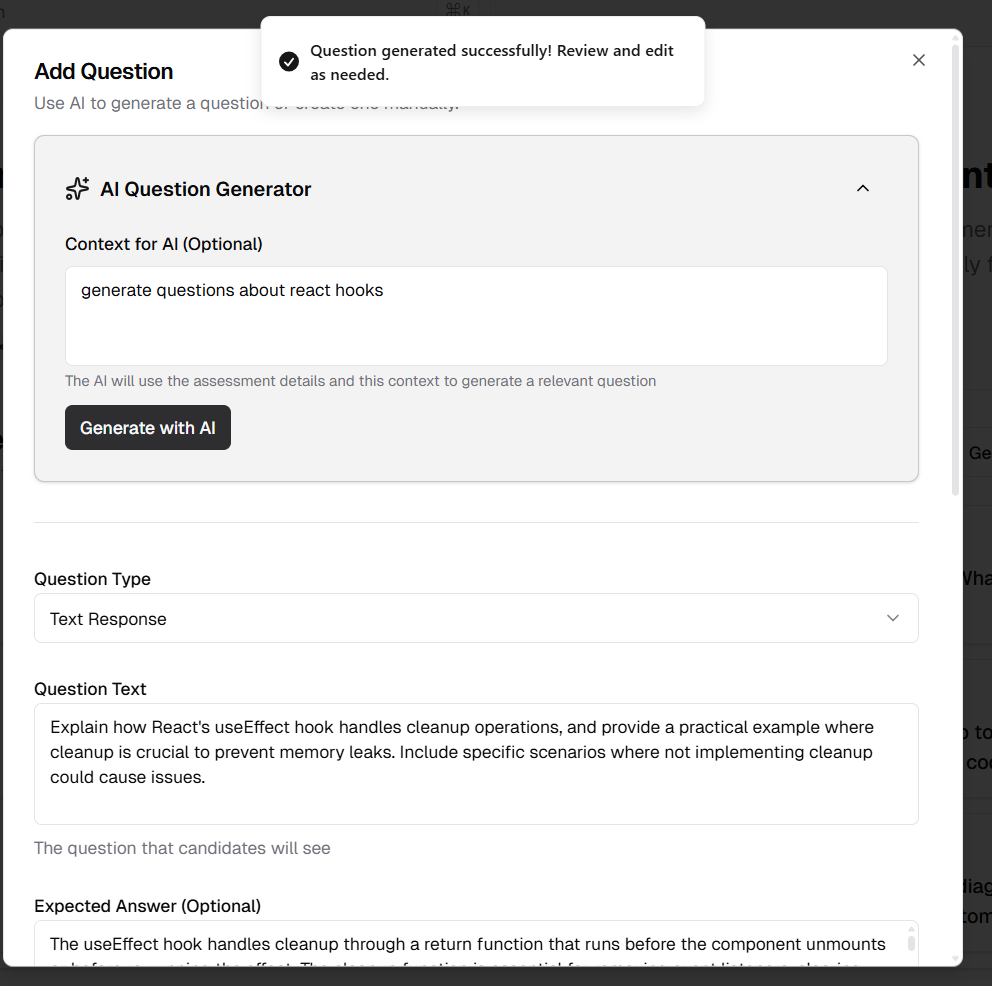
AI-powered question generation with context input and preview
Candidate Management Improvements
CV Download Options
Flexible Document Access
Download both original candidate CVs and platform-generated versions directly from the candidate details screen.
Key Features:
Dual Download Options:
- Original CV: Download the candidate's submitted/uploaded CV
- Platform CV: Download the system-generated or edited CV version
- Multiple Formats: Support for PDF, DOCX, and other common formats
- Quick Access: Convenient download buttons in candidate profile
Download Locations:
- Candidate details page
- Application review screens
- Bulk export options
Benefits:
- Easy document access
- Comparison between original and formatted CVs
- Offline review capability
- Sharing with hiring managers
- Record keeping and compliance
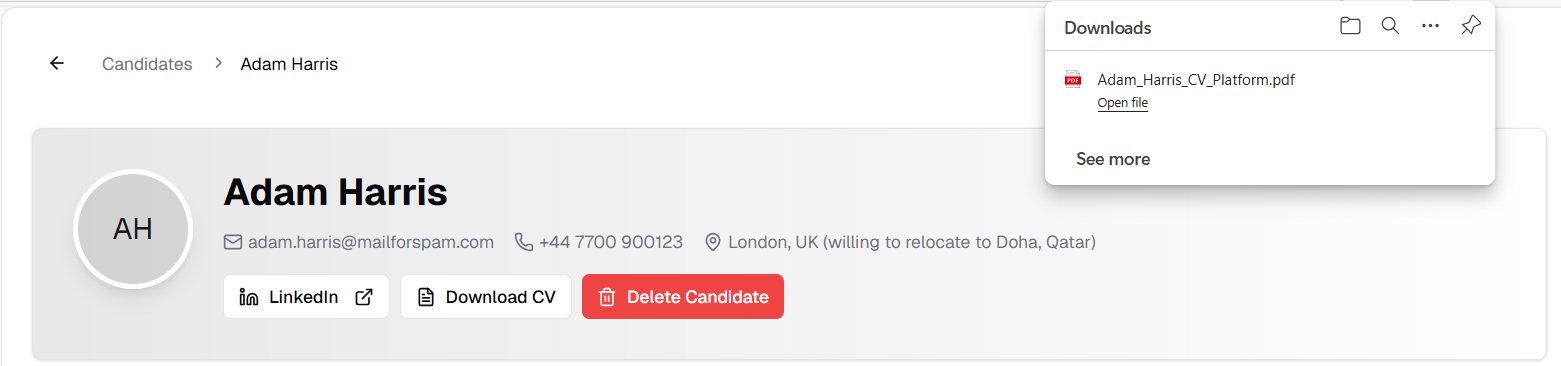
Download buttons for original and platform-generated CVs
Offer Letter Generation
Automated Offer Letter Creation
Professional Offer Letters for Hired Candidates
Generate professional, customized offer letters for candidates who successfully complete the interview process. Support for both permanent and contract positions with dedicated forms for each employment type.
Key Features:
Post-Interview Offer Generation:
- Multi-Channel Interview Support: Generate offers after suuccessfully completes text, Google Meet, or Teams interviews
- One-Click Generation: Send offer button accessible from candidate profile
- Smart Automation: Pre-filled with Benifits & perks,candidate and job information
- Professional Templates: Industry-standard offer letter formats
- Email Delivery: Offer letter sent directly to candidate's email with PDF attachment
Dual Employment Type Support:
- Permanent Position Offers: Comprehensive full-time employment letters
- Contract Position Offers: Fixed-term contract offer letters
- Type-Specific Fields: Relevant information for each employment type
- Flexible Terms: Customizable contract duration, benefits, and conditions

Send offer button accessible after interview completion
Permanent Job Offer Letter Form
Comprehensive Full-Time Employment Offers
Generate detailed offer letters for permanent positions with all necessary employment terms and company information.
Form Fields:
Position Details:
- Job Title: Automatic from job posting
- Candidate Name: Automatic from job posting
- Department: Organizational placement
- Reporting Manager: Direct supervisor information
- Start Date: Proposed employment start date
- Offer Expiry Date: Deadline for accepting offer
- Work Location: Office location or remote specification
Compensation Package:
- Base Salary: salary offer
- Payment Frequency: Monthly, bi-weekly,Yearly,Daily.
- Benefits Package: Automatic from job posting, also user can edit
Company Information:
- Company Name: Auto-populated from settings
- Contact Person: HR representative details
- Company Logo: Professional branding
Benefits:
- Complete employment terms documentation
- Professional presentation
- Legal compliance ready
- Clear compensation breakdown
- Comprehensive benefits overview
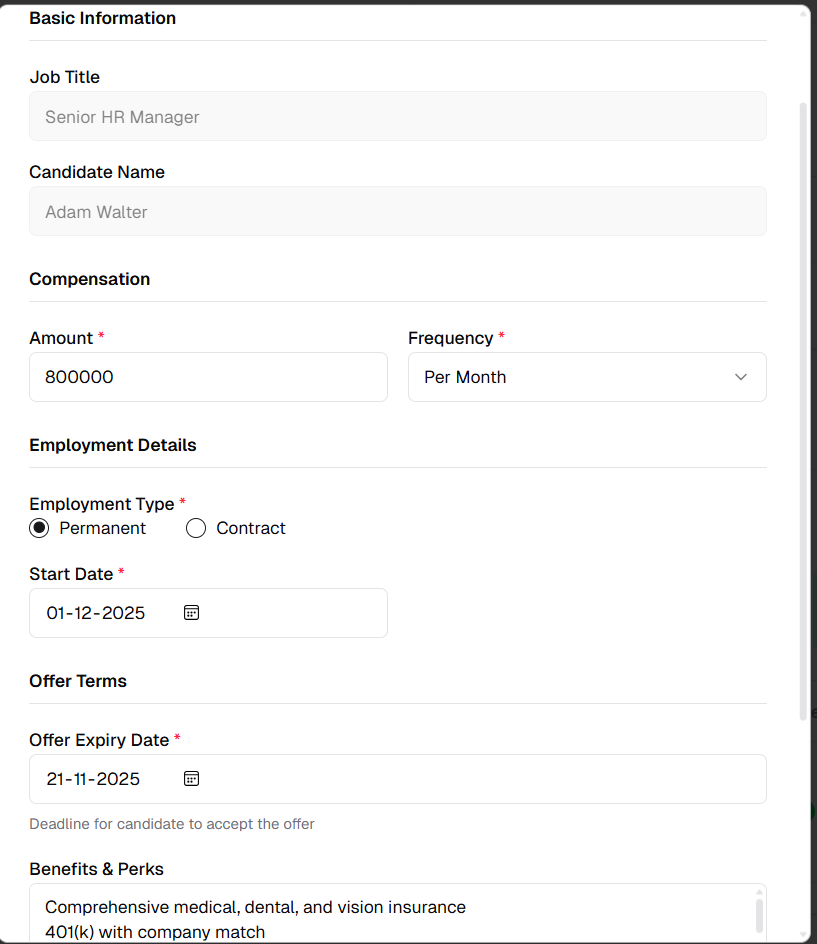
Comprehensive form for permanent employment offers
Contract Job Offer Letter Form
Fixed-Term Contract Employment Offers
Generate offer letters specifically designed for contract positions with contract-specific terms and conditions.
Form Fields:
Contract Details:
- Job Title: Position title from posting
- Candidate Name: Automatic from job posting
- Contract Duration: Start and end dates
- Offer Expiry Date: Deadline for accepting offer
Compensation:
- Base Salary: salary offer
- Payment Frequency: Monthly, bi-weekly,Yearly,Daily.
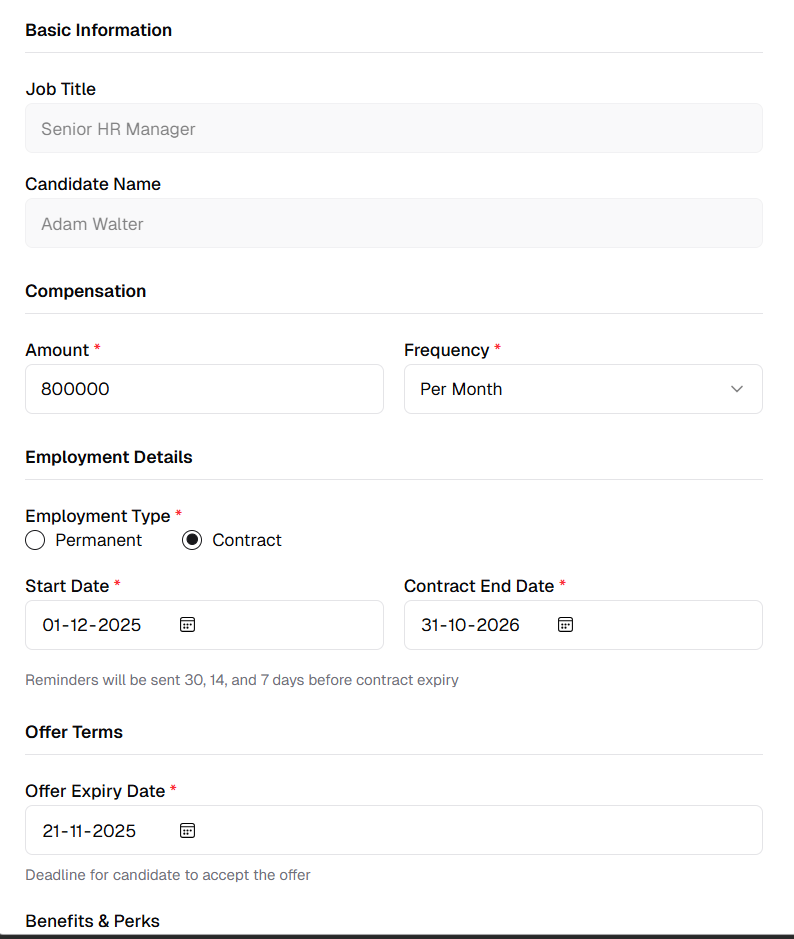
Specialized form for contract employment offers
How Offer Letter Generation Works
Streamlined Offer Process:
1. Complete Interview Process: Conduct the interview, evaluate performance.
2. Access Offer Generation: Open the candidate profile and send an offer; the system auto-detects job type.
3. Fill Offer Details: Select the correct offer form, review pre-filled details, and add or adjust terms.
4. Preview & Send: Preview the offer letter and email, finalize any edits, send it, and track status.
Automation Benefits:
- Reduced manual document creation
- Consistent professional formatting
- Pre-populated candidate information
- Error reduction through templates
- Faster offer turnaround time
- Professional presentation
- Legal compliance support
- Automated email delivery with PDF attachment to candidates
Preview Features:
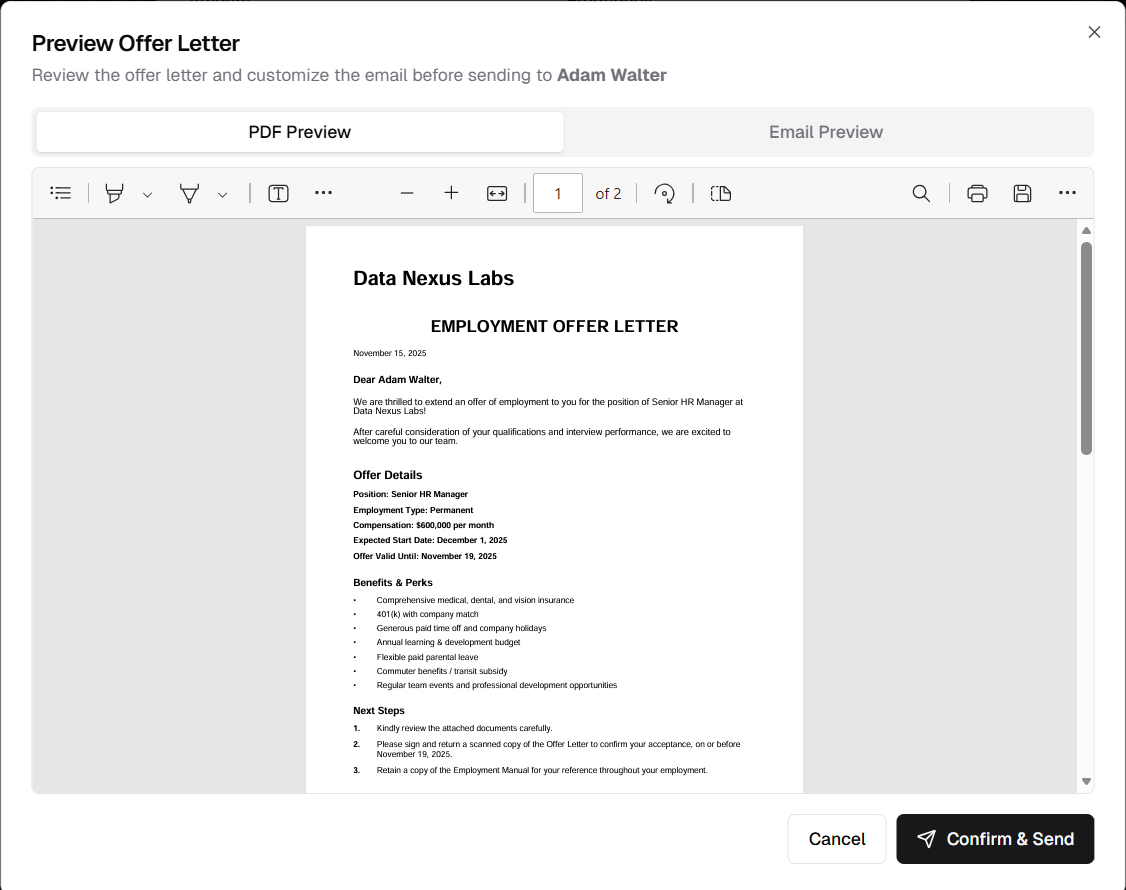
PDF preview of generated offer letter before sending
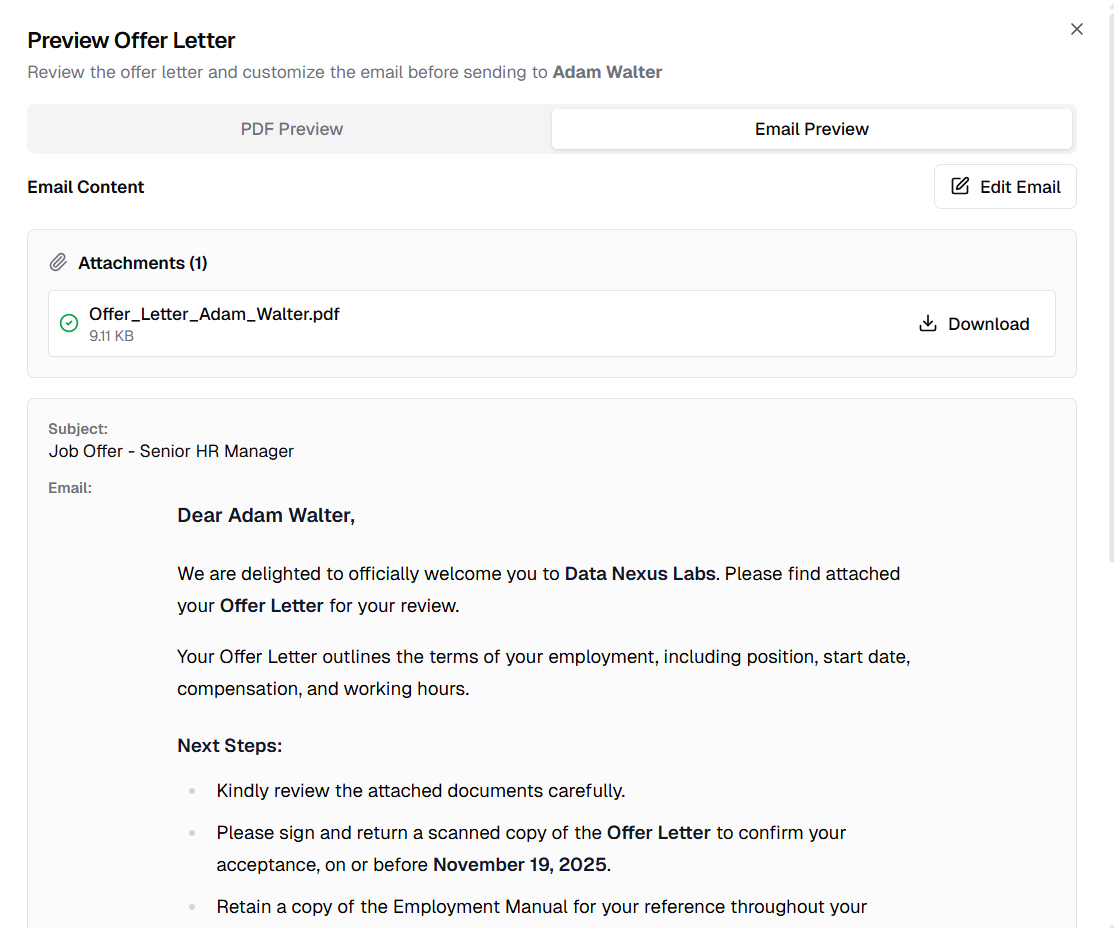
Email preview showing message and attached offer letter PDF
UI/UX Improvements
Chat Interface Fix
Improved Submit Button Design
Fixed design break in chat suggestion submit button for better visual consistency and usability.
What Was Fixed:
- Layout Issue: Submit button design inconsistency
- Visual Alignment: Proper button positioning
- Responsive Design: Correct display across screen sizes
- User Experience: Clearer interaction affordance
Benefits:
- Professional interface appearance
- Better user interaction clarity
- Consistent design language
- Improved chat experience
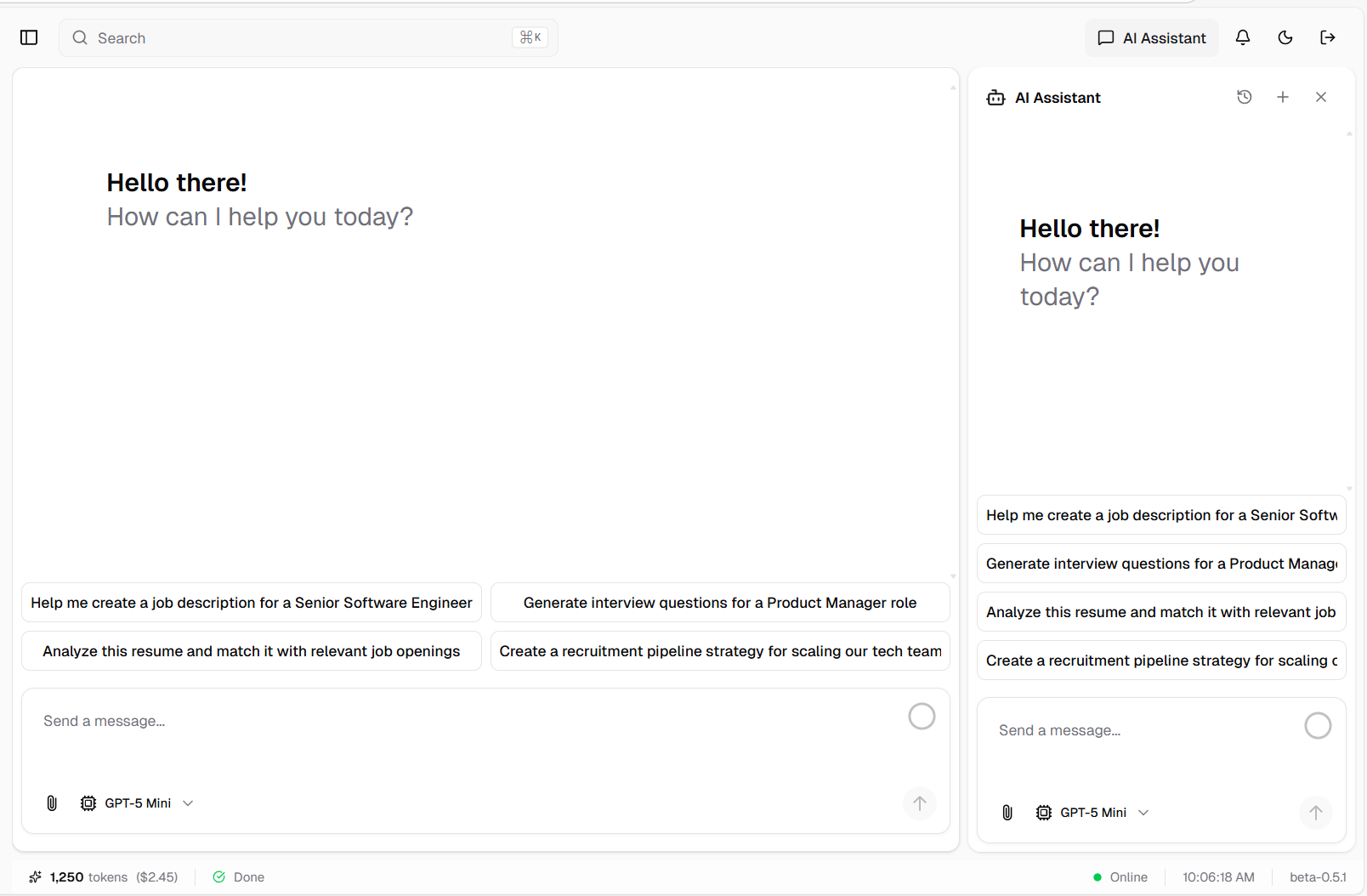
Fixed submit button design in chat suggestions
Filter Functionality Fix
Clear Filter Button Now Works
Resolved issue where the clear filter button was not functioning properly in candidate and job listings.
What Was Fixed:
- Button Responsiveness: Clear filter button now resets all filters
- State Management: Proper filter state cleanup
- UI Feedback: Visual confirmation of filter clearing
- Data Refresh: List updates correctly after clearing filters
Benefits:
- Smooth filtering workflow
- Easy filter reset
- Better list navigation
- Improved user control
Additional Improvements
Model Selector Optimization
Curated AI Model Selection
Streamlined the AI model selector by removing unused models, providing a focused selection of the most powerful and relevant AI models for recruitment tasks.
Currently Available Models:
OpenAI Models:
- GPT-5: Latest flagship model with advanced reasoning
- GPT-5 Mini: Lightweight, fast version for quick tasks
Anthropic Claude Models:
- Claude Opus 4.1: Most capable Claude model for complex tasks
- Claude Sonnet 4: Balanced performance and speed
- Claude 3.5 Sonnet: Enhanced reasoning and analysis
xAI Grok Models:
- Grok 4: Advanced reasoning and real-time knowledge
- Grok 3: Fast, efficient model for standard tasks
Google Gemini Models:
- Gemini 2.5 Pro: Powerful multimodal reasoning
- Gemini 2.5 Flash: Ultra-fast response times
DeepSeek:
- DeepSeek R1: Specialized reasoning model
Benefits:
- Cleaner, easier-to-navigate model selector
- Focus on proven, high-performance models
- Reduced decision fatigue for users
- Faster model selection
- Better user experience
- Optimal model choices for recruitment workflows
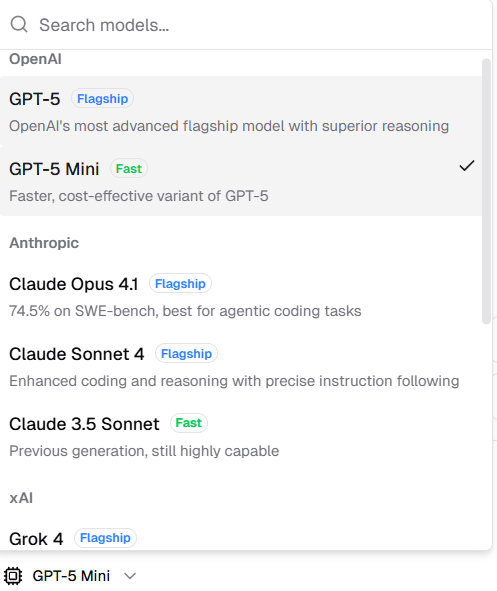
Optimized model selector with curated AI model selection
Released on November 15, 2025
View all releases