Release Notes - Beta v0.5.1
Summary
This release introduces a comprehensive company profile management system and powerful AI-powered chat features for streamlined recruitment operations. Organizations can now configure their company information, upload logos, and manage contact person details. Additionally, the AI chat assistant now enables complete job, candidate, and assessment management through natural language conversations, making recruitment workflows more intuitive and efficient.
What's New
- The Company Profile Settings section allows managing company profile information including company details, branding and contact person information.
- AI-powered Job Management through chat (list, view, create, update, analyze)
- AI-powered Candidate Management through chat (list, view, create, remove, analyze)
- AI-powered Assessment Management through chat (list, create)
- Interactive navigation widgets in chat for jobs, candidates, and assessments
- Natural language processing for recruitment operations
Company Profile Settings
Comprehensive Organization Management
A new dedicated section in Settings for managing company profile information, including company details, branding, and contact person information.
Key Features:
Company Profile Management:
- Centralized Settings: All company information in one place
- Two Main Sections: Company Information and Contact Person Information
Save and Reset Functionality:
- Save Changes: Persist all modifications to company profile
- Reset Changes: Discard unsaved changes and restore previous values
Benefits:
- Professional company profile management
- Easy branding and identity setup
- Centralized contact information
- Better organization presentation
- Streamlined settings management
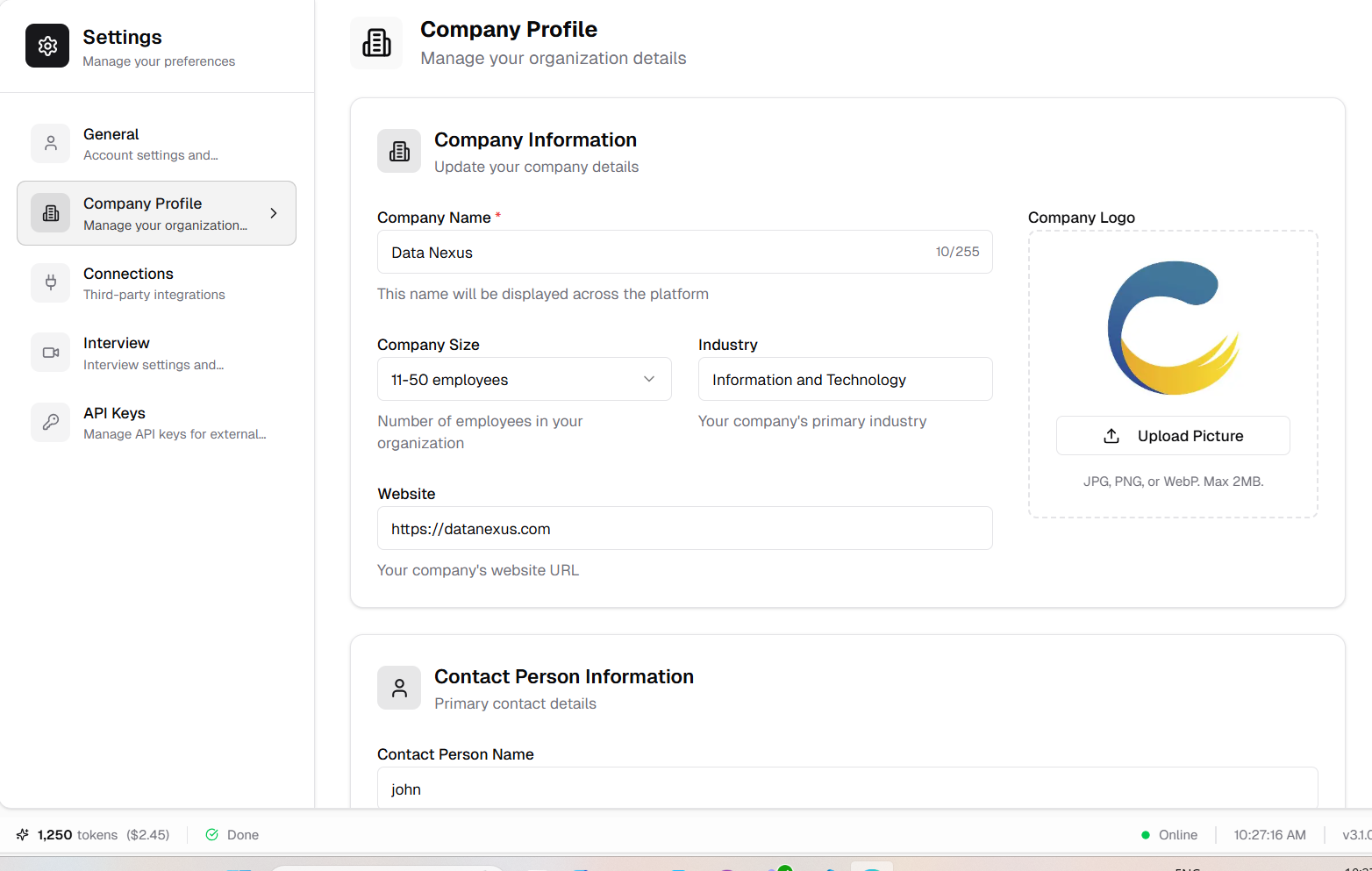
Company Profile Settings page with company information and contact person sections
Company Information
Organization Details and Branding
Configure your organization's core information including name, size, industry, website, and company logo.
Features:
Company Details:
- Company Name:
- -Required field
- -Minimum 2 letters
- -Clear validation messages
- Company Size:
- -Dropdown selection
- -Options: "1-10", "11-50", "51-200", "201-500", "501-1000", "1000+"
- -Helps categorize organization scale
- Industry:
- -Text input for industry specification
- -Example: Healthcare, Technology, Finance, etc.
- Website:
- -URL validation
- -HTTPS protocol required
- -Automatic format checking
Logo Upload:
- Supported Formats: PNG, WEBP, JPG, JPEG
- Image Preview: View uploaded logo before saving
- Professional Branding: Display your organization's visual identity
How It Works:
1. Navigate to Settings > Company Profile
2. Fill in Company Information section:
3. Upload company logo:
4. Click "Save Changes" to persist information
5. Use "Reset Changes" to discard modifications
Validation Rules:
- Company name must be at least 2 letters
- Website must include HTTPS protocol
- Logo must be in supported image format
- All required fields must be completed
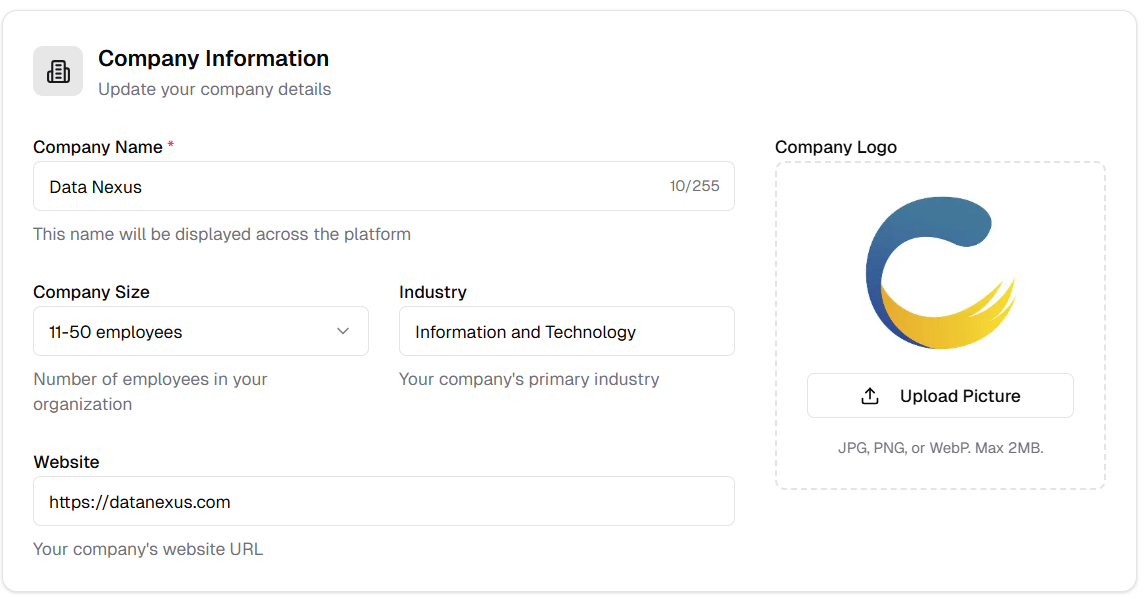
Company Information section with name, size, industry, website, and logo upload
Contact Person Information
Primary Contact Details Management
Manage the details of the primary contact person for recruitment and communication purposes.
Features:
Contact Details:
- Contact Person Name:
- -Full name of primary contact
- -Required field
- Contact Person Email:
- -Email address for communications
- -Non-editable (linked to account)
- -Automatically populated from account settings
- Contact Person Role:
- -Job title or position
- -Example: Hiring Manager, HR Director, Recruiter, etc.
- -Helps candidates understand who they're communicating with
Email Protection:
- Non-Changeable Email: Contact email tied to user account
- Visual Indicator: Disabled field shows email is account-linked
- Security: Prevents accidental email changes
- Account Sync: Always reflects current account email
How It Works:
1. View Contact Person Information section
2. Enter or update contact person name
3. Review contact email (automatically populated, non-editable)
4. Specify contact person role
5. Click "Save Changes" to update information
6. Changes reflect in all communications and candidate interactions
Use Cases:
- Candidate Communications: Professional contact identification
- Email Signatures: Automatic inclusion in automated emails
- Application Responses: Clear point of contact for candidates
- Internal Reference: Team coordination and responsibility tracking
Benefits:
- Clear point of contact for candidates
- Professional communication identity
- Role clarity for applicants
- Consistent contact information
- Secure email management
- Better candidate experience
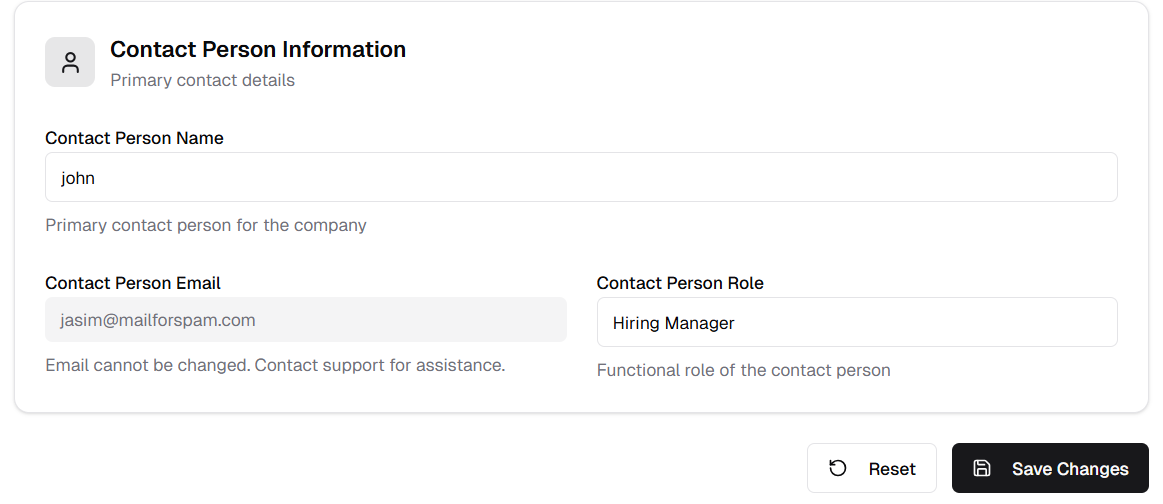
Contact Person Information with name, email (non-editable), and role fields
AI Chat-Powered Recruitment Management
This release introduces powerful AI chat capabilities that enable recruiters to manage jobs, candidates, and assessments through natural language conversations. The AI assistant understands your requests and provides interactive widgets for seamless navigation and operation management.
AI-Powered Job Management
Intelligent Job Operations Through Natural Language
Manage your entire job posting lifecycle through conversational AI. List jobs, view details, create new postings, update existing ones, and analyze job metrics—all through simple chat interactions.
Key Features:
Job Listing:
- Natural Language Requests: Ask "Show me all jobs" or "List available positions"
- Interactive Job Cards: Click-to-navigate job listings in chat widget
- Quick Overview: See job titles, status, and key information at a glance
- Seamless Navigation: Direct links to job detail pages
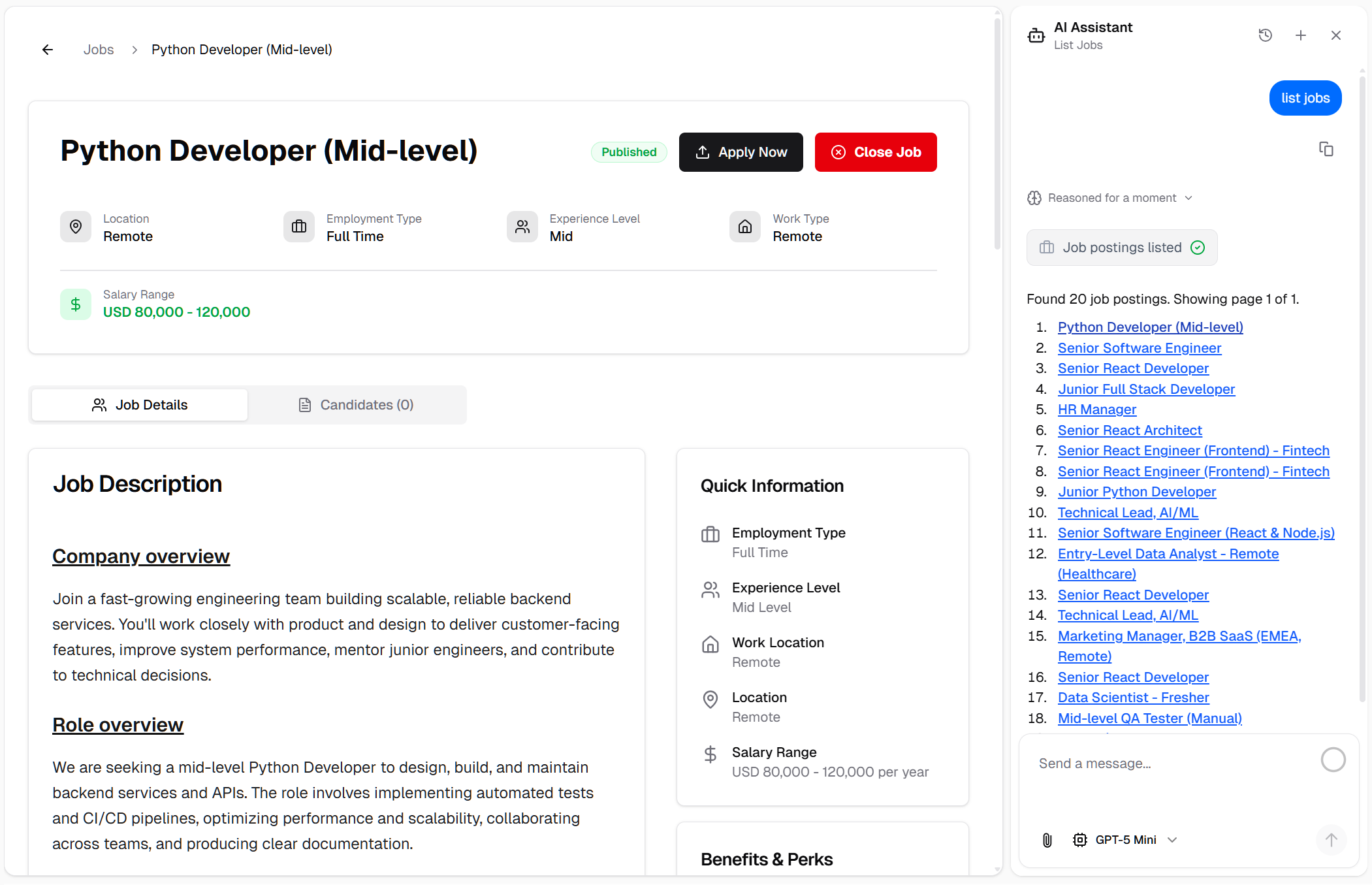
AI chat displaying interactive job listings with navigation capabilities
Job Details Retrieval:
- Conversational Queries: "Show me details for [job title]" or "What are the requirements for this position?"
- Comprehensive Information: Full job description, requirements, status, and metadata
- Context-Aware Responses: AI understands your specific job references
- Instant Access: No need to navigate through multiple pages
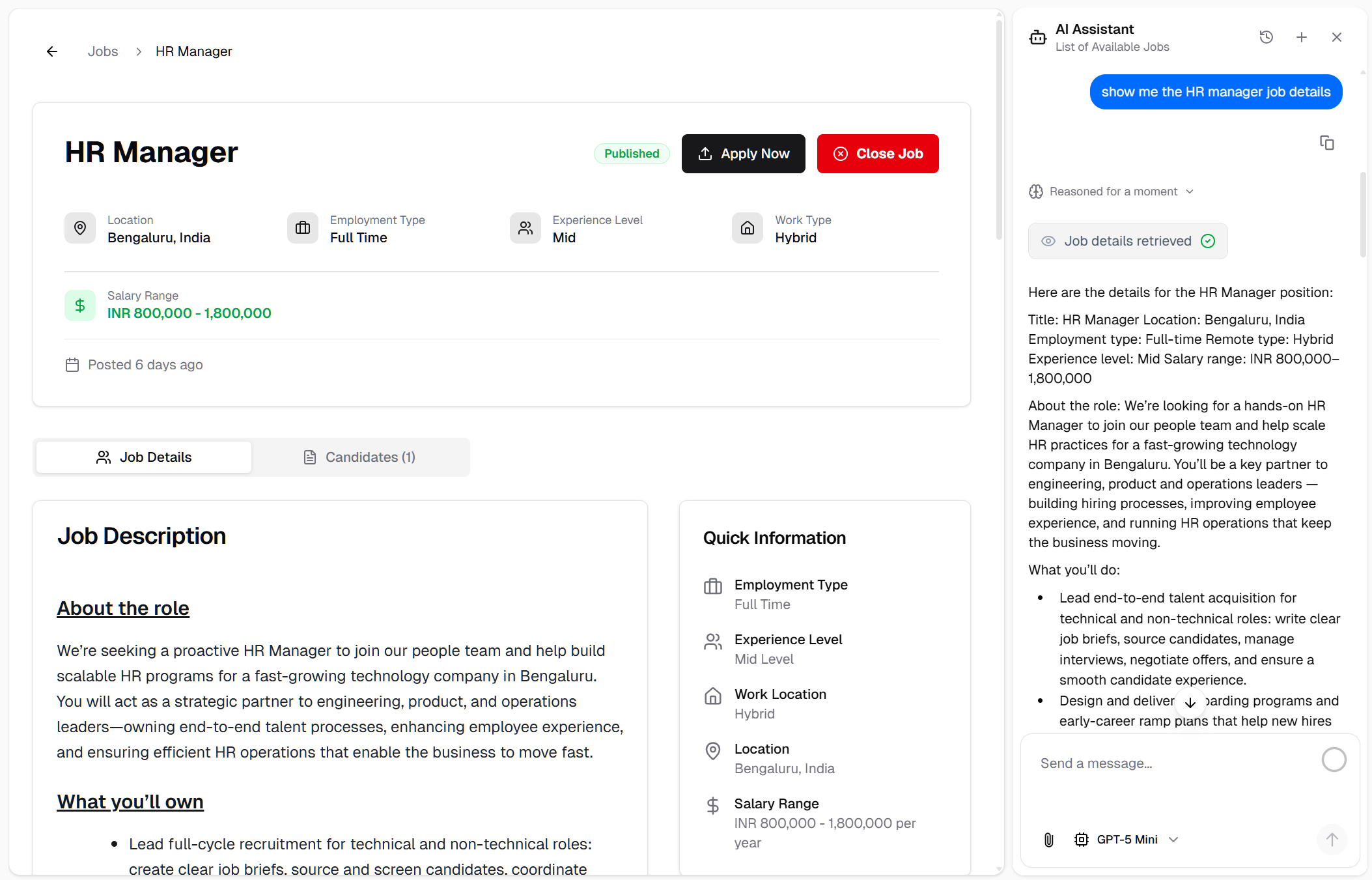
AI chat showing detailed job information on request
Job Creation:
- AI-Assisted Creation: "Create a new job posting for Senior Developer"
- Intelligent Defaults: AI fills in details based on job title and industry standards
- Custom Requirements: Specify your own requirements or let AI generate them
- Guided Process: Conversational flow for complete job setup
- Instant Publishing: Jobs are created and ready to post immediately
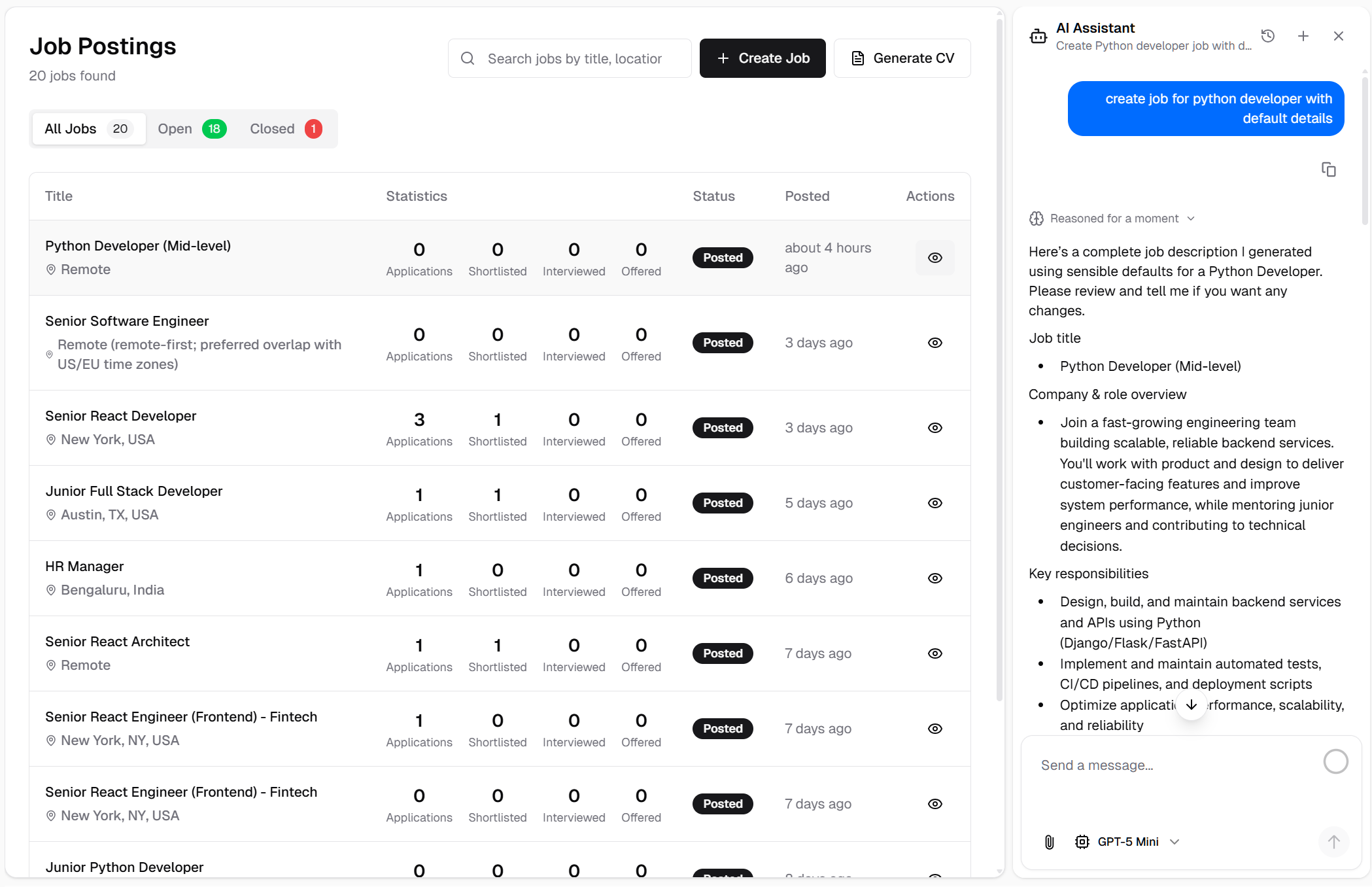
Creating a new job posting through AI chat with intelligent defaults
Job Updates:
- Natural Updates: "Update the status of [job] to active" or "Change the description for [job]"
- Multiple Fields: Update title, description, status, requirements, and more
- Context Retention: AI remembers which job you're working with
- Confirmation Feedback: Clear success messages after updates
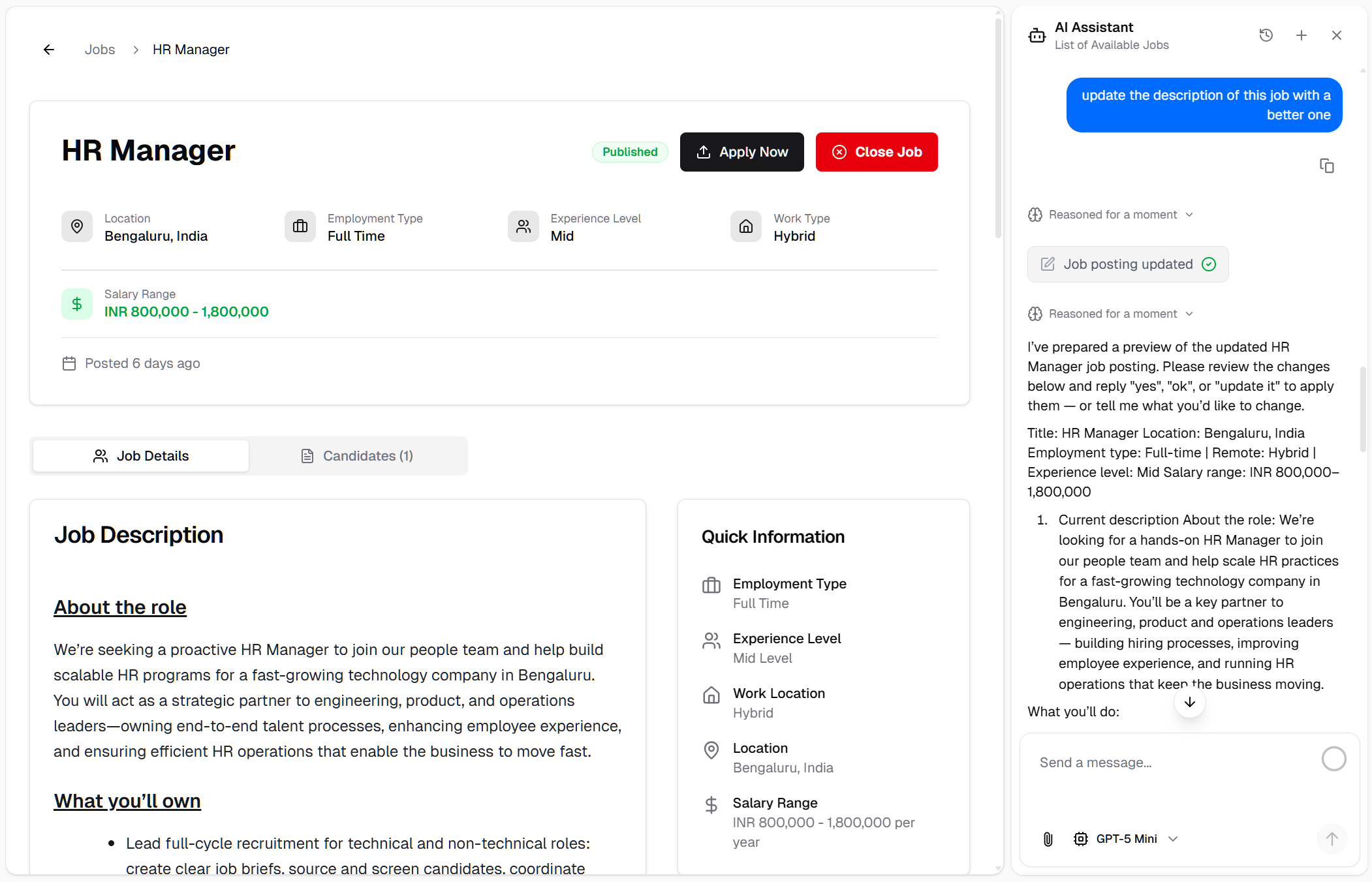
Updating job details through conversational AI interface
Job Analytics:
- Instant Insights: "Show me job statistics" or "Analyze my job postings"
- Key Metrics:
- -Total number of jobs
- -Active vs inactive jobs
- -Status breakdown per job
- -Application counts
- Visual Summaries: Easy-to-read analytics in chat
- Data-Driven Decisions: Quick access to recruitment metrics
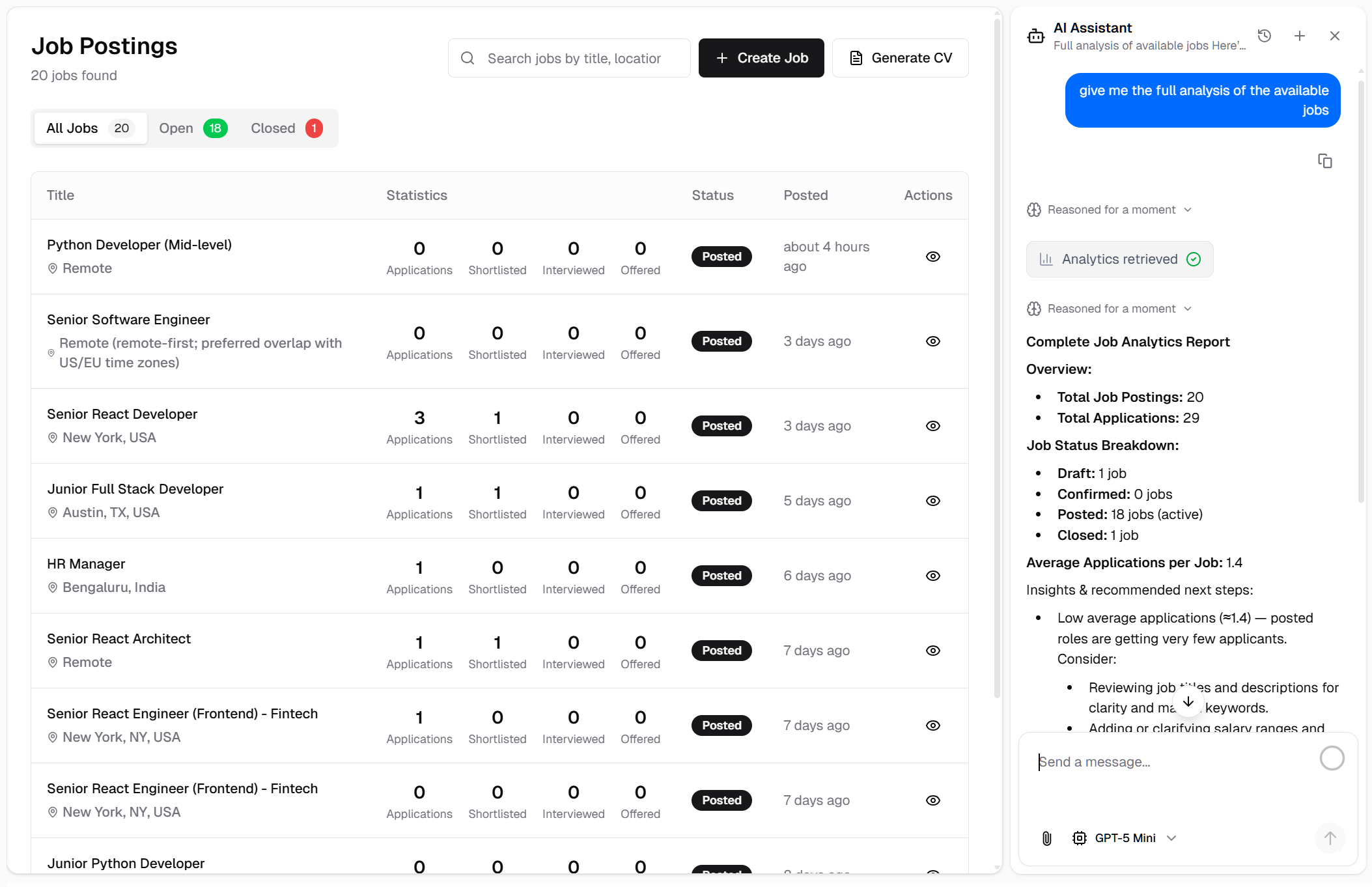
AI-powered job analytics and statistics in chat
Benefits:
- Streamlined job management workflow
- Reduced time for job posting operations
- Intelligent automation for routine tasks
- Natural, intuitive interface
- No learning curve—just chat naturally
- Faster response to hiring needs
- Centralized job operations in one chat interface
AI-Powered Candidate Management
Intelligent Candidate Operations Through Conversation
Manage your candidate pipeline through natural language interactions. List candidates, view profiles, create new entries, remove outdated records, and analyze candidate metrics—all conversationally.
Key Features:
Candidate Listing:
- Conversational Requests: "Show me all candidates"
- Interactive Candidate Cards: Click-to-navigate candidate profiles
- Quick Overview: Names, status, applied positions, and key details
- Filter Support: Request specific candidate segments
- Direct Navigation: Links to full candidate profiles
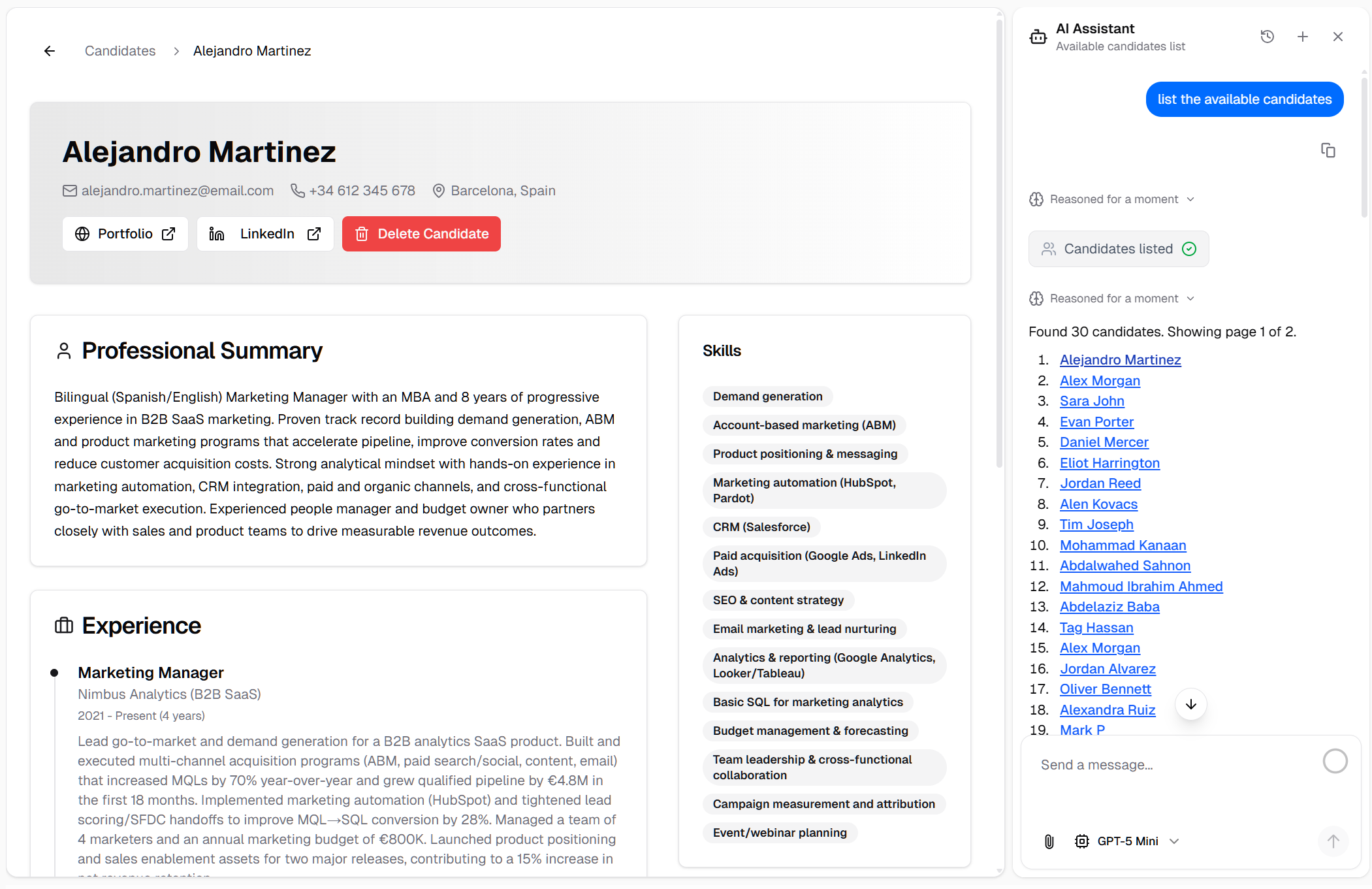
AI chat displaying interactive candidate listings with navigation
Candidate Details:
- Natural Queries: "Show me [candidate name]'s profile" or "What are the qualifications of [candidate]?"
- Complete Profiles: Full candidate information, experience, skills, and application history
- Context-Aware: AI understands candidate references from previous conversation
- Instant Access: No manual searching required
- Rich Information Display: Structured presentation of candidate data
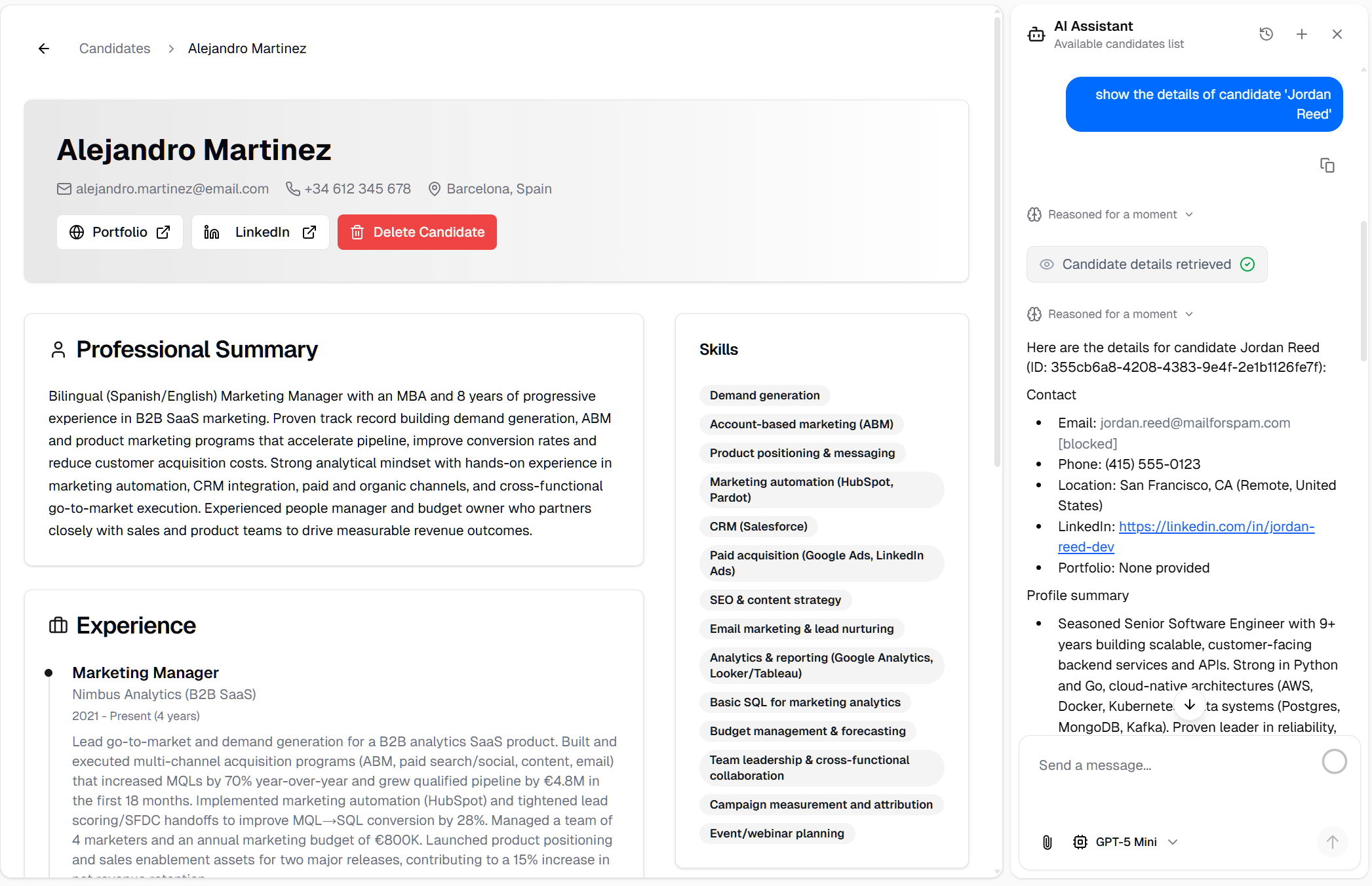
Detailed candidate information displayed through AI chat
Candidate Creation:
- AI-Assisted Input: "Create a new candidate profile for [name]"
- CV Upload Support: "Create candidate from this CV" with file attachment
- Intelligent Extraction: AI parses CV and extracts relevant information
- Manual Input Option: Provide details conversationally
- Smart Defaults: AI fills in standard fields intelligently
- Structured Data: Properly formatted candidate records
- Immediate Availability: Candidates ready for review and matching
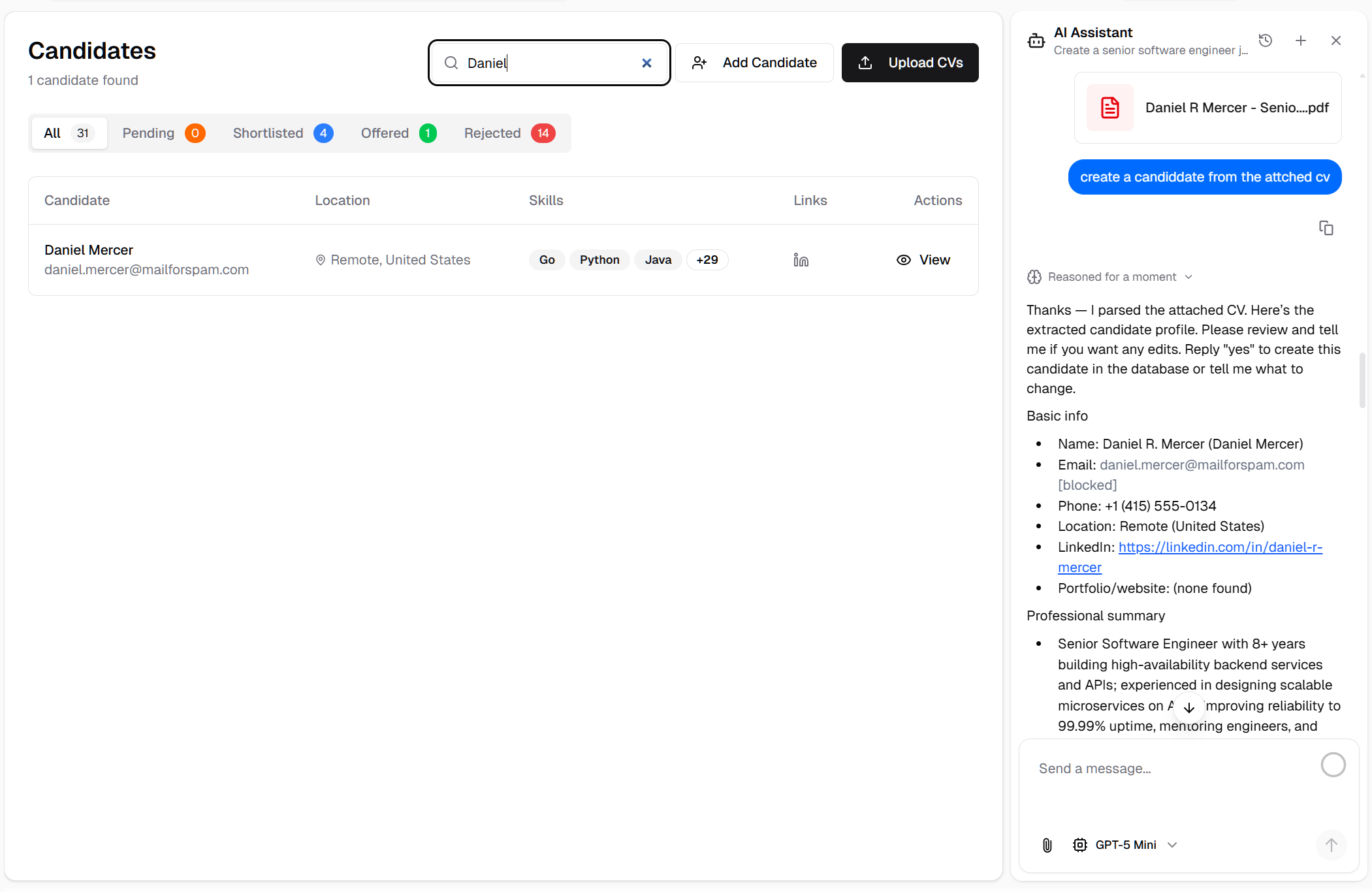
Creating new candidate profiles through AI chat with CV parsing
Candidate Removal:
- Simple Commands: "Remove [candidate name]" or "Delete candidate profile for [name]"
- Confirmation Flow: Safety checks before deletion
- Context Understanding: AI identifies the correct candidate
- Clean Operations: Proper record removal from system
- Status Updates: Clear feedback on successful removal
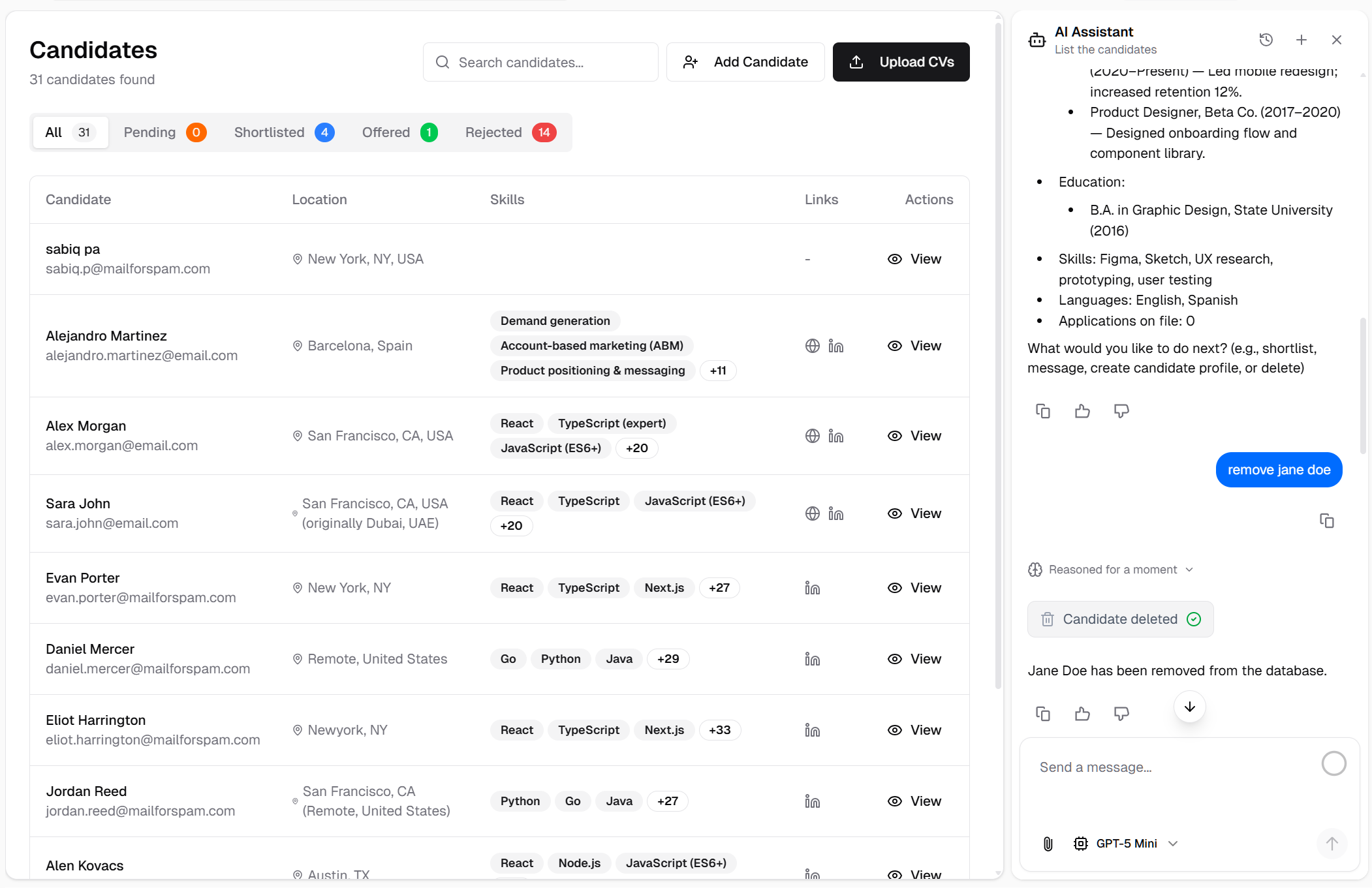
Removing candidate profiles through conversational interface
Candidate Analytics:
- Instant Insights: "Show me candidate statistics" or "Analyze my candidate pipeline"
- Key Metrics:
- -Total number of candidates
- -Active candidates count
- -Status distribution
- -Recruitment stage breakdown
- -Specific candidate workflow tracking
- -Pipeline health indicators
- Visual Reports: Easy-to-understand analytics
- Recruitment Intelligence: Data for better hiring decisions
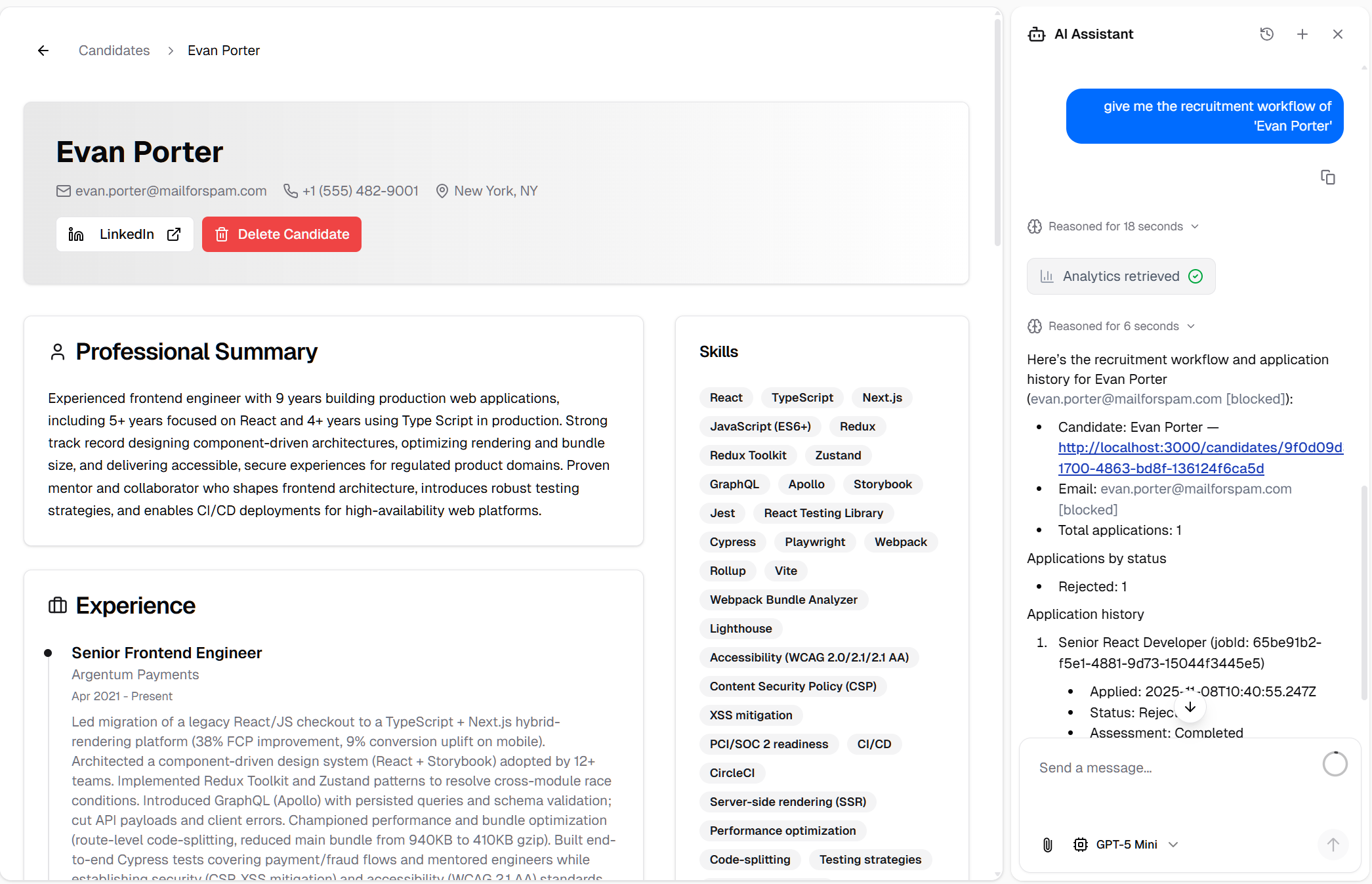
AI-powered candidate analytics and pipeline insights
Benefits:
- Simplified candidate management
- CV parsing automation saves time
- Natural conversation instead of forms
- Faster candidate profile creation
- Easy pipeline monitoring
- Quick access to candidate information
- Streamlined candidate operations
- Better recruitment workflow visibility
AI-Powered Assessment Management
Intelligent Assessment Creation and Management
Create and manage technical assessments, skill tests, and interview questions through conversational AI. The system generates relevant questions based on job requirements and candidate profiles.
Key Features:
Assessment Listing:
- Natural Requests: "Show me all assessments" or "List available tests"
- Interactive Assessment Cards: Click-to-view assessment details
- Quick Overview: Assessment titles, question counts, and types
- Direct Navigation: Links to full assessment pages
- Filter Capabilities: Request assessments by job or skill
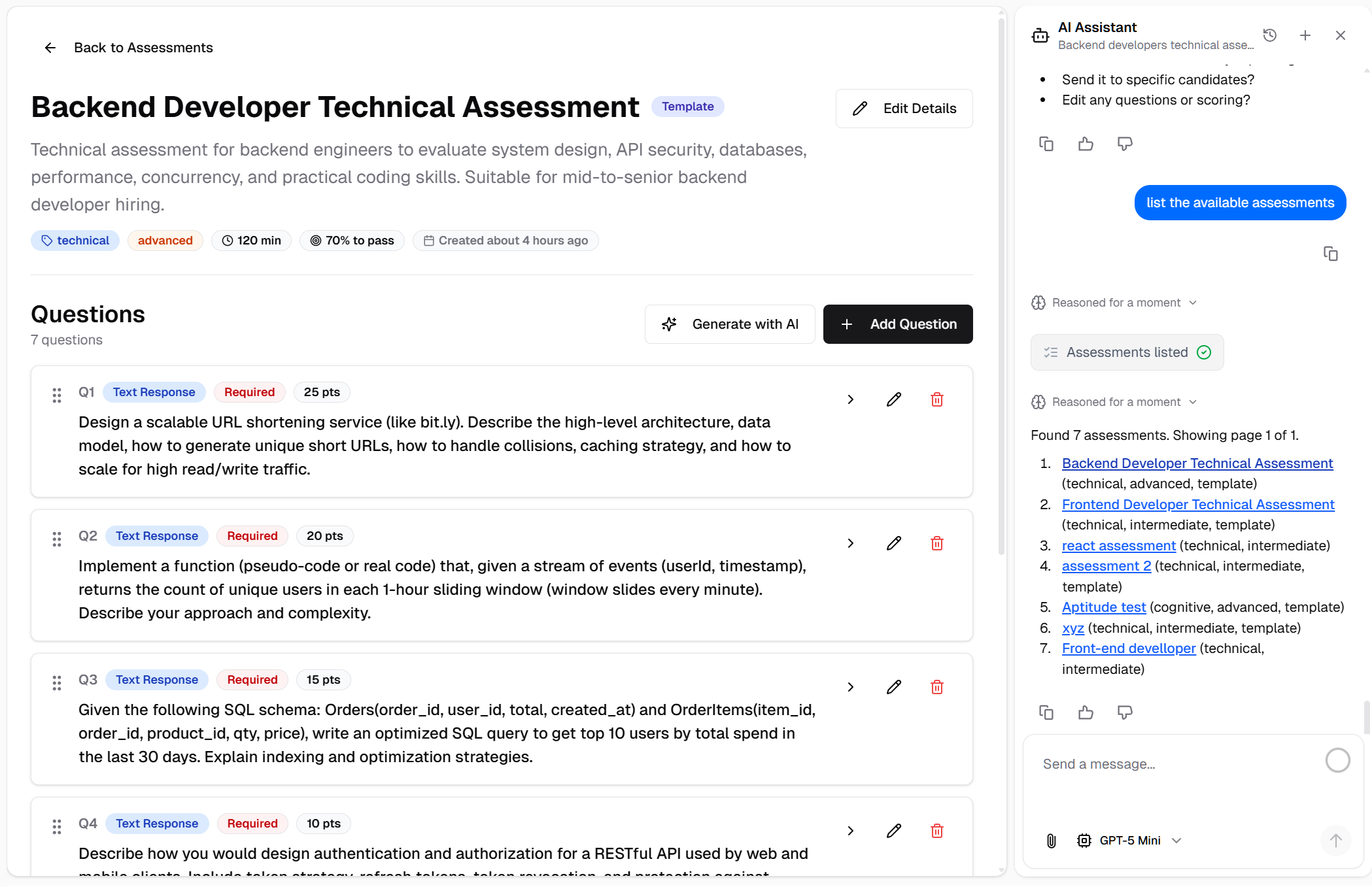
AI chat displaying interactive assessment listings
Assessment Creation:
- AI-Generated Questions: "Create an assessment for [job title/skill]"
- Custom Requirements: "Generate questions about [specific topic]"
- Intelligent Question Generation:
- -Multiple choice questions
- -Technical coding challenges
- -Behavioral questions
- -Role-specific scenarios
- Automatic Question Sets: AI generates complete assessments
- Manual Override: Refine or add custom questions
- Skill-Based: Questions tailored to job requirements
- Difficulty Levels: Appropriate challenge levels for roles
- Instant Deployment: Assessments ready to assign immediately
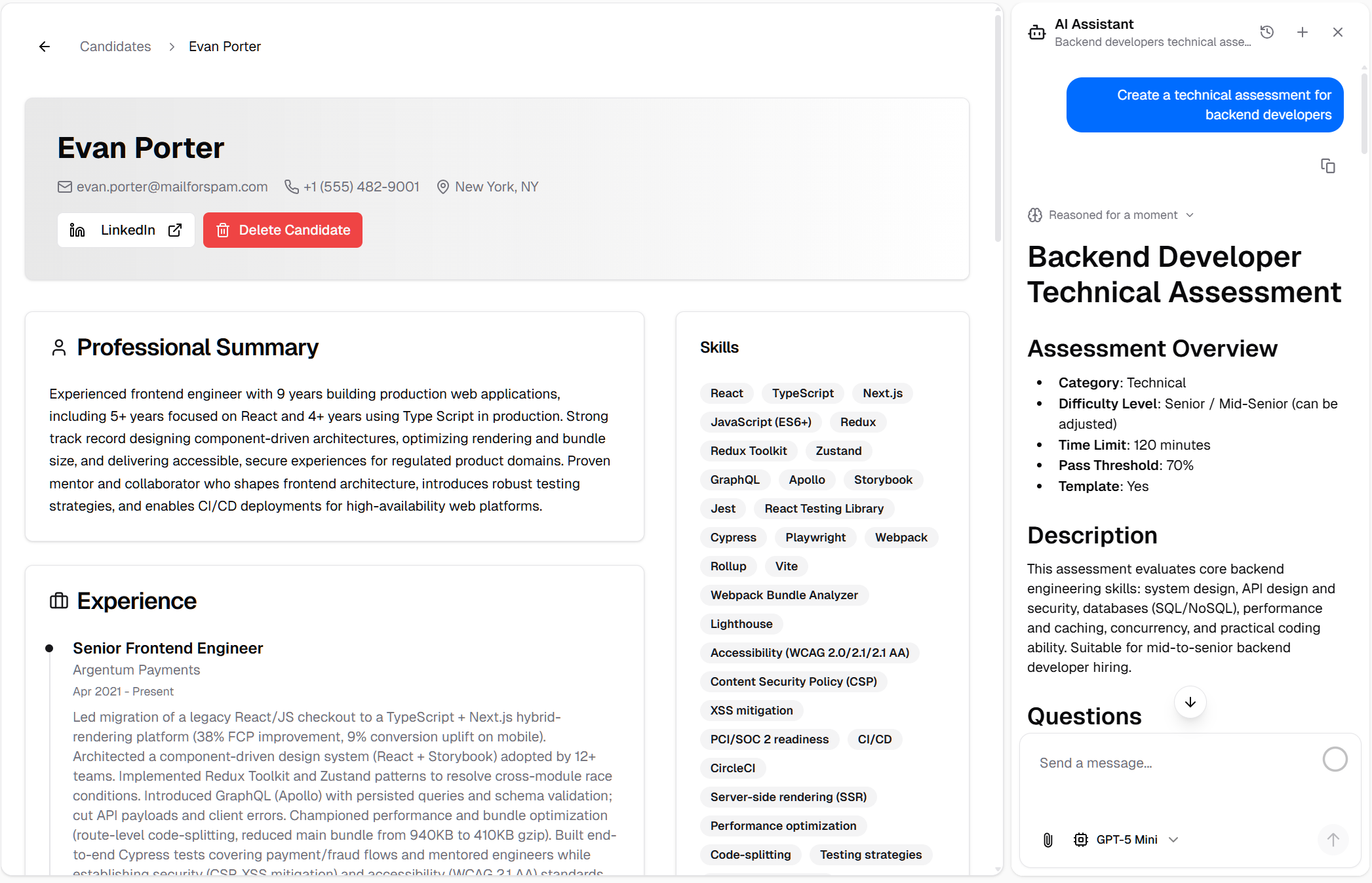
Creating new assessments with AI-generated questions
How It Works:
1. Request Assessment: "Create an assessment for Senior Frontend Developer"
2. AI Analyzes: System analyzes job requirements and industry standards
3. Question Generation: AI generates relevant questions across categories:
4. Review & Refine: Review generated questions and request modifications
5. Deploy: Assessment is ready to assign to candidates
Benefits:
- Rapid assessment creation
- Industry-standard questions
- Role-appropriate difficulty
- Time savings on test preparation
- Consistent evaluation criteria
- Scalable assessment library
- Professional quality questions
- Customizable to specific needs
Centralized Recruitment Operations
All Recruitment Tasks in One Intuitive Chat Interface
These AI-powered features transform the Taqat AI ATS into a truly conversational recruitment platform where natural language replaces complex forms and multiple navigation steps.
Overall Benefits:
- Natural Language Interface: Talk to your ATS like you would to a colleague
- Reduced Clicks: Accomplish tasks with simple chat messages
- Faster Operations: No form-filling or page navigation required
- Intelligent Automation: AI handles routine tasks automatically
- Context Awareness: AI remembers your conversation and preferences
- Unified Workflow: All recruitment operations in one place
- Learning Curve: Minimal—just chat naturally
- Productivity Boost: Significant time savings on daily tasks
- Better Experience: More intuitive and enjoyable to use
Use Cases:
- "Show me all active jobs and their candidate counts"
- "Create a new Software Engineer position with standard requirements"
- "List candidates who applied in the last week"
- "Generate an assessment for Data Analyst role"
- "Update the Product Manager job status to closed"
- "Show me recruitment metrics for this month"
- "Create a candidate profile from this CV [upload]"
- "Remove duplicate candidate entries"
Released on November 11, 2025
View all releases