Release Notes - Beta v0.4.1
Summary
This release brings significant enhancements to candidate management, API integrations, and public job features. We've focused on improving recruiter workflows with animated status transitions, expanding external integration capabilities, and creating a seamless public job application experience.
What's New
- Candidate status filter tabs with real-time counts
- Review Done status with animated transitions
- Interview settings connection warnings
- API key management for external integrations
- Public job listing and application pages
- Embeddable job application forms via iframe
✨ What's New
📊 Candidate Status Filter Tabs
Enhanced candidate management with intelligent status filtering
Manage your candidate pipeline more effectively with organized status-based filtering.
Features:
- Status-based filtering: Quick access to candidates by status (Pending, Shortlisted, Offered, Rejected)
- Real-time count badges: View the number of candidates in each status at a glance
- Color-coded indicators: Visual status identification for faster navigation
- Improved workflow: Streamlined candidate pipeline management
How It Works:
1. Navigate to Candidates page
2. Click on any status tab (All, Pending, Shortlisted, Offered, Rejected)
3. View filtered candidate lists with real-time counts
4. Easily track candidates through your hiring pipeline
Available Statuses:
- Pending (Orange) - Candidates awaiting review
- Shortlisted (Blue) - Candidates selected for further consideration
- Offered (Green) - Candidates who received job offers
- Rejected (Red) - Candidates not selected for the position
Benefits:
- Reduces time spent navigating between candidate lists
- Better pipeline visibility for recruiters
- Faster candidate status tracking
- Clear overview of hiring progress
- Improved decision-making with status metrics
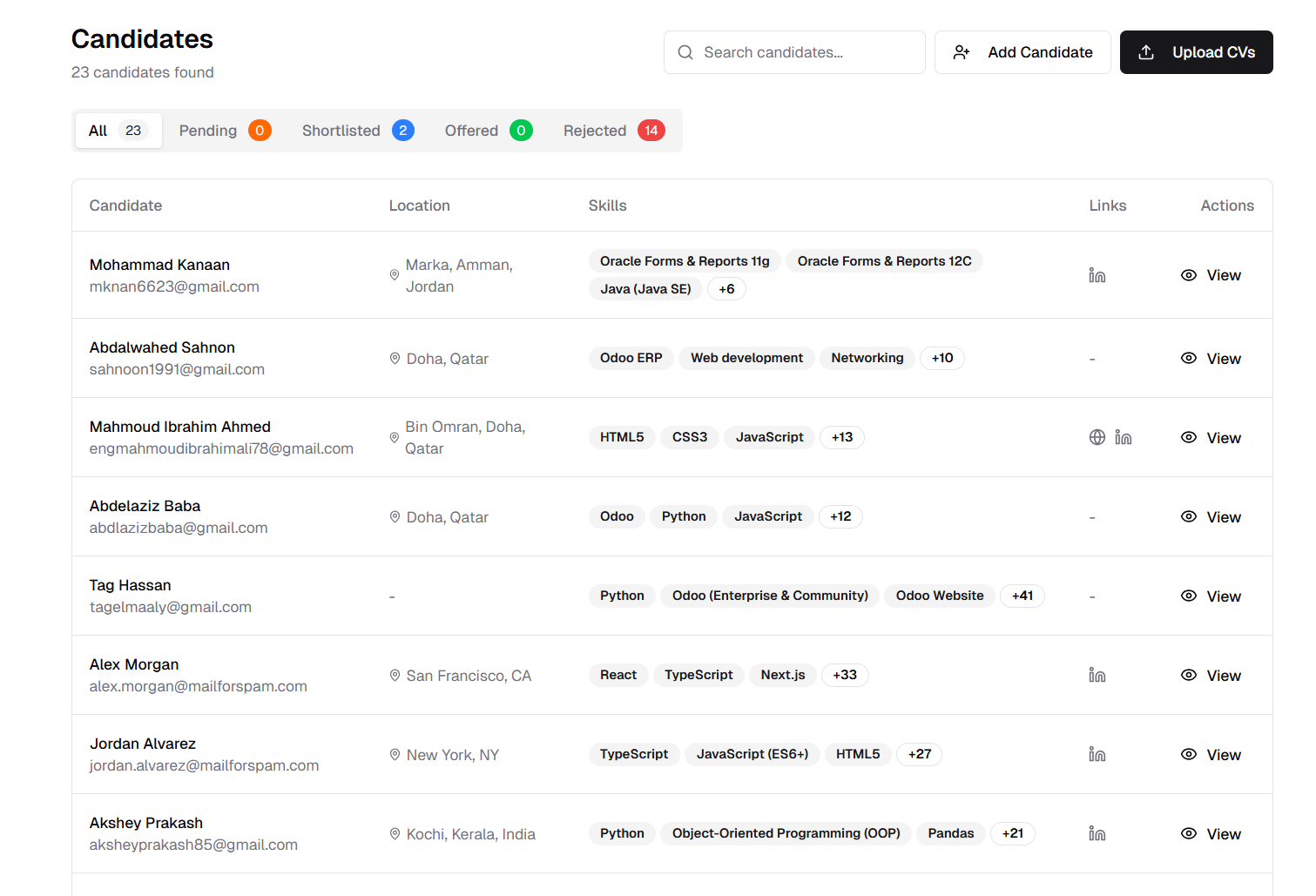
Filter candidates by status with real-time count badges
✨ Review Done Status with Animated Transitions
Visual candidate status progression from "Interviewed" to "Review Done"
Track post-interview progress with a new status and beautiful animations.
Features:
- New "Review Done" status: Track candidates who have completed the interview review process
- Animated status transitions: Smooth, visual feedback when updating candidate status
- Interview workflow enhancement: Clear distinction between interviewed and review-completed candidates
- Grid view animations: Beautiful transition effects in the candidate grid layout
How It Works:
Status Progression:
1. Candidate completes interview → Status: "Interviewed"
2. Recruiter reviews interview feedback
3. Status updates with smooth animation
4. Status changes to "Review Done" with visual transition
5. Grid automatically updates with animated state change
Visual Feedback:
- Smooth animations between status states
- Real-time updates with instant visual feedback
- Grid layout support with seamless transitions
- Clear visual indicator of candidate journey
Benefits:
- Enhanced user experience with visual feedback
- Clear candidate pipeline progression
- Improved interview workflow management
- Better visibility into post-interview status
- Engaging, modern interface interactions
- Immediate visual confirmation of status updates
⚠️ Interview Settings Connection Warnings
Proactive alerts for meeting platform connectivity
Prevent scheduling errors with clear warnings about missing platform connections.
Features:
- Connection status alerts: Clear visual warnings when Microsoft Teams or Google Meet are not connected
- Contextual notifications: Warning appears directly in interview settings when selecting video meeting options
- Quick action button: "Go to Connections" button for immediate resolution
- Prevents configuration errors: Stops incomplete setup before scheduling interviews
- Real-time validation: Checks connection status when selecting meeting link types
How It Works:
Setting Up Interview Platforms:
1. Navigate to Settings → Interview
2. Select your preferred meeting link type (Text-Based, Google Meet, or Microsoft Teams)
3. If platform is not connected:
- Red alert box appears with clear warning message
- "Go to Connections" button displayed
4. Click button to navigate to Connections settings
5. Complete the connection setup
6. Return to Interview Settings to confirm integration is active
Warning Message Examples:
- "Microsoft Teams Not Connected - Connect your Microsoft Teams account to use this feature."
- "Google Meet Not Connected - Connect your Google Meet account to use this feature."
Benefits:
- Prevents failed meeting link generation
- Reduces support requests for connection issues
- Improves interview scheduling reliability
- Guides users to complete setup
- Better user experience with proactive notifications
- Eliminates confusion about missing integrations
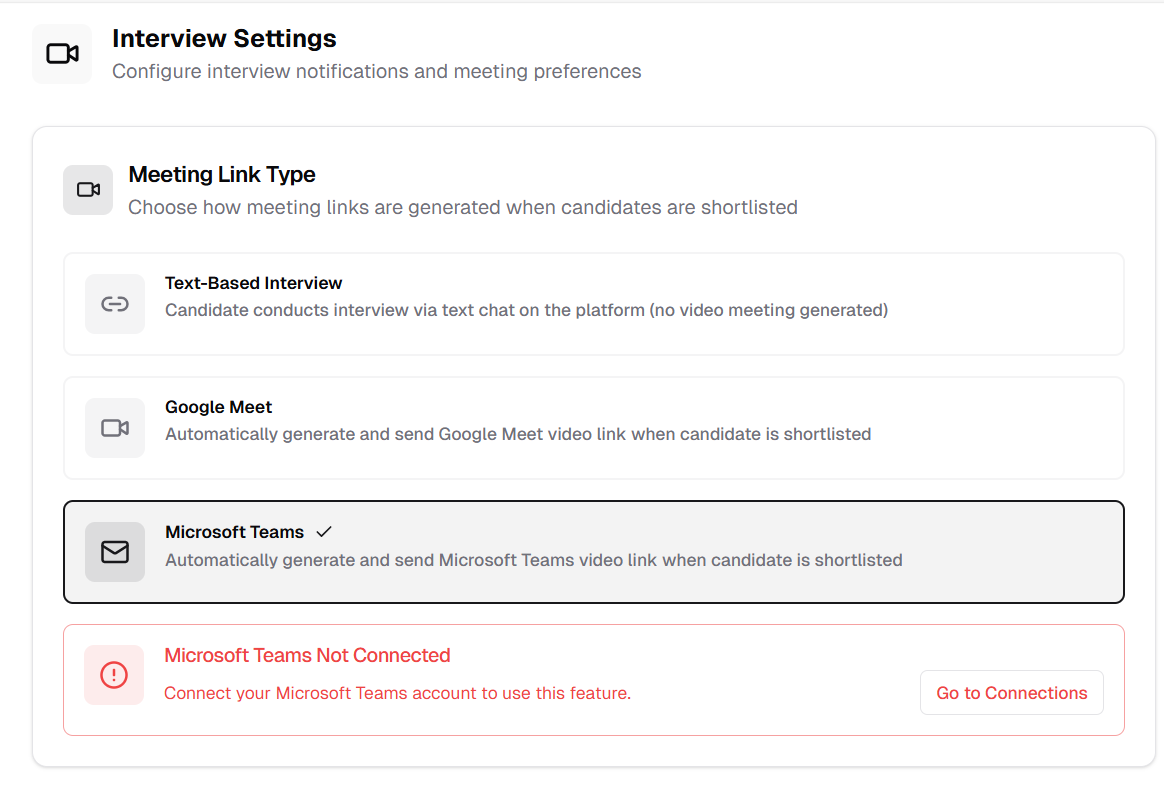
Clear warnings when meeting platforms are not connected
🔑 API Key Management
Secure API key management for external integrations
Manage API keys for third-party integrations with enterprise-grade security.
Features:
- Centralized API key dashboard: Manage all API keys from Settings → API Keys
- Key lifecycle management: Create, activate/deactivate, and delete API keys
- Security features:
- Masked key display for security (`sk_prod_•••••••••••••`)
- Expiration date tracking
- Active/Inactive status toggle
- Quick view and delete actions
- Security guidelines: Built-in best practices for API key management
How It Works:
Creating API Keys:
1. Go to Settings → API Keys
2. Click "Create New Key" button
3. Enter key name and optional description
4. Set expiration date
5. Save key securely (it will be masked after creation)
6. Use key in Authorization header for API calls
Managing API Keys:
- Toggle active/inactive status as needed
- View key creation and expiration dates
- Delete unused keys regularly
- Monitor API key usage
Security Best Practices Included:
- Keep API keys secure and never share publicly or in version control
- Rotate API keys regularly to maintain security
- Monitor API key usage and disable unused keys
- Immediately delete compromised keys and contact support
Use Cases:
- Third-party ATS integrations
- Custom recruitment tool connections
- Webhook and API automation
- External data synchronization
- Partner system integration
Benefits:
- Enterprise-grade security for integrations
- Clear visibility of all API keys
- Easy key rotation and management
- Prevents unauthorized access
- Comprehensive audit trail
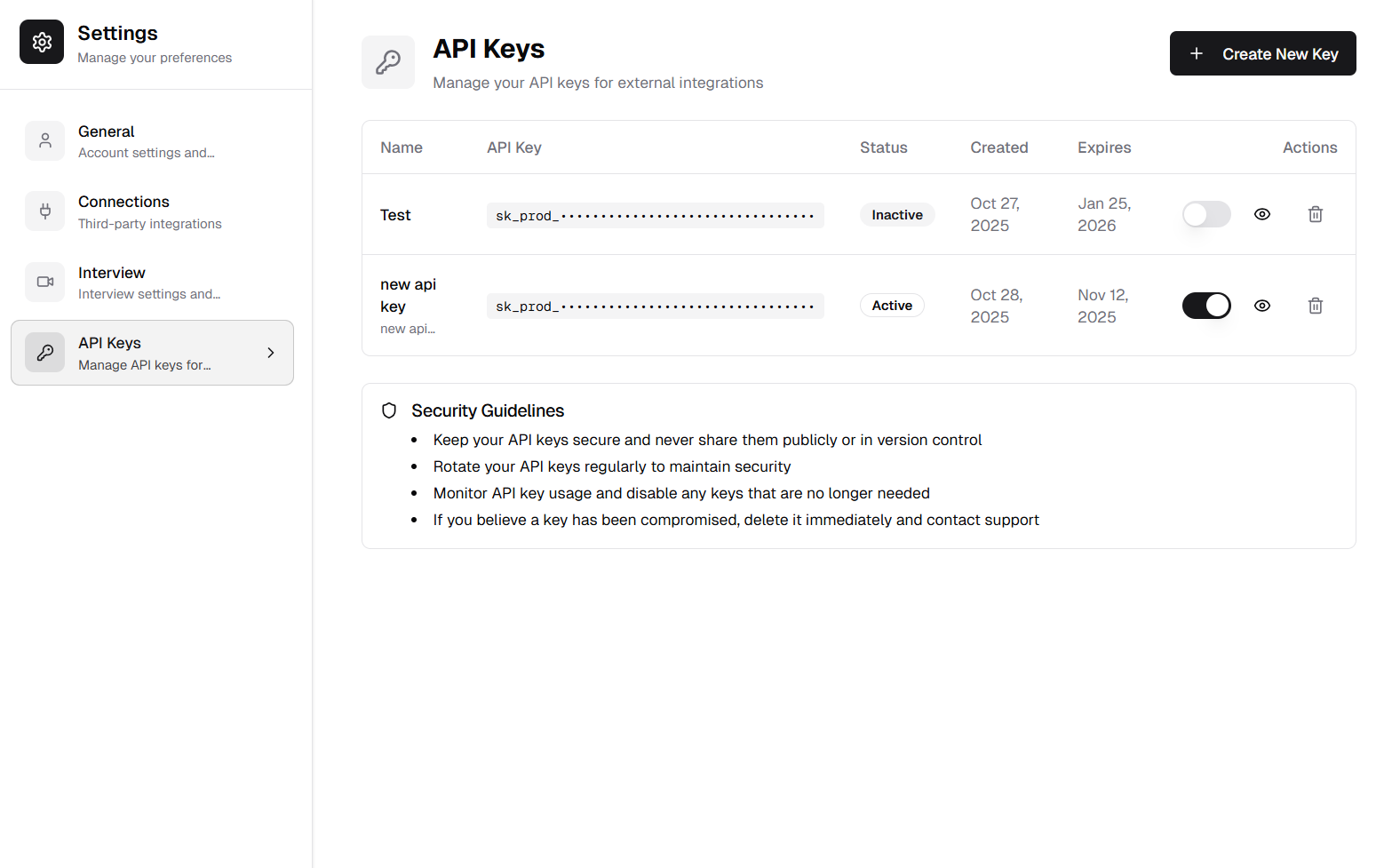
Secure API key management with lifecycle controls
🌐 Public Job Listing Page
Public-facing job board for external candidates
Showcase your open positions with a professional, modern job board.
Features:
- Clean, modern job board: Professional presentation of available positions
- Comprehensive job cards: Display key information at a glance
- Job title and experience level
- Location and work type (Remote, Hybrid, On-site)
- Salary range with currency
- Employment type (Full Time, Part Time, Contract)
- Posted date (relative time)
- Responsive design: Optimized for desktop, tablet, and mobile devices
- Quick filtering: Find relevant positions easily
- SEO-optimized: Better discoverability for job seekers
How It Works:
Publishing Jobs:
1. Create or edit a job posting
2. Set status to "Published"
3. Job automatically appears on public job listing page
4. Share public URL with candidates
Job Board Features:
- Only displays published job postings
- Automatic status badge display
- Direct application links
- Professional employer branding
- Real-time updates
Benefits:
- Professional employer branding
- Better candidate discovery
- Improved application rates
- Modern, attractive presentation
- Mobile-friendly experience
- Easy sharing on social media
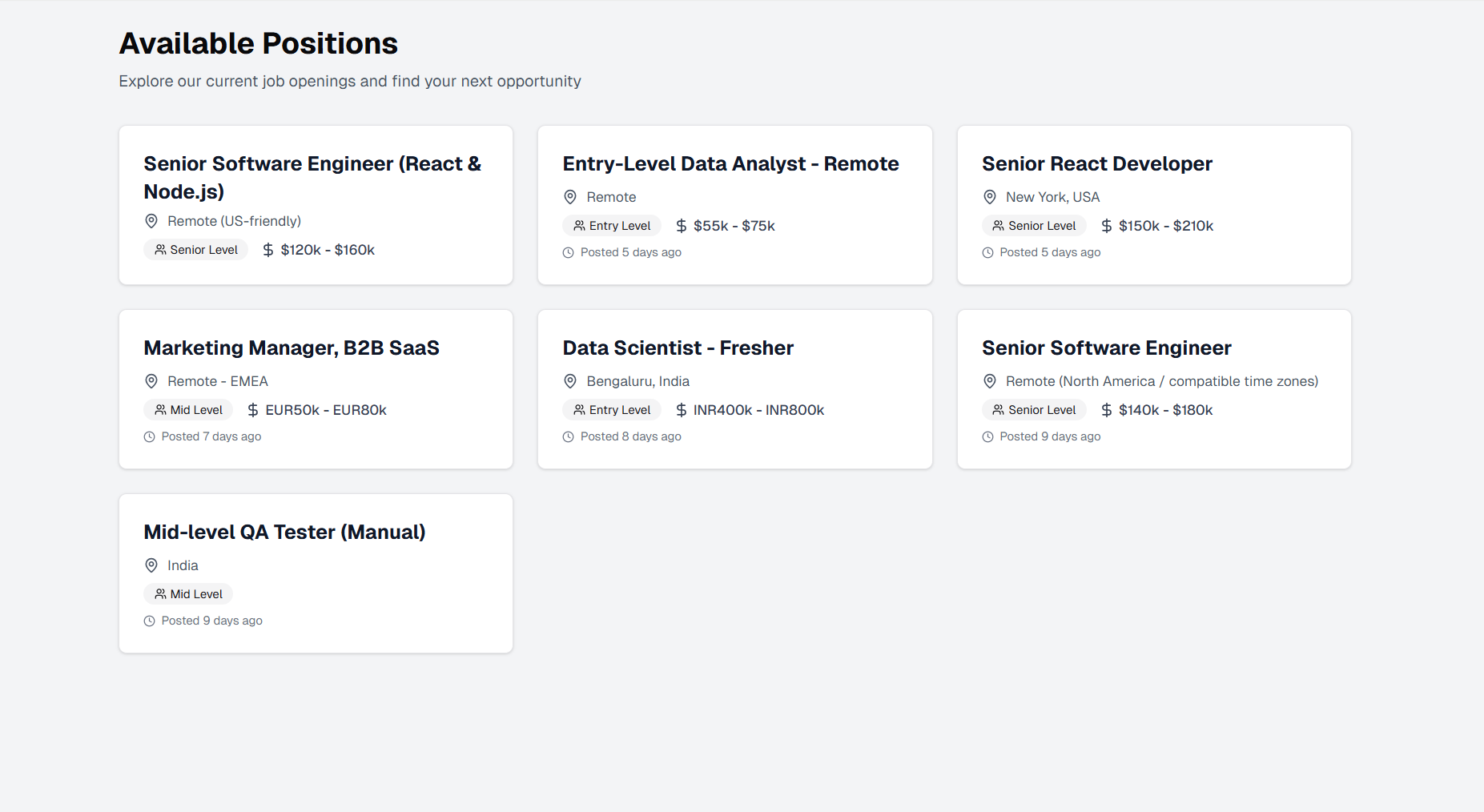
Public-facing job board with professional presentation
📄 Public Job Application Page
Streamlined application experience for candidates
Provide candidates with a complete, professional application experience.
Features:
- Comprehensive job details: Complete information including:
- Full job description
- Required and preferred qualifications
- Skills requirements with badge display
- Benefits and compensation
- Location and employment details
- Quick information panel: Key details at a glance
- Professional layout: Clean, organized presentation
- One-click application: "Apply Now" button for easy submissions
How It Works:
Candidate Experience:
1. Candidate clicks on job from listing page
2. Views complete job details and requirements
3. Reviews qualifications and benefits
4. Clicks "Apply Now" button
5. Completes application form
6. Submits application
Job Details Display:
- Job description with formatted sections
- Requirements list with clear bullets
- Preferred qualifications section
- Skills displayed as badges
- Salary range and benefits
- Employment type and location
Benefits:
- Improved candidate experience
- Higher application completion rates
- Better qualified applicant pool
- Professional employer branding
- Clear communication of role expectations
- Reduced candidate confusion
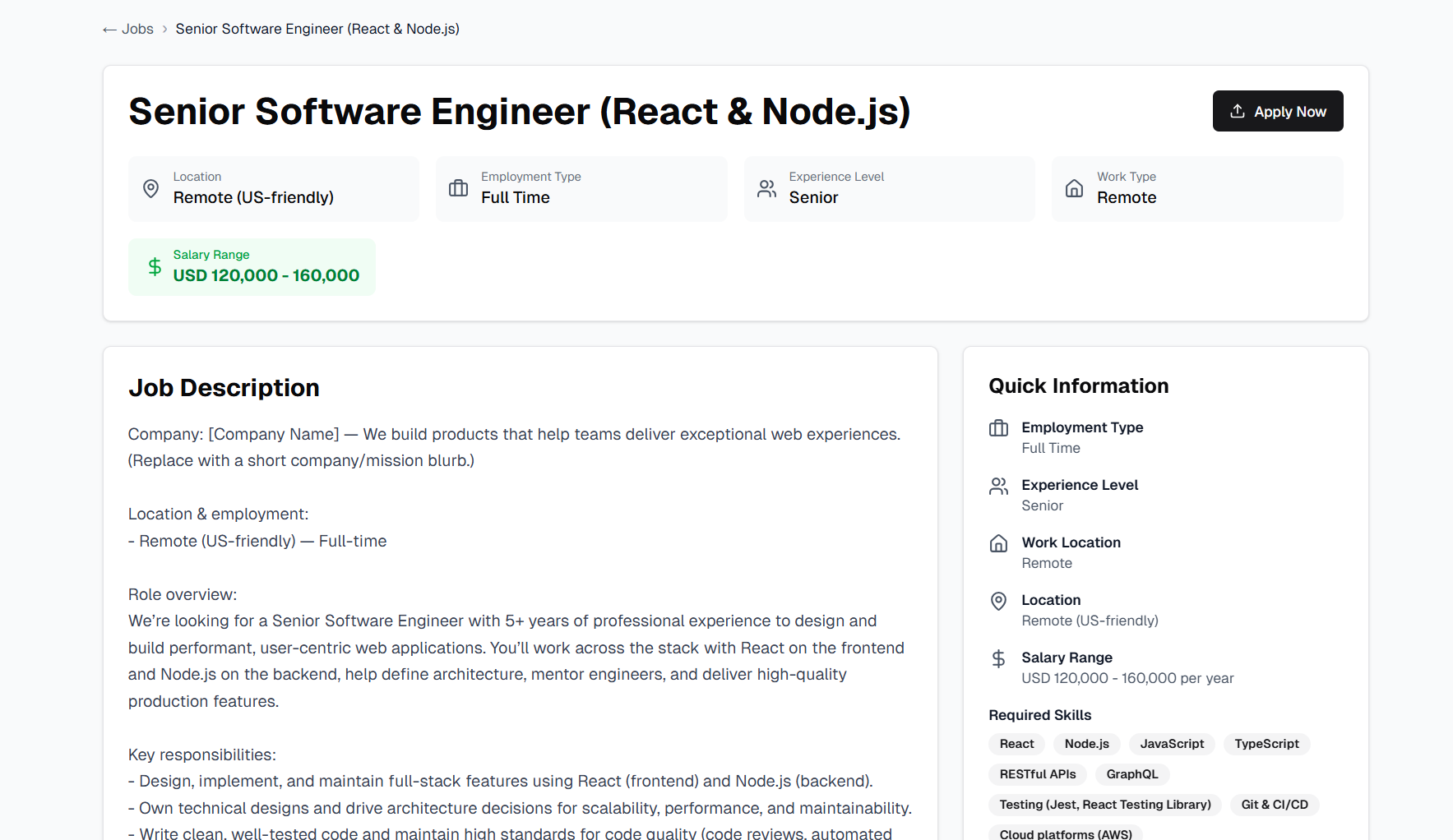
Complete job details with streamlined application flow
🔗 Embeddable Job Application Form
Iframe-based job posting widget for external websites
Embed job postings on any website with a simple iframe integration.
Features:
- Easy website integration: Embed job postings on any website using iframe
- Fully self-contained: Complete application flow within the embed
- Responsive embed: Adapts to parent container size
- No authentication required: Public access for external candidates
- Complete job details: Full job information within iframe
- Inline application form: Apply without leaving the embedded page
How It Works:
Implementation:
1. Get job ID from your published job
2. Use the embed URL: `/job-list/[job-id]/embed`
3. Add iframe to your website
4. Customize dimensions as needed
Implementation Example:
<iframe
  src="https://your-domain.com/job-list/[job-id]/embed"
  width="100%"
  height="800px"
  frameborder="0"
  title="Job Application"
></iframe>
Embed Features:
- Complete job details within iframe
- Inline application form
- File upload support
- Automatic candidate submission
- Consistent branding across platforms
- Responsive design
Use Cases:
- Company career pages
- Job board aggregators
- Partner websites
- Social media landing pages
- Email campaign links
- External job portals
Benefits:
- Easy integration without technical complexity
- Consistent candidate experience
- Branded application process
- No redirect required
- Better conversion rates
- Seamless external integration
Released on November 05, 2025
View all releases